


Humidity Damage to PC Components: Recovery Guide
Humidity Damage to PC Components: Recovery Guide. Everything you need to know with SA pricing, step-by-step instructions & expert recommendations.
Read moreConfused by your projector connectivity ports? 📽️ We break down HDMI, VGA, and USB to help you connect your devices seamlessly for the best viewing experience. Learn which cable you need today! 🔌
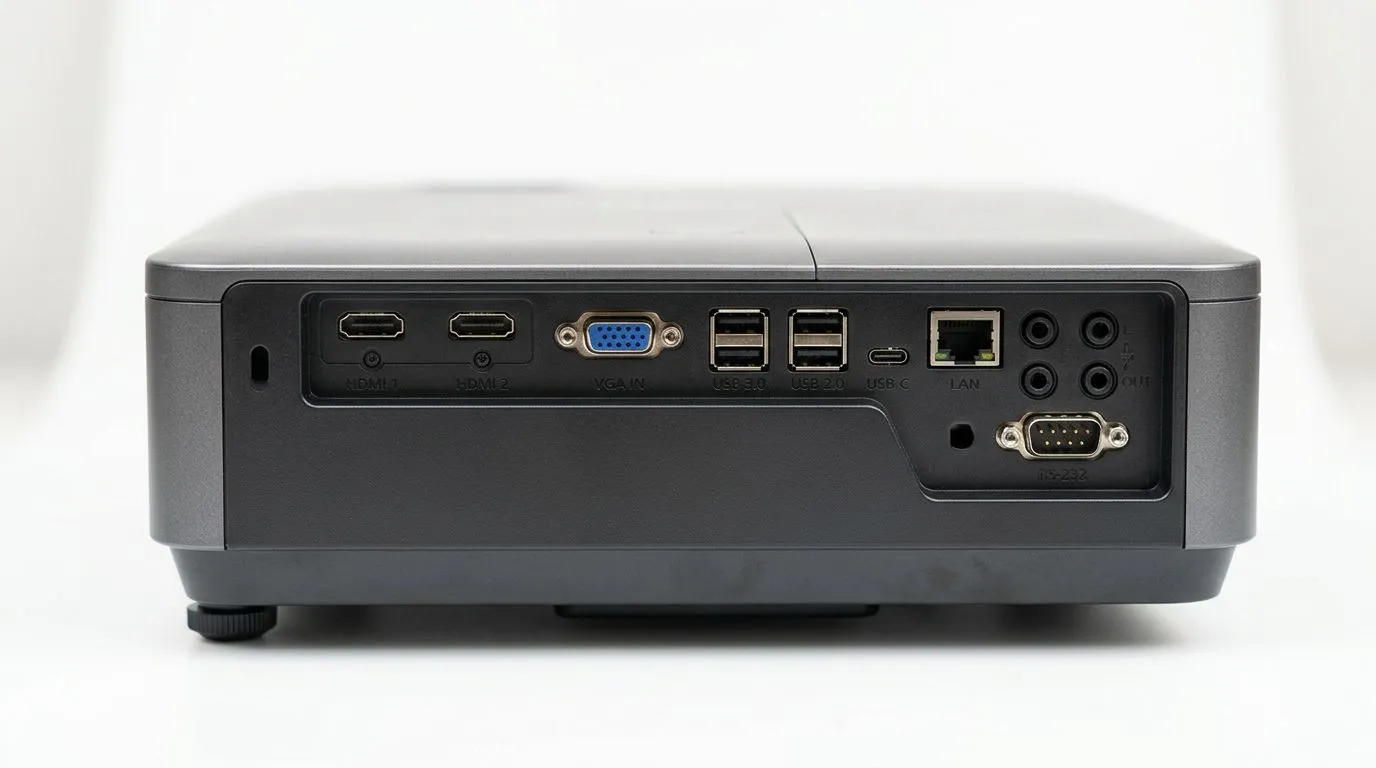
If you’ve ever tried to plug a laptop into a projector and got “No Signal”… you’re not alone. In South Africa, projector buying is popular for home cinemas, PS5 weekends, and classroom setups. But the real difference comes down to connectivity ports. Knowing what your projector supports, and what your source device can output, saves you time and money.
This guide breaks down Projector Connectivity Ports Explained: HDMI, VGA, and USB Guide so you can choose the right cables and avoid compatibility headaches. 🚀
HDMI is the most common “it just works” option today.
Most HDMI connections carry:
When gamers ask, “Will it support my console?” the answer often comes down to whether the projector has HDMI inputs. HDMI is also the easiest path for streaming boxes, laptops, and consoles.
If you’re shopping right now, browse Evetech projector options here: Shop projectors
VGA is the “classic” port. It’s still useful, but it’s not usually the first choice.
VGA sends video only (analogue). That means:
VGA can be the right move if you’re connecting:
If you’re using VGA with a projector for presentations or training, budget time for audio routing. It’s often the missing piece people only notice once the projector is already mounted.
“USB on a projector” can mean different things depending on the model.
Because USB implementations vary, the safest approach is to check whether the USB port supports media playback or video input via adapters on the specific projector model.
If you want to focus on a brand lineup that often clearly lists connectivity details, start here: Shop Promate projectors
Or if you’re considering business and home options, this ViewSonic selection is worth checking: Shop Viewsonic projectors
Before you buy, do a 60-second compatibility check between your source device and the projector inputs.
On Windows laptops, open Display Settings and confirm the output is set to “Projector” or “Duplicate” mode before you connect. Then plug in the projector last. This prevents the most common flicker and “no signal” cycle, especially when switching between HDMI and older VGA adapters.
A lot of South African students and small businesses start with VGA because “it’s already in the drawer”. Then one day someone brings a newer laptop and the projector starts acting up. In most cases, switching to HDMI fixes it. The lesson? Cables aren’t just accessories… they’re part of the spec.
If your goal is movie nights or console gaming, prioritise:
If your budget is tight, use Evetech to filter options within a realistic ZAR range and compare inputs before checkout: Projectors under R7000
Ready to Find Your Perfect Match? If you want fewer cable headaches and more “press play” moments, the right projector connectivity matters. Explore our massive range of projectors and compare HDMI, VGA, and USB support so you can buy with confidence. Shop projectors at Evetech and get your setup sorted for the weekend.
HDMI is the standard for high-quality video and audio transmission, supporting high resolutions and refresh rates, making it the best choice for modern projectors.
Most projector USB ports are for media players or firmware updates. You need a USB-C to HDMI adapter or a DisplayPort cable if your laptop lacks an HDMI port.
VGA is an analog connection and is largely outdated. It lacks audio support and cannot handle high-definition resolutions as well as digital HDMI cables.
Yes, you typically need a digital AV adapter or a USB-C to HDMI cable, depending on your phone's port, to mirror your screen onto the projector.
HDMI is designed for consumer electronics like consoles and players, while DisplayPort is often used in professional or PC-centric environments for higher bandwidth.
Ensure you have selected the correct input source on the projector menu. Also, check that your cable is firmly seated and compatible with your device's output.
Humidity Damage to PC Components: Recovery Guide. Everything you need to know with SA pricing, step-by-step instructions & expert recommendations.
Read more
Gamer Spending Trends April : Complete Setups. Clear setup instructions with SA-specific considerations, troubleshooting tips & recommended components.
Read more
Setting Up DDR5 32GB Kit. Tested & verified settings for best FPS and visual quality on SA hardware budgets.
Read more
Tech Setup Guide for SPU Res Students. Clear setup instructions with SA-specific considerations, troubleshooting tips & recommended components.
Read more
Monster Hunter Wilds Ultrawide Support: 21:9 and. Clear setup instructions with SA-specific considerations, troubleshooting tips & recommended components.
Read more
Apple iPad Durability Guide: Cases, Screen. Practical breakdown of costs, regulations & whether it makes financial sense for SA buyers.
Read more
AMD RX 9050 XT: Rumoured Specs, Price & Release. SA-focused analysis with local pricing data, real-world insights & actionable buying advice.

Can RTX 4080 Super Run AI Workloads for SA Developers Detailed answer with SA data, expert analysis & practical recommendations for local buyers.

Can RTX 4090 Run AI Workloads for SA Developers Detailed answer with SA data, expert analysis & practical recommendations for local buyers.

Top Settings for Intel Arc B580 at Ultrawide 1440p picks evaluated on performance, value & SA availability with current Rand pricing from Evetech.

RTX 4060 CS2 Low Settings at 1080p: FPS Results. Real-world benchmark data, FPS numbers & performance analysis. What SA gamers can actually expect.

Visual Artifacts: Possible GPU Issue Issue #1. Diagnosis steps, proven fixes & when to seek professional help. SA-specific support info included.

Can the RTX 4090 Handle 1440p 144Hz Gaming. Performance testing verdict with real data & practical recommendations for SA buyers.

Top ASUS GPU Under R15000 picks evaluated on performance, value & SA availability with current Rand pricing from Evetech.

GTA 6 Max Settings on RTX 5070. Tested & verified settings for best FPS and visual quality on SA hardware budgets.

Cyberpunk 2077 Max Settings on RTX 5080. Tested & verified settings for best FPS and visual quality on SA hardware budgets.

Starfield Max Settings on RTX 5070 Ti. Tested & verified settings for best FPS and visual quality on SA hardware budgets.

Top RTX 5090 Under R5000 picks evaluated on performance, value & SA availability with current Rand pricing from Evetech.