


Bandwidth Explained: What SA Buyers Need to Know
Bandwidth Explained: What Buyers Need to Know. Plain-English explanation of what it means, why it matters & how it affects your buying decisions in SA.
Read moreLearn how to reduce background noise on calls without expensive audio equipment using smart settings, mic placement, and quick habits. Clearer calls in minutes without gear upgrades. 🎧📞
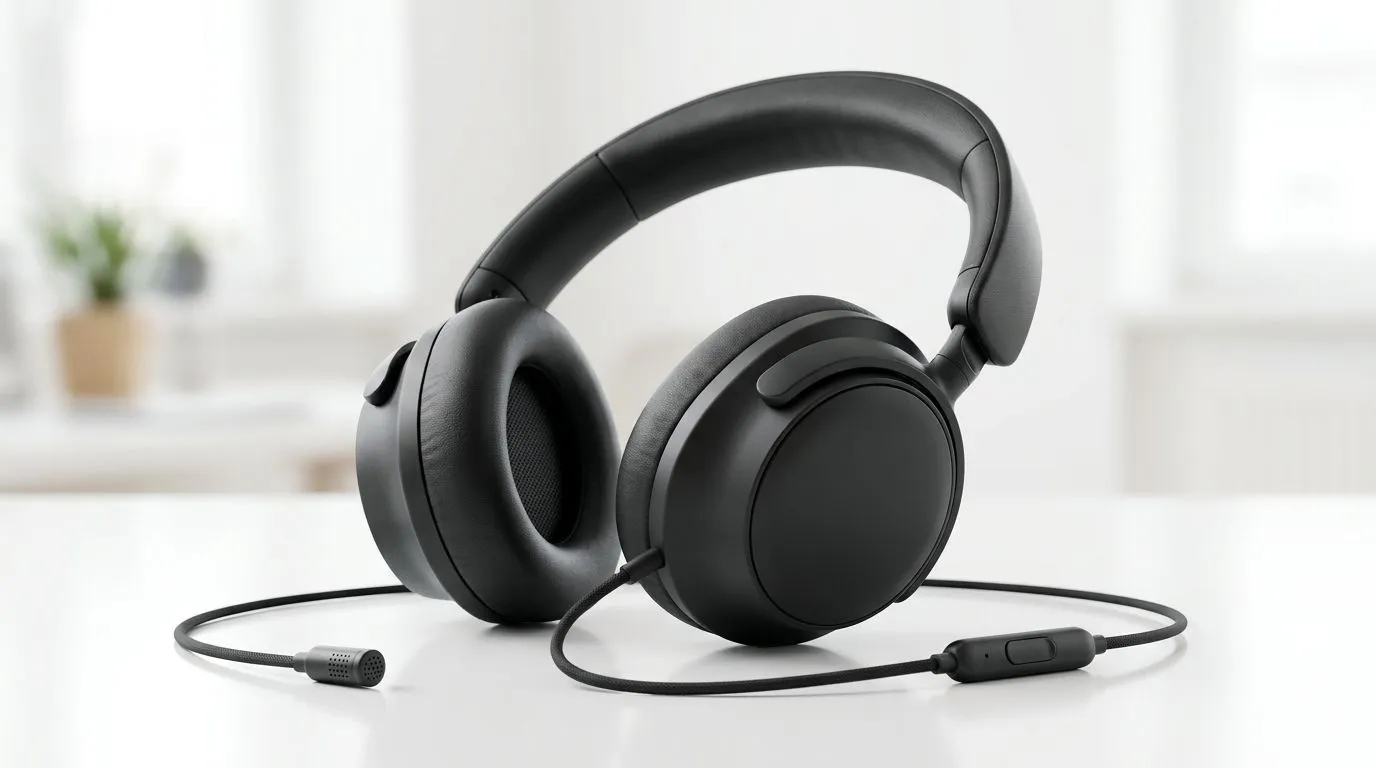
If your calls sound like you’re speaking from a loading bay in Joburg, you’re not alone. Background noise can creep in fast. Fans, street traffic, keyboard clatter, and even a noisy neighbour can make you sound unprofessional. The good news? You can learn how to reduce background noise on calls without expensive audio equipment... and it starts with a few smart tweaks you probably already have access to. 🔧
The easiest win is your environment. Move to the quietest room you can find. Close windows. Switch off unnecessary fans. Put your phone on silent. If you’re using a laptop, place it on a hard surface so it doesn’t resonate through a desk or table.
Microphone placement matters too. Keep the mic close to your mouth, but not directly in front of your breath. That helps your voice come through clearer while reducing room echo. If you’re on a laptop or headset, test different positions before an important meeting or ranked team chat.
These small habits often do more than people expect. They cost nothing, and they improve clarity instantly.
Most devices already include some noise reduction tools. In Windows, many conferencing apps let you choose a noise suppression setting. Zoom, Microsoft Teams, and Discord all have their own audio controls. Check the app settings before buying anything new.
If you want a practical upgrade path, start by exploring a solid headset with a clean mic profile. A wireless option like the Razer Barracuda X Chroma wireless headset in Phantom White is a good place to compare features if you want better voice pickup without going full studio setup. Prices change, so always check the latest ZAR listing on Evetech.
Turn on noise suppression in your call app before you start the meeting. Then do a 10-second test call with a friend or colleague. If your voice sounds hollow, move the mic closer and lower your speaker volume.
You do not need expensive audio gear to sound decent. But if you’re upgrading, focus on the microphone first, not flashy looks. A headset with a decent mic and comfortable fit will usually beat a cheap pair with “gaming” branding and poor voice pickup.
If you want to browse more options, Evetech’s Razer headphones and headsets range gives you a useful starting point. You can also compare a wider mix of styles on the headphone and headset category page to see what suits your budget and call habits.
For South African buyers, that matters. You want value, not just specs on a box. The best choice is often the one that fits your daily routine... whether that’s WFH meetings, campus lectures, or late-night Discord raids. ✨
If you’re still getting picked up clearly by the wrong sounds, combine the basics:
That trio can make a basic setup sound much cleaner. In real use, the difference is often obvious to everyone on the call. Better clarity also means less repeating yourself, which keeps meetings moving and gaming comms tighter.
The smartest part? None of this requires a studio budget. Start with the free fixes first. Then upgrade only if you still need better performance.
Ready to Find Your Perfect Match? The Mac vs Windows debate is complex, but for maximum power, choice, and value in South Africa, Windows is hard to beat. Explore our massive range of laptop specials and find the perfect machine to conquer your world.
Use noise suppression in your call app, improve mic placement, lower room noise sources, and silence distracting devices to reduce background noise on calls.
Try enabling noise suppression, using a tighter mic pickup pattern if available, and adjusting gain/volume so your voice stays above the noise floor.
Place the mic close to your mouth and slightly off-axis from fans and keyboards to reduce background noise on calls.
Lower desk vibration, use a lighter touch, and angle the mic away from the keyboard; turn off mechanical click sounds if your setup allows.
Many video and VoIP apps include built-in noise suppression and echo cancellation; test the feature first before installing extra tools.
Echo often comes from room reflections and speaker feedback; use headphones, reduce reflective surfaces, and enable echo cancellation.
Move the mic closer, avoid pointing it at the fan, reduce fan speed if possible, and use noise suppression settings in your app.
Lower mic gain, speak closer to the mic, reduce background sources, and ensure the correct input device is selected.
Bandwidth Explained: What Buyers Need to Know. Plain-English explanation of what it means, why it matters & how it affects your buying decisions in SA.
Read more
Set Up RX 7800 XT for Competitive Gaming. Step-by-step instructions with SA-specific tips, common pitfalls to avoid & expert recommendations.
Read more
Can the Ryzen 5 9600X Handle 4K Gaming Without Bottlenecking Detailed answer with SA data, expert analysis & practical recommendations for local buyers.
Read more
Why Is Ping So High in South Africa for Gaming Detailed answer with SA data, expert analysis & practical recommendations for local buyers.
Read more
Can a 1200W PSU Handle the RX 9070 XT? Power. Plain-English explanation of what it means, why it matters & how it affects your buying decisions in SA.
Read more
How Does Altitude Affect PC Cooling in Gauteng Detailed answer with SA data, expert analysis & practical recommendations for local buyers.
Read more
AMD RX 9050 XT: Rumoured Specs, Price & Release. SA-focused analysis with local pricing data, real-world insights & actionable buying advice.

Can RTX 4080 Super Run AI Workloads for SA Developers Detailed answer with SA data, expert analysis & practical recommendations for local buyers.

Can RTX 4090 Run AI Workloads for SA Developers Detailed answer with SA data, expert analysis & practical recommendations for local buyers.

Top Settings for Intel Arc B580 at Ultrawide 1440p picks evaluated on performance, value & SA availability with current Rand pricing from Evetech.

RTX 4060 CS2 Low Settings at 1080p: FPS Results. Real-world benchmark data, FPS numbers & performance analysis. What SA gamers can actually expect.

Visual Artifacts: Possible GPU Issue Issue #1. Diagnosis steps, proven fixes & when to seek professional help. SA-specific support info included.

Can the RTX 4090 Handle 1440p 144Hz Gaming. Performance testing verdict with real data & practical recommendations for SA buyers.

Top ASUS GPU Under R15000 picks evaluated on performance, value & SA availability with current Rand pricing from Evetech.

GTA 6 Max Settings on RTX 5070. Tested & verified settings for best FPS and visual quality on SA hardware budgets.

Cyberpunk 2077 Max Settings on RTX 5080. Tested & verified settings for best FPS and visual quality on SA hardware budgets.

Starfield Max Settings on RTX 5070 Ti. Tested & verified settings for best FPS and visual quality on SA hardware budgets.

Top RTX 5090 Under R5000 picks evaluated on performance, value & SA availability with current Rand pricing from Evetech.