


Best Laptop for Wits Students Under R8000
Top Laptop for Wits Students Under R8000 picks evaluated on performance, value & SA availability with current Rand pricing from Evetech.
Read moreFind the best budget case fan setup in South Africa. Learn how many fans you need (ZAR) for quiet, cool airflow without overspending. 👍🌬️
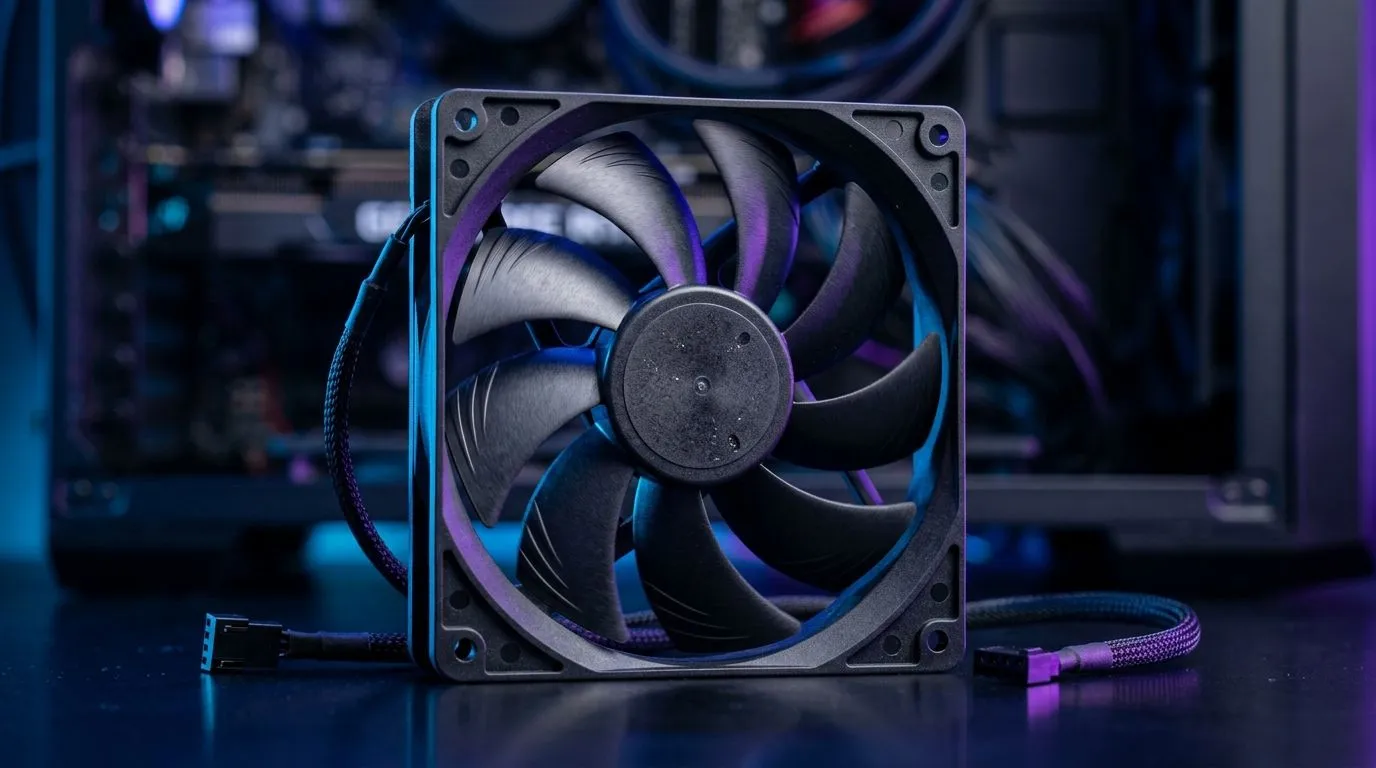
If your PC feels like it’s throttling mid-game, don’t rush to blame your CPU… it might be airflow. South African power outages and hot rooms make cooling even more important. The big question for budget builders is simple: Best Budget Case Fan Setup in South Africa: How Many Fans? You can save real money, avoid noise, and still keep temps under control. Let’s get you to a setup that actually works in SA conditions 🔧
Most budget gaming builds do best with 3 to 4 case fans, depending on your case layout. In real terms, that’s usually:
Why not more right away? More fans can mean more noise, more cable clutter, and higher cost. But if you’re adding fans, the goal is consistent airflow: cool air in, warm air out.
Here’s a simple rule of thumb: aim for slightly more intake than exhaust (positive pressure) when possible. This helps reduce dust buildup over time, which matters in SA where air quality can vary.
If you want to shop smarter, browsing a focused fan category can help you pick sizes and features faster. Start with Evetech’s case fan options here:
Different cases handle airflow differently. Instead of guessing, check where mounts exist and how many are already included.
A solid, cost-conscious setup looks like this:
If your CPU cooler uses a tower design, top exhaust can help move hot air out of the case faster, especially during long gaming sessions. If your case has limited top mounts, stick to front + rear first.
RGB is fun. Cooling is essential. If you’re going budget-first, buy for airflow and bearings, then add lighting later.
For lighting options, you can filter fans like this:
Fan size affects airflow and how loud the fan feels at the same speed. Many budget builds use either 120mm or 140mm fans.
Use Evetech’s sizing filters to match your case:
If you already prefer a particular brand, you can browse those fans too:
On Windows, use a monitoring app to check CPU package temperature during a 10-minute gaming session. If temps climb fast, add an intake fan or reposition cables. If temps stay steady but fan noise is high, lower fan curves in your BIOS. This saves money and avoids buying extra fans you don’t need. It’s a practical way to dial in your airflow before upgrading parts."
Before you click “add to cart”, confirm these:
If your PC is already stable but warm, upgrading from 2 fans to 3 or 4 is often the biggest real-world difference.
Ready to Find Your Perfect Match? The Mac vs Windows debate is complex, but for maximum power, choice, and value in South Africa, Windows is hard to beat. Explore our massive range of laptop specials and find the perfect machine to conquer your world.
Most builds do well with 3–5 case fans total: typically 2–3 intakes and 1–2 exhausts for stable airflow.
Aim for a balanced intake/exhaust layout (usually 3 intake + 2 exhaust in larger cases). Use quality-budget fans and set sane fan curves.
Start balanced: intakes bring cool air in, exhaust removes hot air. Slight intake bias can help reduce dust with positive pressure.
A common sweet spot is 4 fans (2 intake front, 1 intake/optional bottom, 1 exhaust rear). Bigger cases can support 5.
For airflow-focused builds, 4–5 fans usually outperform 2 fans. Prioritize good placement over adding extra cheap fans everywhere.
Ensure cool intake reaches the CPU cooler area. A strong front/side intake plus rear exhaust typically improves CPU temps on budget setups.
Expect to allocate a modest portion of your budget for 3–5 fans. Prices vary by brand, but plan around multiple fans rather than one pricey kit.
Negative pressure (more exhaust than intake) can pull more dust in through leaks. A slight positive pressure setup is often cleaner for budget builds.
Top Laptop for Wits Students Under R8000 picks evaluated on performance, value & SA availability with current Rand pricing from Evetech.
Read more
Build Your R8,000 Student Laptop Setup: Complete. Clear setup instructions with SA-specific considerations, troubleshooting tips & recommended components.
Read more
Wits Laptops Under R8000: Q4 Report. Full parts list, Rand pricing & expected performance. Build confidently with SA-available components.
Read more
Top Laptops Under R8,000 picks evaluated on performance, value & SA availability with current Rand pricing from Evetech.
Read more
Top Budget Monitor for MacBook Under R5,000 picks evaluated on performance, value & SA availability with current Rand pricing from Evetech.
Read more
NWU Laptops Under R8000: Q3 Report. Full parts list, Rand pricing & expected performance. Build confidently with SA-available components.
Read more
CS2 Low FPS: Monitor Bottleneck. Real-world benchmark data, FPS numbers & performance analysis. What SA gamers can actually expect.

Is AOC a Good Monitor Brand for Gaming in South Africa Detailed answer with SA data, expert analysis & practical recommendations for local buyers.

What Gaming Monitor Can You Get for R20,000. Full parts list, Rand pricing & expected performance. Build confidently with SA-available components.

What Gamers Actually Bought: November Report. Real purchase data from SA retailers revealing what local buyers are actually choosing and why.

Can the RX 7700 XT Handle 1440p 144Hz Gaming. Performance testing verdict with real data & practical recommendations for SA buyers.

Top Laptop with Core i7 + RX 7700S: Picks picks evaluated on performance, value & SA availability with current Rand pricing from Evetech.

RX 7700 XT Black Myth Wukong 2 FPS: Performance. Real-world benchmark data, FPS numbers & performance analysis. What SA gamers can actually expect.

RTX 6080 Gran Turismo 7 PC Performance: FPS Test. Real-world benchmark data, FPS numbers & performance analysis. What SA gamers can actually expect.

Eliminate background noise in gaming voice chat using cardioid microphones to focus on your voice and reject room sounds. Get cleaner comms fast with smart placement and settings—🎮🎧

Wondering how much to spend on a high-end gaming headset in South Africa? We break down budget vs performance, what you actually get, and smart upgrade steps 🎧⚡

Wondering about THX Spatial Audio vs 7.1 surround for positional awareness? We compare imaging, depth, and cueing so you can pick the best option for gaming. 🎧👣

50mm bio-cellulose drivers vs standard drivers: does material affect audio precision? Compare clarity, bass control, and imaging so you can choose the right headphones. 🎧🔍