


Best Laptop for Wits Students Under R8000
Top Laptop for Wits Students Under R8000 picks evaluated on performance, value & SA availability with current Rand pricing from Evetech.
Read more- Assess cables; - Route & secure; - Use modular PSUs; - Maintain airflow; PC cable management to reduce cable clutter inside your PC case, improve airflow and simplify upgrades. 🧰✨
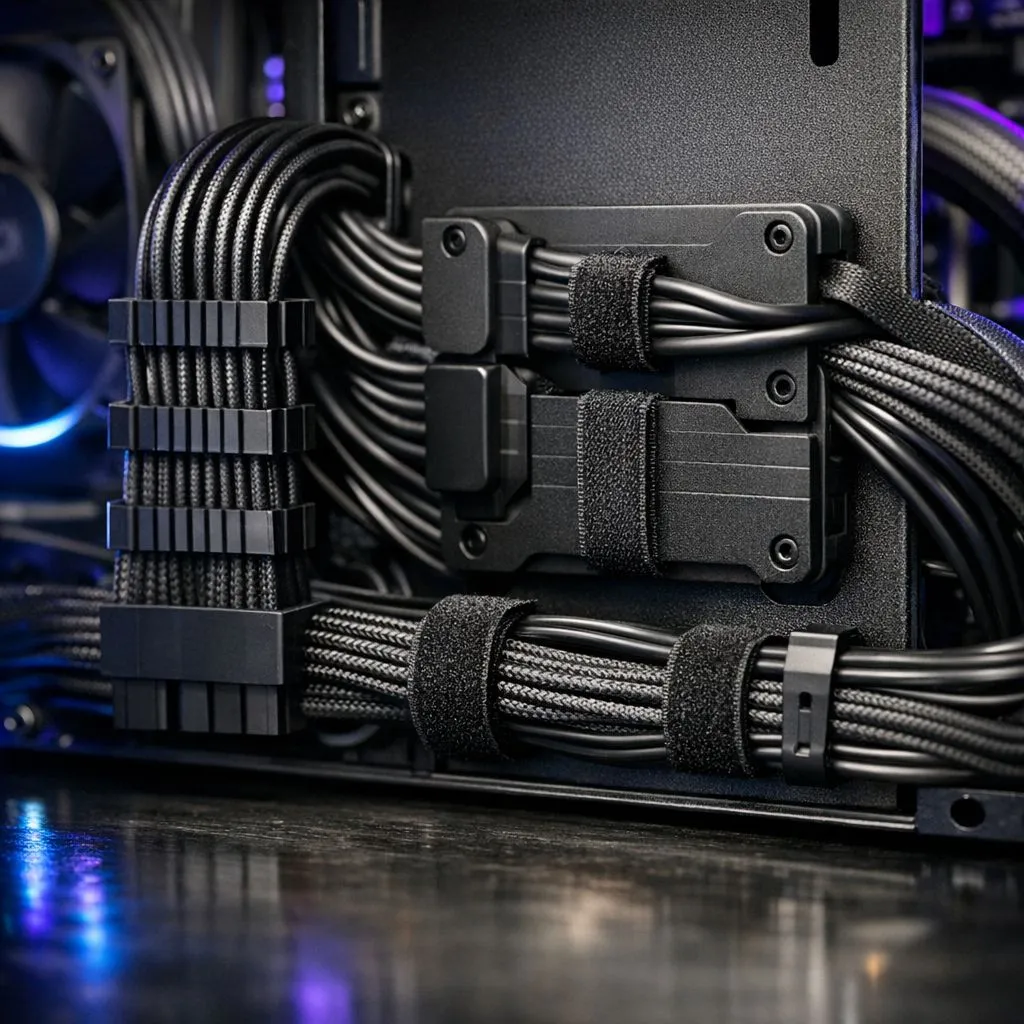
We’ve all been there. You’ve just unboxed a shiny new GPU in Jozi, but your case looks like a plate of spaghetti. Proper PC cable management isn't just about showing off on Reddit. It’s about keeping your components cool and ensuring your hardware lasts. Learning how to reduce cable clutter inside your case is the final boss of every great PC build. 🔧
The primary reason to tidy up those wires is airflow. When loose cables hang in front of your intake, they create turbulence and trap heat. This forces your case fans to work harder... which usually leads to more noise and higher electricity bills. By routing cables through the back of the motherboard tray, you create a direct path for cool air to reach your CPU and graphics card.
Avoid using plastic zip ties for your initial cable routing. Use reusable velcro straps instead. This allows you to add or remove cables as you upgrade your build without needing to snip anything near your expensive components. It is a safer, more sustainable way to manage your South African gaming rig.
Your choice of cooling hardware significantly impacts how much mess you have to manage. For instance, high-performance CORSAIR fans often utilise dedicated hubs to centralise connections. This is much cleaner than having wires splayed across the motherboard. If you are looking for a balance between performance and value, Deepcool fans offer excellent daisy-chaining options that reduce the number of headers you need to occupy. 🚀
When planning your layout, consider the physical dimensions of your cooling solution. Using three 120mm fans in the front is standard... but it means managing three sets of power and lighting cables. In larger chassis, switching to two 140mm fans can provide similar airflow with fewer wires to hide. Every cable you eliminate makes the internal environment look more professional.
The "RGB Tax" isn't just about the price in ZAR... it is also about the cable management effort. Vibrant RGB fans look incredible through a tempered glass side panel, but they require double the wiring for power and colour control. If you prefer a minimalist, professional aesthetic, choosing fans with no lighting effects simplifies your build process immensely. This "stealth" approach is perfect for workstations where distractions should be kept to a minimum. ✨
Ready to Clean Up Your Build? A tidy PC is a happy PC. Whether you need high-static pressure fans or whisper-quiet cooling, we have the hardware to make your dream build a reality. Explore our massive range of case fans and start your journey toward a clutter-free setup today.
Start by unplugging unused cables, use the motherboard tray for routing, bundle with Velcro or zip ties, and prefer modular PSU cable management.
Use zip ties, Velcro straps, cable combs, cable ties with mounts, a long screwdriver for routing, and nylon sleeves for neat runs.
Yes. A modular PSU lets you attach only required cables, drastically reducing clutter and improving airflow and case aesthetics.
Route GPU and PSU cables behind the motherboard tray or along case edges, keep them snug to the frame and away from intake paths.
Cable combs help align individual sleeved cables for a cleaner look and easier routing, especially for visible GPU and 24-pin runs.
Revisit cable management after major upgrades, every 6–12 months for cleaning, or whenever airflow or access is impacted.
Yes. Tidier cable routing reduces airflow obstructions, which can lower component temps and improve cooling efficiency.
Top Laptop for Wits Students Under R8000 picks evaluated on performance, value & SA availability with current Rand pricing from Evetech.
Read more
Build Your R8,000 Student Laptop Setup: Complete. Clear setup instructions with SA-specific considerations, troubleshooting tips & recommended components.
Read more
Wits Laptops Under R8000: Q4 Report. Full parts list, Rand pricing & expected performance. Build confidently with SA-available components.
Read more
Top Laptops Under R8,000 picks evaluated on performance, value & SA availability with current Rand pricing from Evetech.
Read more
Top Budget Monitor for MacBook Under R5,000 picks evaluated on performance, value & SA availability with current Rand pricing from Evetech.
Read more
NWU Laptops Under R8000: Q3 Report. Full parts list, Rand pricing & expected performance. Build confidently with SA-available components.
Read more
CS2 Low FPS: Monitor Bottleneck. Real-world benchmark data, FPS numbers & performance analysis. What SA gamers can actually expect.

Is AOC a Good Monitor Brand for Gaming in South Africa Detailed answer with SA data, expert analysis & practical recommendations for local buyers.

What Gaming Monitor Can You Get for R20,000. Full parts list, Rand pricing & expected performance. Build confidently with SA-available components.

What Gamers Actually Bought: November Report. Real purchase data from SA retailers revealing what local buyers are actually choosing and why.

Can the RX 7700 XT Handle 1440p 144Hz Gaming. Performance testing verdict with real data & practical recommendations for SA buyers.

Top Laptop with Core i7 + RX 7700S: Picks picks evaluated on performance, value & SA availability with current Rand pricing from Evetech.

RX 7700 XT Black Myth Wukong 2 FPS: Performance. Real-world benchmark data, FPS numbers & performance analysis. What SA gamers can actually expect.

RTX 6080 Gran Turismo 7 PC Performance: FPS Test. Real-world benchmark data, FPS numbers & performance analysis. What SA gamers can actually expect.

Eliminate background noise in gaming voice chat using cardioid microphones to focus on your voice and reject room sounds. Get cleaner comms fast with smart placement and settings—🎮🎧

Wondering how much to spend on a high-end gaming headset in South Africa? We break down budget vs performance, what you actually get, and smart upgrade steps 🎧⚡

Wondering about THX Spatial Audio vs 7.1 surround for positional awareness? We compare imaging, depth, and cueing so you can pick the best option for gaming. 🎧👣

50mm bio-cellulose drivers vs standard drivers: does material affect audio precision? Compare clarity, bass control, and imaging so you can choose the right headphones. 🎧🔍