


Best RTX 5070 Under R25,000 in South Africa 2026
Top RTX 5070 Under R25,000 picks evaluated on performance, value & SA availability with current Rand pricing from Evetech.
Read moreWhite gaming setup essentials: learn how to match white peripherals for a clean, cohesive desk—keyboards, mice, monitors, headsets and RGB tips to build a polished look. 🎮✨
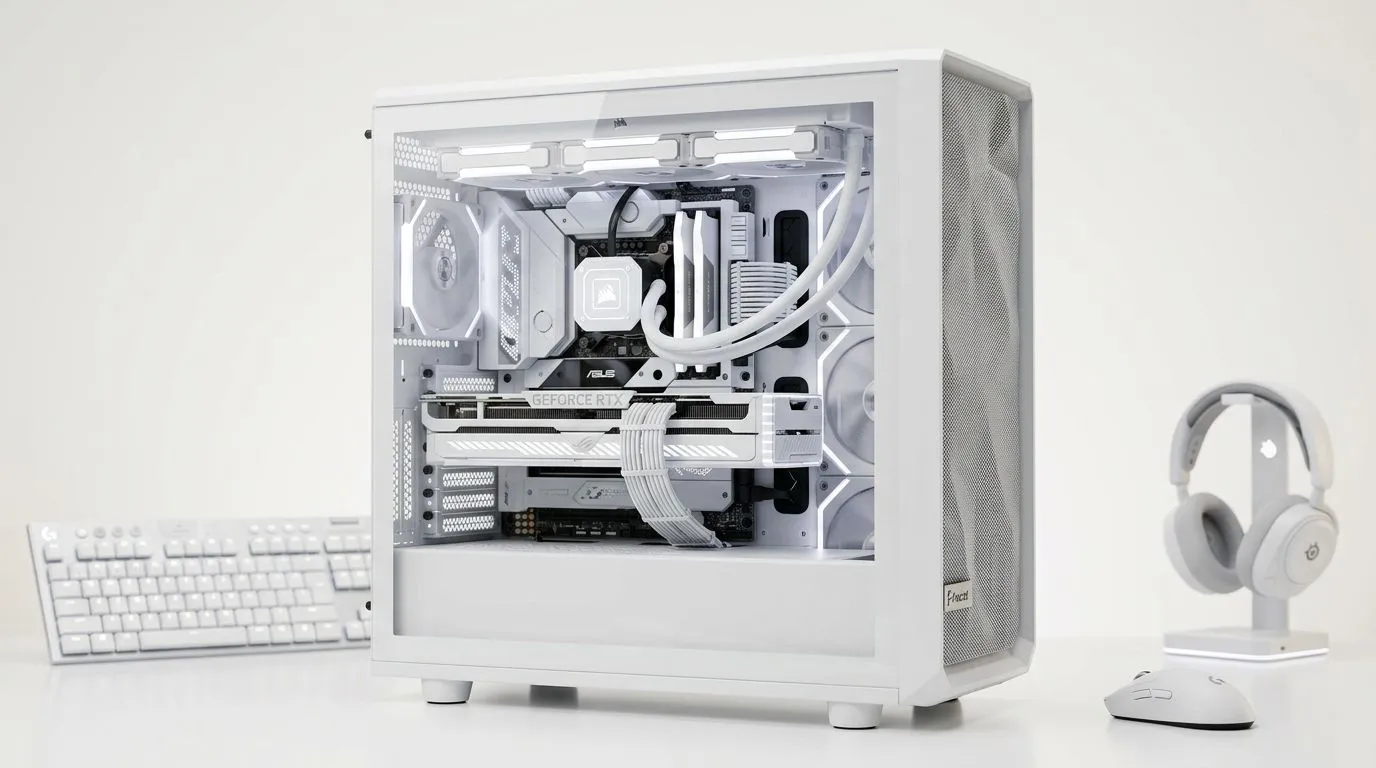
South African rigs look incredible when every peripheral matches. A crisp white gaming setup gives a clean stage for your monitor, RGB and trophies… and it’s easier to pull off than you think. Start simple: pick one white piece (like a headset or keyboard), test its finish under your room lights, then expand. Need a ready example? Check the Razer Barracuda X Chroma (Phantom White) for a compact wireless headset option that suits a minimalist desk. 🔧✨
White peripherals make small Cape Town or Johannesburg desks look larger and less cluttered. The trick is balance: pure white plastic, brushed aluminium, and warm accents stop the look from feeling clinical. For a reliable starting point, browse Razer’s white headphone range to see finishes and feature sets that match your vibe. When comparing options, trust the official product pages for accurate specs and compatibility details.
For a broader view of headset options, take a look at Razer headphones and headsets stocked locally so you can compare tech like Bluetooth vs low-latency wireless.
Wipe white plastics weekly with a lint-free cloth and 70% isopropyl for smudges. Keep gear out of direct sunlight to slow yellowing. Use cable sleeves and adhesive cable clips to prevent grime buildup around ports.
Mixing textures is your friend. Pair white plastic peripherals with an aluminium monitor arm or a fabric mousepad in muted grey. That mix adds depth and keeps reflections pleasing on camera. For lighting, choose a warm white (2700K–3500K) if you want a cozier stream, or neutral white (4000K) for clearer colour reproduction on monitors. If you’re shopping parts, Evetech’s components and headset category pages list compatible options and filters to narrow by finish and feature.
A buddy in Cape Town started with white earbuds and a white desk lamp. He swapped the mouse cable for a white paracord, chose a matte white keyboard, and added a minimalist white headset. The result looked like a professional livestream rig, without blowing the budget. Small, consistent swaps give big visual returns.
For more headset and component options to complete your build, browse Evetech’s white headsets and components listings to compare models and finishes before you buy.
Ready to Find Your Perfect Match? The Mac vs Windows debate is complex, but for maximum power, choice, and value in South Africa, Windows is hard to beat. Explore our massive range of laptop specials and find the perfect machine to conquer your world.
Choose a consistent white finish, match accent colors or RGB profiles, and balance scale—pair a white keyboard with a white mouse and neutral desk surfaces.
Look for low-profile white keyboards, matte white mice, a neutral white monitor bezel, and a white headset; prioritize clean lines and minimal RGB.
Yes. Mix budget white peripherals with one standout piece (monitor or keyboard) and use cable management and desk mats to elevate the look.
RGB helps unify components—use a single color palette or synced effects to create cohesion without overpowering the white aesthetic.
Choose monitors with slim white bezels or white-backed monitors, matching resolution and refresh rate to your GPU for performance and aesthetic harmony.
Use microfiber cloths, isopropyl wipes for keycaps, and regular dusting. Protective desk mats and wrist rests reduce grime on white surfaces.
Add a white mousepad, cable sleeves, white headphone stand, and subtle LED strips. These white gaming accessories tie the desk together.
Top RTX 5070 Under R25,000 picks evaluated on performance, value & SA availability with current Rand pricing from Evetech.
Read more
Core i5-14600K + B760 + RTX 5060 Build Under. Full parts list, Rand pricing & expected performance. Build confidently with SA-available components.
Read more
RX 7800 XT The Witcher 4 Low Settings at 1440p. Real-world benchmark data, FPS numbers & performance analysis. What SA gamers can actually expect.

RTX 5070 GTA 6 High Settings at 1440p: FPS Results. Real-world benchmark data, FPS numbers & performance analysis. What SA gamers can actually expect.

Does RTX 5070 Run Hot in South African Climate Detailed answer with SA data, expert analysis & practical recommendations for local buyers.

How Long Will the RX 7900 XTX Last for Gaming Detailed answer with SA data, expert analysis & practical recommendations for local buyers.

Every spec on PCIe 5.0 explained in plain English. What matters for gaming and creator work in 2026, what's marketing fluff, and how each number translates to real-world performance.

Every spec on bios explained in plain English. What matters for gaming and creator work in 2026, what's marketing fluff, and how each number translates to real-world performance.

Every spec on gaming setups explained in plain English. What matters for gaming and creator work in 2026, what's marketing fluff, and how each number translates to real-world performance.

Every spec on cooling systems explained in plain English. What matters for gaming and creator work in 2026, what's marketing fluff, and how each number translates to real-world performance.

Every spec on 10tb enough storage explained in plain English. What matters for gaming and creator work in 2026, what's marketing fluff, and how each number translates to real-world performance.

External HDD vs External SSD: real-world performance, SA pricing, power draw and which one delivers better value for your build. The clear answer — without the fluff.

What to prioritise when shopping for external hard drive in South Africa: the specs that matter, Rand value tiers, and the trade-offs between budget and flagship picks in 2026.

Desktop External HDDs vs Portable Drives: real-world performance, SA pricing, power draw and which one delivers better value for your build. The clear answer — without the fluff.