

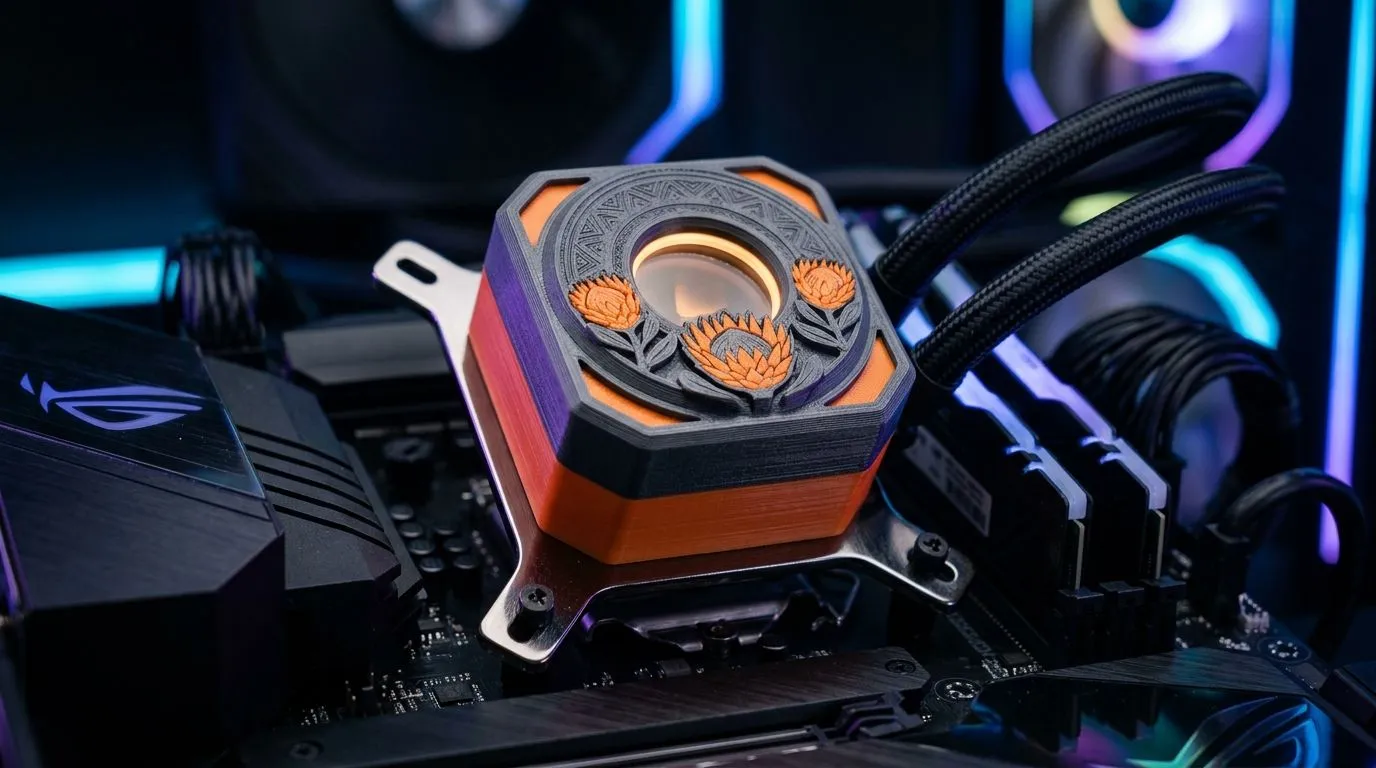
3D Printed AIO Pump Cover Customisation for PC Builders: Make Your Build Feel Like Yours ✨
You’ve spent hours choosing the right CPU cooler… then you notice the pump block still looks like everyone else’s. That’s where 3D printed AIO pump cover customisation for PC builders turns “a tidy system” into “that one build you want to show off”. It’s a small mod, but it scratches the same itch as cable sleeves and custom fan curves.
In South Africa, where builds often happen in tight budgets and tighter desks, customisation is also about control. You can match your colour theme, improve how the pump area blends with your case, and even tidy up visual clutter around the block… without touching performance.
This guide will walk you through the practical parts: what to measure, how to design or source a cover that actually fits, and what to double-check so your AIO stays healthy 🔧
What Exactly Are You Customising? (And Why It Matters for AIOs) 🚀
An AIO pump cover is basically a cosmetic shroud for the pump block. The pump itself sits inside the housing, and the cover’s job is mostly aesthetic and airflow guidance. Your key goal is to avoid blocking key areas like:
- The pump’s inlet/outlet interfaces (don’t interfere with fittings)
- Any areas where tubing needs clean clearance
- Hot zones around the pump head and surrounding components
You’re not replacing the cooler. You’re customising the cover around it.
Because AIOs vary by pump housing shape and mounting layout, you should treat “universal” covers as risky. You’ll get the best results by confirming your cooler’s series, pump block dimensions, and radiator size first.
If you’re currently shopping for the right liquid cooler (AIO), Evetech lists a wide selection here:
- Liquid cooler options on Evetech: https://www.evetech.co.za/PC-Components/cpu-coolers-84
And if you already know you want liquid specifically, use the filtered version:
- Liquid cooler (AIO) selection: https://www.evetech.co.za/PC-Components/cpu-coolers-84?attributes-coolertype=Liquid+Cooler+%28AIO%29
Step-by-Step: Getting a Custom 3D Printed AIO Pump Cover Right 🔧
Here’s the process PC builders use when they don’t want to waste filament or time.
1) Identify your exact AIO model (not just the brand)
Even within a brand, pump block shapes can differ. Start by noting the exact cooler model number, then confirm whether it’s a 240mm or 360mm radiator setup. That changes how your case routing will look, even if the pump block design stays similar.
Evetech also categorises AIO coolers by common attributes like radiator size and brands, which helps when you’re matching parts and specs:
- 240mm radiator AIO coolers: https://www.evetech.co.za/PC-Components/cpu-coolers-84?attributes-coolertype=Liquid+Cooler+%28AIO%29&attributes-coolingsize=240mm+Radiator
- 360mm radiator AIO coolers: https://www.evetech.co.za/PC-Components/cpu-coolers-84?attributes-coolertype=Liquid+Cooler+%28AIO%29&attributes-coolingsize=360mm+Radiator
2) Measure twice… then model once
Don’t guess. You need accurate dimensions for:
- Cover inner opening or mounting points
- Clearance around tubing and fittings
- Screw holes or any latch points (if applicable)
- Cable or logo recesses (if you want custom text)
If you’re doing the design yourself, build a “fit-check” test print in a durable but cheaper filament first.
3) Choose materials that handle enclosure heat
AIO pump areas can run warm. For a reliable cover, you want a material that won’t warp easily and won’t become brittle with heat cycling. Many makers prefer engineering plastics (or high-temp filaments) for parts near electronics.
If you’re buying a printer and want to avoid regret, focus on:
- Temperature control consistency
- Print surface adhesion
- Accurate first-layer calibration
4) Trial fit before you commit to the final print
Do a dry install and check:
- Tubes aren’t pinched
- Pump block isn’t stressed by the cover
- You still have access to serviceable parts
This is where your build quality shows. A cover that fits too tightly can cause long-term issues.
Productivity Pro Tip ⚡
Use a simple ‘clearance shim’ during trial fitting. Print a small strip in your intended material, slice it to thickness, and place it around the pump housing edge. If the cover still closes without pressure after removing the shim, you’ve nailed the clearance. It saves time and prevents squishing tolerances.
Brand-Specific Builds: Matching Your Cooler’s Look 🎨
If you’re building around a popular brand, your custom cover can align with that brand’s visual language.
For example, if you’re on a CORSAIR AIO, you’ll typically want to start with the exact unit you purchased and confirm its pump housing geometry before designing the cover. Evetech’s brand filtering helps you verify what’s currently on hand:
- CORSAIR liquid cooler (AIO) options: https://www.evetech.co.za/PC-Components/cpu-coolers-84?attributes-coolertype=Liquid+Cooler+%28AIO%29&brands=CORSAIR
Deepcool builders often go for bold, clean looks too. The same measurement rule applies, because pump shapes can still vary:
- Deepcool liquid cooler (AIO) options: https://www.evetech.co.za/PC-Components/cpu-coolers-84?attributes-coolertype=Liquid+Cooler+%28AIO%29&brands=Deepcool
What “customisation” can mean in practice
You can customise without making the build harder to maintain:
- Replace a plain outer shroud with a themed cover
- Add a subtle logo or gamer tag (recessed, not raised)
- Match your case colour palette for a cohesive look
- Create a cover that hides pump area cable runs cleanly
If you want extra flair, consider textured finishes… but keep airflow and access in mind.
Common Mistakes PC Builders Make (And How to Avoid Them) ✅
Let’s be honest… most failed covers come from one of these issues:
- Wrong model fit “It’s close enough” is how you end up with a cover that rubs tubing or applies stress.
- Too little clearance A tight fit may look perfect today, then cause pressure changes later.
- Skipping test prints Full final prints are expensive. Trial prints are cheaper and faster.
- Blocking service paths If your cover prevents access to parts or makes maintenance awkward, it’s not worth it.
Instead, design for real-world service. Even if you’ll never “need” it, future you will.
How to Choose the Right AIO First (So Your Cover Fits) 🧠
If you’re still planning the build, choose the cooler with your case and aesthetic goals in mind.
Start with radiator size. A 240mm setup usually fits more cases neatly, while 360mm setups can give you better visual balance (more fans across the radiator), depending on your case. Evetech lists both common sizes in the AIO category, which makes it easier to compare what’s available:
- 240mm AIO selection: https://www.evetech.co.za/PC-Components/cpu-coolers-84?attributes-coolertype=Liquid+Cooler+%28AIO%29&attributes-coolingsize=240mm+Radiator
- 360mm AIO selection: https://www.evetech.co.za/PC-Components/cpu-coolers-84?attributes-coolertype=Liquid+Cooler+%28AIO%29&attributes-coolingsize=360mm+Radiator
Then pick a brand/model that’s easy to match for custom parts. When your cooler is consistent and documented, your customisation workflow becomes predictable.
Ready to upgrade your whole look (not just your pump)? ⚡
Ready to Find Your Perfect Match? The Mac vs Windows debate is complex, but for maximum power, choice, and value in South Africa, Windows is hard to beat. Explore our massive range of laptop specials and find the perfect machine to conquer your world.











