Armrest dimensions such as 3D, 4D and 6D are shorthand for adjustment sets, not a universal list of movements. This gaming chair armrest adjustment guide shows how to compare real directions and positions using the R16,599 AutoFull M6 Pro+ 2.0 as a 6D example.
Quick Answer
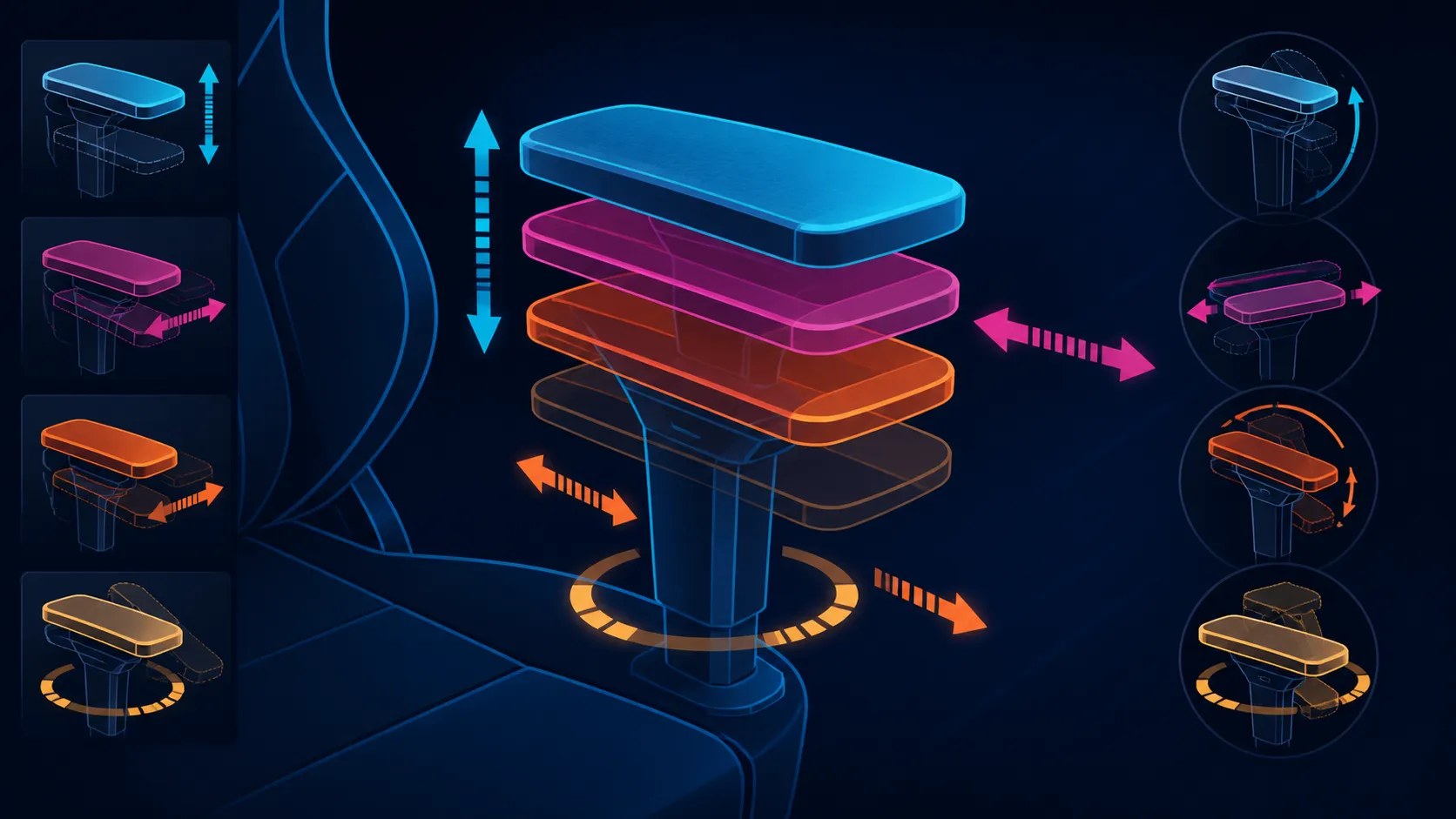
A higher dimensional label suggests broader armrest adjustment, yet it cannot define the axes shared by every chair. On the M6 Pro+, mechanical 6D arms combine folding with 360-degree positioning. Test keyboard, mouse, controller and break arrangements to find the useful motions instead of assuming a universal six-axis map.
🧭 Translate labels into movements
A 3D or 4D label should lead to a concrete list: height, sideways movement, forward or backward travel, rotation or another model-specific direction. The D count alone cannot tell the buyer which combination is present.
Use a comparison worksheet with one column for the label and separate columns for every movement demonstrated by the exact chair. This prevents a missing direction from hiding behind a larger number.
The M6 Pro+ adds a 360-degree description to its 6D armrests. Treat that as broad adjustability without naming six axes that have not been checked. The foldable mechanical design is another distinct function.
Explore Evetech's AutoFull gaming chair category after turning desired positions into explicit armrest tests.
⌨️ Test real control positions
Start with the keyboard and mouse. Keep the shoulders relaxed, bring the supports toward the forearms and check whether the hands reach the controls naturally. Repeat for a controller, steering device or other input actually used.
Different tasks need not share one setting. Typing may benefit from a position near the desk, while a controller session can bring the forearms inward. Record each workable configuration rather than searching for one universal armrest position.
Desk edges and chair height affect access. Exact armrest range and chair dimensions must be compared with the workspace. A 6D label cannot prove that the supports will pass beneath a particular desk.
↘️ Include folding and recline
Foldable arms can clear space when the model procedure moves them away from the working position. Test this function around the actual desk and nearby furniture. The word foldable does not provide a clearance measurement.
The M6 Pro+ reclines to 160 degrees. As the backrest changes, reposition the supports so the forearms are not left behind in the upright task setting. The best arm configuration may differ between a break and active control use.
Dynamic lumbar and the 3D ErgoCloud neck pillow also change the overall seated relationship. Armrests should complement those support areas, not force the shoulders or elbows into a fixed pose.
Compare complete chairs through Evetech's gaming chair selection in South Africa.
✅ Score useful range, not count
Rank each armrest by whether it reaches repeatable positions for the owner's tasks. One highly useful direction can matter more than several movements that remain unused. Stability, material and durability need their own model evidence.
More adjustment cannot promise comfort, pain relief or a medical outcome. It creates positioning options. The user still needs suitable chair geometry, desk height and regular movement.
At R16,599, the M6 Pro+ armrests form part of a package with climate functions, dynamic lumbar and deep recline. Score the arms independently before deciding how much they contribute to overall value.
If two chairs use the same D label, compare them movement by movement. The matching number does not guarantee matching axes, range, controls or folded geometry.
Draw the control area from above and mark where each forearm needs support. A mouse hand may sit farther forward than a keyboard hand, while a controller can bring both arms inward. The sketch converts abstract dimensions into positions the chair must reach.
Then add the desk edge. An armrest may offer the desired movement yet contact the furniture before reaching it. Exact chair and desk measurements decide clearance; the folding function should be tested in the same real relationship.
Do not use the 360-degree description to imply continuous usefulness throughout a full circle. Instead, identify the positions that serve the owner's tasks and observe how the mechanism reaches them. Range and practical support are not identical.
Recline changes the geometry again. Test arm support at an ordinary work angle and at the selected break angle, without assuming that the maximum 160-degree position needs the same support. Store both results in the worksheet.
For shared chairs, complete separate position maps. One user may need a different height or rotation even at the same desk. More adjustment can make sharing easier, but only when both settings can be reproduced.
Keep discomfort language measured. If a setting reduces reaching in the moment, describe the alignment change. Do not turn that observation into a promise that the armrest treats shoulder or wrist pain.
At R16,599, the armrest score should reflect these proven task positions, not the 6D label by itself. The remaining price belongs to climate, lumbar, recline, neck support and capacity.
Armrest value often appears between tasks rather than within a static posture. Time a normal move from keyboard work to controller use, then from active play to a reclined pause. Note how many adjustments are made, whether both sides need attention and whether the previous arrangement can be restored without guesswork.
Repeat the sequence with the real desk edge, chair distance and peripherals in place. A movement that looks useful away from furniture may be blocked once the workstation surrounds it. Folding can create another option, but inspect the chair's actual path and clearance instead of deriving them from the 6D description.
For shared setups, run the changeover map for every regular occupant. Keep their preferred reach and forearm support separate, particularly where dominant-hand equipment makes the two sides asymmetric. The most valuable system is not necessarily the one with the longest dimension label; it is the one whose confirmed movements solve recurring relationships and remain easy to reproduce.
Frequently Asked Questions
What do 3D, 4D and 6D labels indicate?
They indicate different sets of armrest adjustment, while each model determines the actual directions and ranges.
Which label applies to the M6 Pro+ armrests?
AutoFull equips this chair with folding mechanical arms, a 6D designation and 360-degree adjustment.
Can six exact axes be named from 6D alone?
No. Inspect the precise armrest system before assigning names to each movement.
Why does 360-degree adjustment matter?
It broadens possible support positions, which can help users align forearms with changing controls and recline angles.
Does more adjustment guarantee comfort?
No. Body dimensions, desk relationship and the usefulness of each available movement still shape comfort.
What should buyers test first?
Begin with the keyboard, mouse or controller position used most often and work outward from relaxed shoulders.
Ready to replace D labels with a movement-by-movement test?
Compare Evetech's gaming chairs after listing the arm positions required by every control and backrest angle in your setup.