

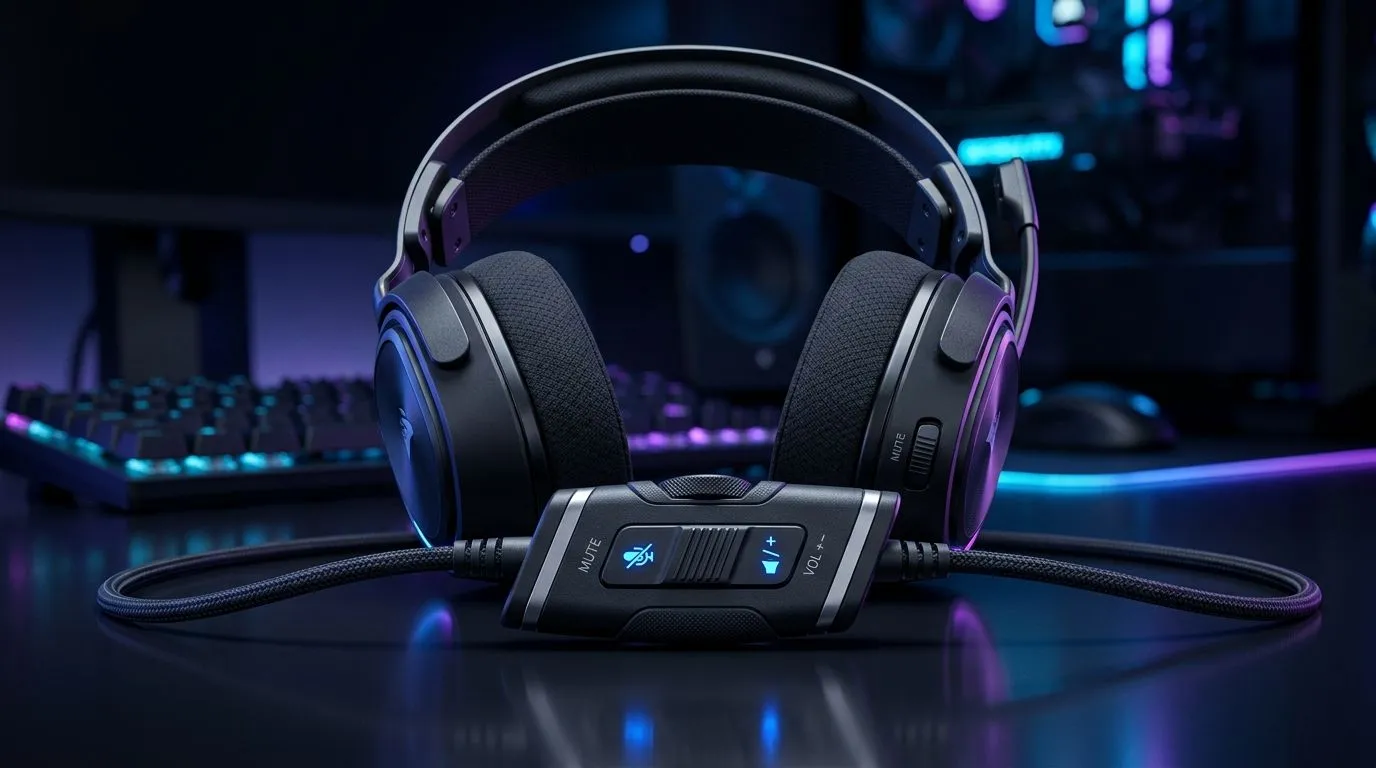
In-Line Volume Controls vs On-Ear Buttons on Gaming Headsets: The Real-World Difference
South African gamers know the moment… you’re mid-match, the sound is off, and you need volume now. Do you reach for a quick tweak on your ear, or do you dial it in along the headset cable? In-Line volume controls and on-ear buttons both promise convenience, but they feel different the second you start moving. 🎮✨
In this deep dive, we’ll compare both options for comfort, reliability, and daily usability on popular gaming headsets available in South Africa, so you can buy with confidence.
In-Line Volume Controls vs On-Ear Buttons on Gaming Headsets: How Each Option Behaves
In-line volume controls (usually on the cable)
In-line volume controls are typically located on the headset cable, letting you adjust sound without taking your hands fully off your controller or keyboard. The benefit is obvious: quick access, often without changing your headset position.
But in SA households where you might game in tight spaces, cable-managed setups matter. If the volume wheel is tucked near your desk edge, you may brush it accidentally. Also, cable strain from repeated movement can affect long-term reliability (especially with heavy use and frequent cable adjustments).
On-ear buttons (built into the earcup)
On-ear buttons are mounted on the earcup, so the control stays attached to the headset. That generally means fewer “where did the cable control go?” moments when you switch between PC and console stations.
The trade-off is tactile precision. Buttons can be easier to find by touch than a tiny wheel, but they may require slightly more hand repositioning depending on headset fit. If you wear glasses or have a tight seal, buttons can feel more intrusive.
Quick experience check: what matters during matches 🔧
When you’re tracking footsteps, small audio changes can feel huge. The best control is the one you can operate accurately without thinking.
For competitive play, ask yourself:
- Can you adjust volume without looking?
- Does the control press by accident during fast head turns?
- Is the control in a spot that works whether you’re seated upright or leaning back?
In-Line Volume Controls vs On-Ear Buttons on Gaming Headsets: Comfort, Build, and Buyer Considerations
Comfort during long sessions
On-ear controls keep everything in one place, which can feel more “locked-in” once the headset is on. In-line controls can be comfortable if the cable sits neatly, but they can become irritating if your chair or desk frequently tugs the cable.
A practical way to judge this: check your intended setup. Do you play with your cable routed behind your desk, or do you run it along the armrest?
Compatibility with your setup (PC, console, mobile)
Most gamers buy headsets for multi-device use. If your headset’s control strategy clashes with your device routing, you’ll feel it quickly. A headset cable routed to the front panel may make in-line controls easier, while a side-slung setup often favours on-ear buttons.
For browsing options that fit different PC setups, start with Evetech’s headset range:
- Explore a curated selection of gaming headsets here: Razer Headphones headsets at Evetech
- Or narrow down by headset category: Headphone & headset deals
In-Line Volume Controls vs On-Ear Buttons on Gaming Headsets: Which One Should You Choose?
Pick in-line volume controls if you…
- Want quick access while keeping your hands on controls
- Route your cable in a consistent, non-tugging way
- Prefer fine adjustments with a wheel or slider feel
If you’re eyeing a headset model with physical cable controls, the Razer Barracuda X Chroma Wireless is worth a look for how it fits in real gaming routines: View the Razer Barracuda X Chroma Wireless Headset in Phantom White
Pick on-ear buttons if you…
- Hate accidental touches on cable controls
- Want the control always where your ear is
- Play long sessions and care about consistent placement
In-Line Volume Controls vs On-Ear Buttons on Gaming Headsets: Setup Tips That Actually Help ⚡
Productivity Pro Tip ⚡
On Windows, use your headset’s control mix (Volume Mixer) to create a “gaming-first” baseline. Then, keep headset volume controls for tiny in-match tweaks only. This reduces over-adjusting, helps you protect your hearing, and keeps audio levels consistent when Discord or game launches switch.
Practical testing before you commit
If you’re in-store or can test quickly:
- Put the headset on and do three head turns left-right.
- Try adjusting volume without looking.
- Listen for comfort: do your fingers brush buttons or the cable constantly?
It sounds basic… but it catches 80% of “why do I hate this headset?” problems.
In-Line Volume Controls vs On-Ear Buttons on Gaming Headsets: Final Verdict
Neither option is objectively “better”. The best choice depends on your physical setup and how you play. In-line controls win for fast access on a clean cable route. On-ear buttons win for stable, always-located controls that stay with the headset. Choose the feel that matches your routine, and your mix will stay consistent.
Ready to buy? Let’s get you the right headset for your games and your day-to-day.
Ready to Find Your Perfect Match? If you’re still deciding between in-line volume controls and on-ear buttons, the best way forward is to compare comfort, fit, and control placement in a headset you can actually live with. Explore Evetech’s massive gaming headset range and choose your next upgrade.











