


MacBook Pro 16-Inch M5 Max: Complete Specs, Features and SA Pricing Guide
MacBook Pro 16-Inch M5 Max: Complete Specs,. Everything you need to know with SA pricing, step-by-step instructions & expert recommendations.
Read moreSingle tower vs dual tower air coolers for better heat? We compare temps, airflow, and cost so you can choose the right design for your CPU and case. ❄️🛠️
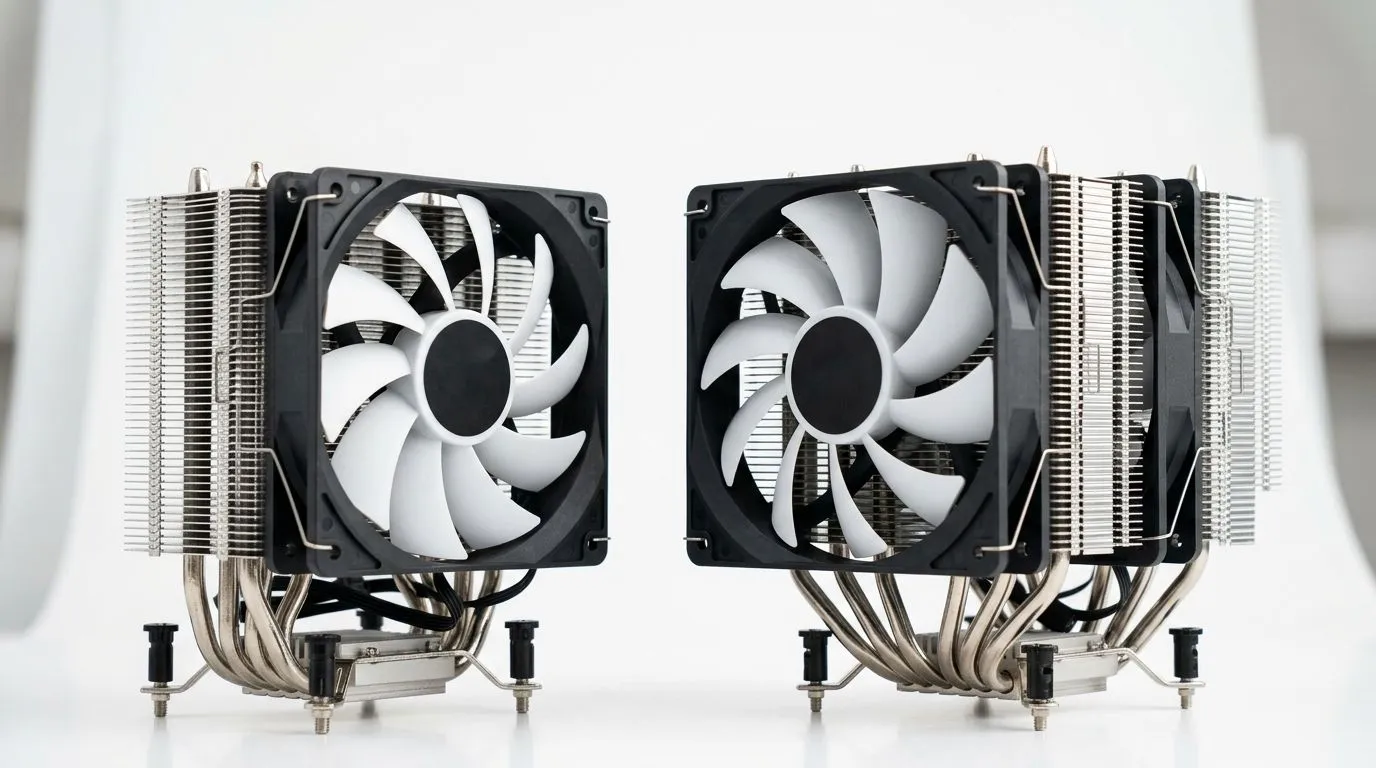
Heat can ruin a good gaming session… or at least throttle your CPU right when the action peaks. In South Africa, we’re also dealing with hotter rooms, dust, and power fluctuations. So when you’re building a rig for PUBG, Fortnite, or a new AAA release, cooling is not an afterthought. The real question is simpler: do you need a single tower air cooler, or will a dual tower air cooler keep things cooler for longer? 🔧
A single tower air cooler uses one stack of heat fins with typically one main fan. A dual tower air cooler stacks two fin arrays side-by-side and often supports two fans. In general, more fin surface area can move more heat into the air, and more airflow paths help during sustained loads like ranked marathons or shader-heavy game moments.
But bigger is not always better. Dual tower models can be:
When you’re shopping, filter by what matters to your build: fan size, case clearance, and whether the cooler is meant for Air Cooling. If you want a quick baseline, start with Evetech’s air cooler selection here: Air coolers at Evetech.
Before you buy, do three practical checks. These usually decide the outcome more than “single vs dual” alone. ⚡
On your next build, run a quick 10-minute stress test after installing the cooler, then check temperatures in BIOS or with a reliable monitoring tool. If you see spikes, reseat the cooler and confirm the fan is spinning in the correct direction before blaming the hardware.
A small micro-story: I’ve seen gamers drop from “fine” to “thermal throttle” just because they used a too-small case with only one rear exhaust fan. They later upgraded the cooler, but the bigger improvement came after adding a front intake and adjusting fan curves. Cooling is a system, not a single part.
If you mostly play esports titles and your CPU boost behaviour is mild, a quality single tower air cooler can be a smart, cost-effective choice. It’s often easier to fit, easier to maintain, and still handles everyday gaming well.
Go dual tower when:
Also consider fan configuration. Evetech’s selection lets you narrow down by air cooling size, which is handy for matching case fans and airflow: 120mm air cooler options.
Brand matters too, especially for build quality and fin design. For example, if you’re considering Deepcool models, browse here: Deepcool air coolers.
And if you’re comparing alternatives like EINAREX, start here: EINAREX air coolers.
Before you commit, ask:
If you want to explore your options in one place, Evetech’s full CPU cooler range is a great starting point: CPU coolers.
Ready to Find Your Perfect Match? The Mac vs Windows debate is complex, but for maximum power, choice, and value in South Africa, Windows is hard to beat. Explore our massive range of laptop specials and find the perfect machine to conquer your world.
Often yes. Dual tower air coolers typically provide more surface area and airflow paths, which can lower CPU temps, especially under sustained loads.
For high TDP CPUs, dual tower air coolers usually handle heat better due to larger heatsink volume. Still, fan speed, case airflow, and mounting matter.
Check your case cooler height clearance and motherboard clearance around the first PCIe slot and RAM. Dual tower models are often taller and heavier.
Fan count and RPM influence heat removal. Dual tower designs can benefit from more effective fin coverage, but poor fan curves can reduce gains.
Usually, yes. For gaming and typical daily use, a quality single tower cooler can keep temps reasonable if your case has good airflow.
Heatpipe design, fin density, fan performance, thermal paste application, and case airflow often decide results as much as single vs dual tower.
They’re often worth it when you need headroom for sustained high clocks. Dual tower coolers can reduce thermal throttling if fitment and airflow are solid.
Choose based on your CPU TDP, target temps, case clearance, and budget. Dual tower is ideal for maximum heat handling; single tower suits tighter setups.
MacBook Pro 16-Inch M5 Max: Complete Specs,. Everything you need to know with SA pricing, step-by-step instructions & expert recommendations.
Read more
Travelling With a MacBook: Travellers. Everything you need to know with SA pricing, step-by-step instructions & expert recommendations.
Read more
Back-to-School Parent Guide: Laptops. Everything you need to know with SA pricing, step-by-step instructions & expert recommendations.
Read more
MacBook Air 13-Inch M5: Complete Specs, Features. Everything you need to know with SA pricing, step-by-step instructions & expert recommendations.
Read more
MacBook Neo Unboxing and First Setup Guide for. Clear setup instructions with SA-specific considerations, troubleshooting tips & recommended components.
Read more
MacBook Pro 16-Inch M5 Pro: Complete Specs,. Everything you need to know with SA pricing, step-by-step instructions & expert recommendations.
Read more
CS2 Low FPS: Monitor Bottleneck. Real-world benchmark data, FPS numbers & performance analysis. What SA gamers can actually expect.

Is AOC a Good Monitor Brand for Gaming in South Africa Detailed answer with SA data, expert analysis & practical recommendations for local buyers.

What Gaming Monitor Can You Get for R20,000. Full parts list, Rand pricing & expected performance. Build confidently with SA-available components.

What Gamers Actually Bought: November Report. Real purchase data from SA retailers revealing what local buyers are actually choosing and why.

Can the RX 7700 XT Handle 1440p 144Hz Gaming. Performance testing verdict with real data & practical recommendations for SA buyers.

Top Laptop with Core i7 + RX 7700S: Picks picks evaluated on performance, value & SA availability with current Rand pricing from Evetech.

RX 7700 XT Black Myth Wukong 2 FPS: Performance. Real-world benchmark data, FPS numbers & performance analysis. What SA gamers can actually expect.

RTX 6080 Gran Turismo 7 PC Performance: FPS Test. Real-world benchmark data, FPS numbers & performance analysis. What SA gamers can actually expect.

Eliminate background noise in gaming voice chat using cardioid microphones to focus on your voice and reject room sounds. Get cleaner comms fast with smart placement and settings—🎮🎧

Wondering how much to spend on a high-end gaming headset in South Africa? We break down budget vs performance, what you actually get, and smart upgrade steps 🎧⚡

Wondering about THX Spatial Audio vs 7.1 surround for positional awareness? We compare imaging, depth, and cueing so you can pick the best option for gaming. 🎧👣

50mm bio-cellulose drivers vs standard drivers: does material affect audio precision? Compare clarity, bass control, and imaging so you can choose the right headphones. 🎧🔍