

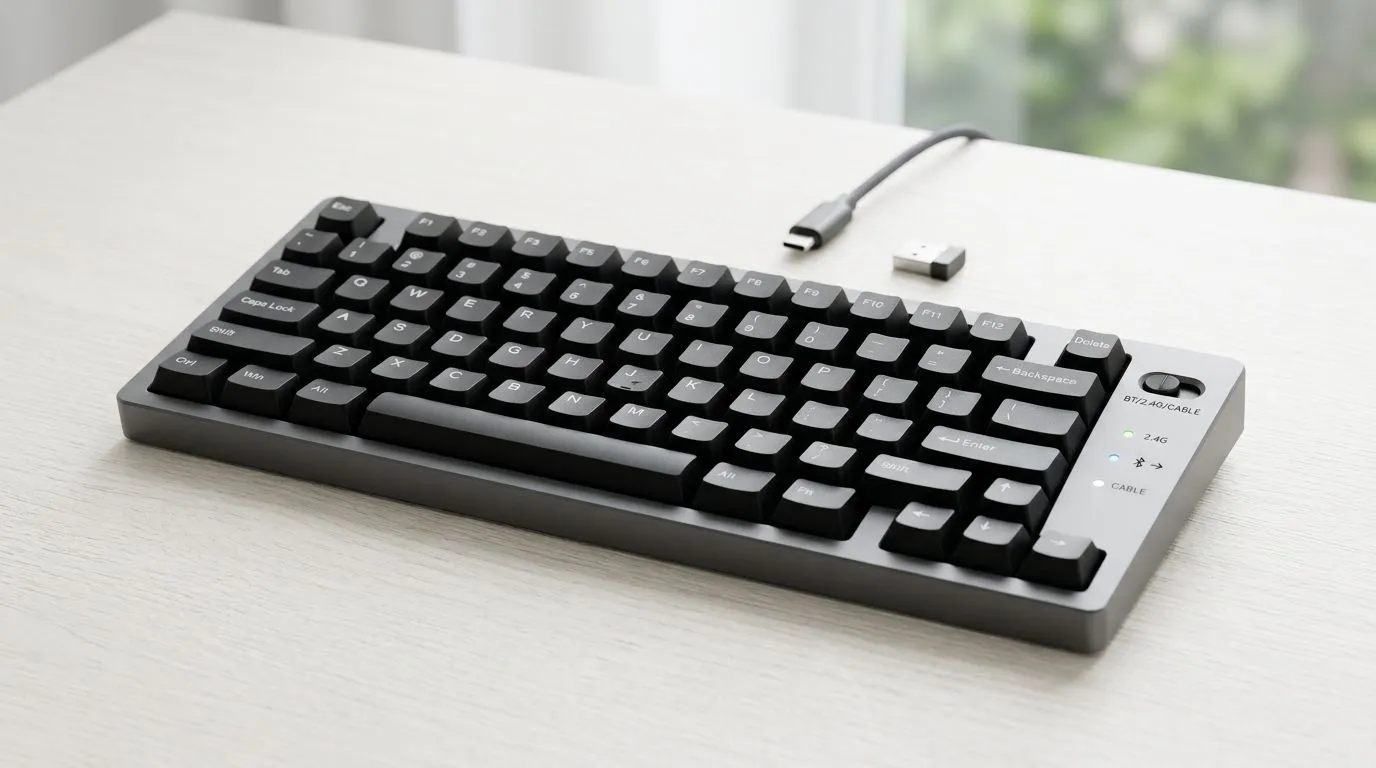
Triple Mode Connectivity on Wireless Keyboards Explained: The quick win for SA gamers
If your keyboard’s “mode” doesn’t match your setup, you’ll feel it fast… lag, disconnects, or awkward switching. And in South Africa, where load shedding, router quirks, and desk chaos are real, you need gear that adapts.
That’s where Triple Mode Connectivity on Wireless Keyboards Explained comes in. We’ll unpack how wired, wireless, and Bluetooth work together, and how to choose the right setup for gaming, work, and living room couch play. 🎮✨
Triple Mode Connectivity on Wireless Keyboards Explained: What “triple mode” actually means
A triple-mode keyboard is designed to connect using three different paths:
- Wired (usually USB), for consistent latency and zero pairing hassle.
- Wireless (typically 2.4GHz via a USB dongle), for low-latency performance.
- Bluetooth, for easy switching with phones, tablets, or laptops without a dongle.
Why gamers care: 2.4GHz is often the sweet spot for response time, while Bluetooth shines for convenience. Wired is the “always works” option when you want maximum reliability.
Many Evetech buyers shop based on the connectivity they need. You can browse deals for specific connection types here:
- {
https://www.evetech.co.za/components/buy-cheapest-gaming-keyboard-in-south-africa-52.aspx?attributes-connectivity=Wired} - {
https://www.evetech.co.za/components/buy-cheapest-gaming-keyboard-in-south-africa-52.aspx?attributes-connectivity=Wireless}
Triple Mode Connectivity on Wireless Keyboards Explained: Which mode should you use for what?
Here’s the practical breakdown most SA desks end up with.
Wired: the “no excuses” choice for competitive sessions
When you game seriously, wired is simple and stable. No Bluetooth pairing. No USB dongle placement issues. No “why did it drop?” moments.
Use wired when:
- You’re playing ranked games or long sessions.
- Your wireless environment is messy (many networks, crowded signals).
- You want the least variables while you fine-tune sensitivity and DPI.
If you’re building a full setup, you can also start from a keyboard-first shopping page like:
- {
https://www.evetech.co.za/components/buy-cheapest-gaming-keyboard-in-south-africa-52.aspx}
2.4GHz wireless: low-latency without cable clutter ⚡
The main reason triple-mode keyboards matter is that 2.4GHz wireless often behaves like a “near-wired” experience. You get freedom, with fewer timing surprises than older Bluetooth profiles.
Use 2.4GHz when:
- You want a clean desk.
- You game from a comfortable distance.
- You move between PC and console-ready setups (where applicable) without re-pairing.
Bluetooth: the desk-to-laptop “just work” setting 🚀
Bluetooth is for convenience. It’s perfect for:
- switching to a laptop for work,
- typing messages on a phone,
- casual gaming on a device that doesn’t support the dongle.
A good habit: assign devices to the keyboard’s built-in Bluetooth profiles (usually 3 profiles). Then switching becomes a button press, not a ritual.
Triple Mode Connectivity on Wireless Keyboards Explained: Setup tips that stop the pain
The best keyboards still feel “wrong” if you wire everything poorly. Here are habits that fix most connectivity issues quickly.
Reduce interference and keep pairing predictable
- Place the 2.4GHz USB dongle at the back of your PC, or use a short USB extension so it’s not buried behind the desk.
- Keep your Bluetooth pairing list lean. Too many old devices can slow switching.
- When switching modes, wait a second after pressing the mode key. Some keyboards “handshake” before they start sending input.
Tune your Windows connection behaviour
If you use Bluetooth often on Windows:
- Use the same Windows power plan consistently.
- If Bluetooth keeps disconnecting, check Bluetooth power management in Device Manager.
Productivity Pro Tip ⚡
On Windows, keep your most-used apps grouped and use a dedicated “gaming” workspace. When your keyboard supports mode switching, use 2.4GHz for gaming and Bluetooth only for chatting or switching tasks. This avoids accidental mode changes during matches and keeps your cursor focus stable on ultrawide monitors. That extra discipline saves more time than you’d think."
Triple Mode Connectivity on Wireless Keyboards Explained: Buying guidance for SA value hunters
Triple mode sounds great, but not every buyer needs all three paths. Here’s a simple decision rule:
- If you’re mainly PC gaming and hate cables: prioritise 2.4GHz + Bluetooth.
- If you’re competitive and want consistency: prioritise wired + 2.4GHz.
- If you’re a mixed-use household: Bluetooth becomes more valuable than you expect.
Also, match your keyboard to your desk ecosystem. If you already run a mouse and keyboard together, consider a combo bundle so you don’t end up swapping parts later:
- {
https://www.evetech.co.za/buy-keyboard-mouse-combo/x/1583.aspx}
And if you want to browse deals without overthinking the spec sheet, start here:
- {
https://www.evetech.co.za/best-gaming-keyboard-deals/x/055.aspx}
Triple Mode Connectivity on Wireless Keyboards Explained: Common questions SA buyers ask
“Does Bluetooth make gaming worse?”
Bluetooth can be fine for casual play, but most players prefer 2.4GHz or wired for competitive titles. The key difference is consistent low latency and fewer connection variables.
“Will wired always feel better than wireless?”
Wired is the most consistent. But 2.4GHz wireless is typically the closest “feel” for gaming, especially on modern triple-mode boards.
“How do I avoid forgetting which mode I’m in?”
Use a quick routine:
- Set device profiles (Bluetooth 1, Bluetooth 2, etc.)
- Keep 2.4GHz as your default for PC gaming
- Only switch to wired when you’re troubleshooting or charging in critical sessions
Ready to upgrade? Choose your connectivity, then lock in the right deal
If you want a keyboard that fits your life… not the other way around, triple mode is one of the smartest feature sets you can buy. Pick the connectivity you’ll actually use most, then build your setup around it.
Ready to Find Your Perfect Match? The Mac vs Windows debate is complex, but for maximum power, choice, and value in South Africa, Windows is hard to beat. Explore our massive range of laptop specials and find the perfect machine to conquer your world.











