Video Adapter Types: Complete Guide for South African Buyers (Start Here)
If you’ve ever connected your PC to a monitor and thought, “Why is the picture… wrong?”, you’re not alone. In South Africa, the right video adapter can be the difference between smooth gaming, crisp work, and frustrating “no signal” moments. 🔧 Whether you’re building a budget rig, upgrading a GPU, or trying to run a second display for work and study, this guide will help you choose confidently.
Video Adapter Types: Complete Guide for South African Buyers (Quick Buyer Checklist)
Before you buy anything, match these three things:
- Your output port (from the PC or console)
- Your display input (what the monitor/TV accepts)
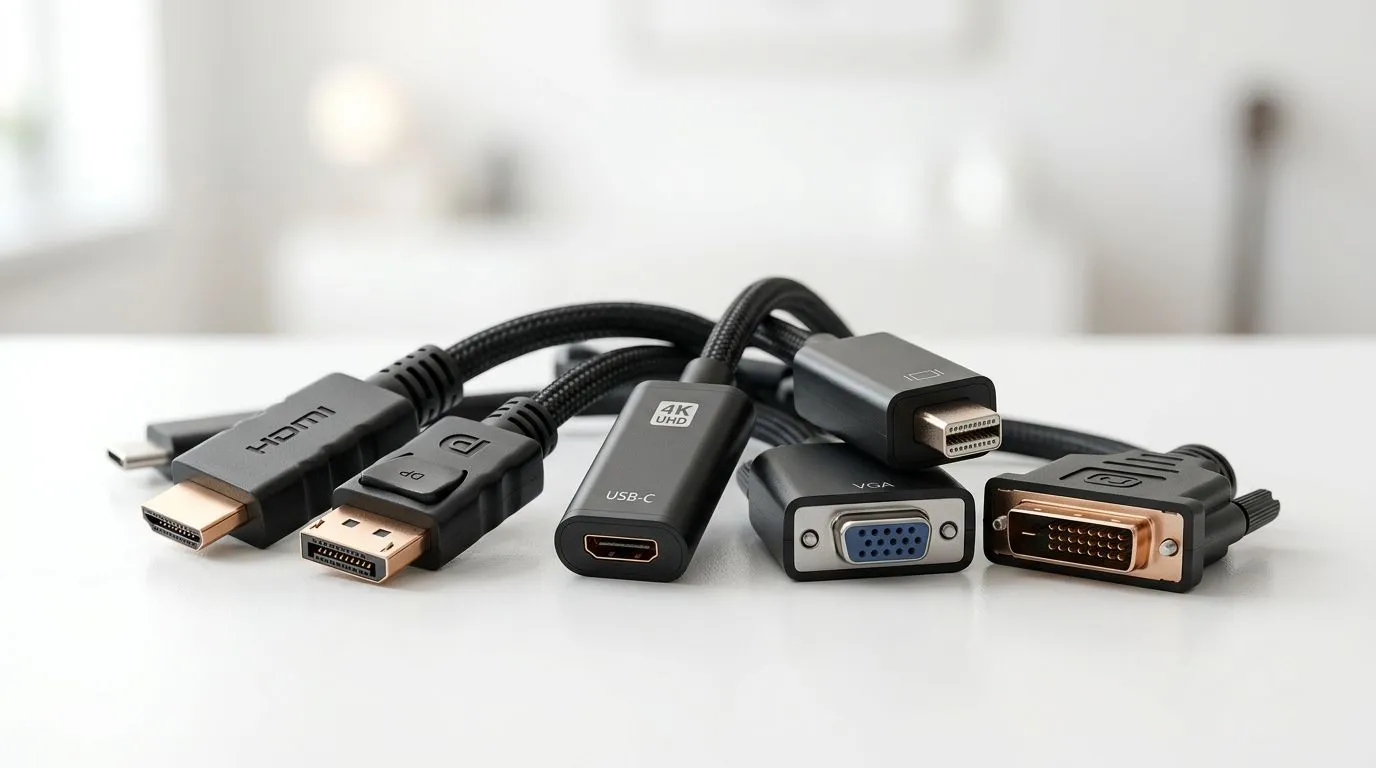
- The cable + adapter type (HDMI, DisplayPort, DVI, VGA, USB-C, and more)
A common South African scenario: you upgrade your GPU or laptop… but your monitor is older. You then need an adapter that supports the right signal type. Otherwise you get low resolution, flicker, or no audio.
Productivity Pro Tip ✨
For multi-monitor setups, plug in the monitor first, then power on your PC. This helps Windows detect the display more reliably, especially with adapters that handle EDID negotiation (the “display handshake”).
Video Adapter Types: Complete Guide for South African Buyers (HDMI Adapters)
HDMI is the most common standard in local homes. You’ll see it on gaming monitors, TVs, soundbars, and many entry-level graphics cards.
When HDMI is the right choice
- Your monitor or TV has HDMI inputs
- You need audio + video on one connection
- You’re running typical gaming resolutions like 1080p or 1440p
What to watch for
- Cable quality matters. Cheap HDMI cables can cause flicker at higher refresh rates.
- If you need a longer run, consider a better-rated HDMI cable rather than stacking multiple adapters.
Video Adapter Types: Complete Guide for South African Buyers (DisplayPort Adapters)
DisplayPort (DP) is popular for PC gaming and higher refresh rates. Many PC monitors include DP alongside HDMI.
Why gamers like DisplayPort
- Often preferred for smooth refresh rate behaviour
- Frequently used for ultrawide and multi-monitor desk setups
Key tip for buyers
If you’re choosing between HDMI and DisplayPort for a gaming monitor, prioritise the connection that your monitor supports best. For most buyers, HDMI is simplest, but DP is usually the more “PC-first” option. ⚡
Video Adapter Types: Complete Guide for South African Buyers (USB-C Video Adapters)
USB-C gets confusing fast, because not every USB-C port supports video output. What you want is USB-C with DisplayPort Alt Mode.
Typical use cases
- Laptops with USB-C ports connecting to external monitors
- A clean desk setup without extra bulky cables
Buyer sanity check
Look for wording like “video output” or “Alt Mode / DisplayPort Alt Mode” in the laptop or adapter details. If it’s unclear, don’t assume.
Video Adapter Types: Complete Guide for South African Buyers (DVI and VGA: The “Legacy” Options)
DVI and VGA still show up in older monitors and projectors. If you’re working with legacy hardware, adapters may be necessary.
DVI adapters
- Usually used when a monitor has only DVI inputs
- Generally provides decent quality for older setups
VGA adapters
- VGA is analogue. Expect less sharp output than digital connections.
- If you’re gaming, VGA usually won’t give you the best experience.
Video Adapter Types: Complete Guide for South African Buyers (Active vs Passive Adapters)
Not all adapters are equal. This is where many South African buyers lose money.
Passive adapters (simple conversions)
Often work when the signal path is straightforward (for example, certain HDMI-to-DVI style conversions).
Active adapters (signal “translation”)
If you’re converting between different standards that don’t “agree” easily, active adapters may be required. They can help handle the conversion logic that passive adapters lack.
Adapter Buying Checklist 🔧
Before checkout, confirm whether the adapter is active or passive and whether it supports your target resolution and refresh rate. When listings are vague, that’s your warning sign.
Video Adapter Types: Complete Guide for South African Buyers (Multi-Display and “No Signal” Fixes)
Let’s talk real-world problems. You plug everything in and… blank screen.
Here are practical steps that usually fix it:
- Reroute once. Unplug the adapter, then connect the display directly (if possible) to confirm the monitor works.
- Restart with order. Power on the monitor first, then the PC.
- Switch output mode in software. On Windows, open Display settings and choose the correct display.
- Check refresh rate. If you forced a high refresh rate, drop it to a stable value.
- Avoid stacking. Don’t chain multiple adapters. It increases failure points.
If you’re running a multi-monitor desk, you’ll probably need more cables and adapters than you think, so it’s smart to plan a small “kit” before you start.
Video Adapter Types: Complete Guide for South African Buyers (Where to Buy in South Africa)
Shopping locally matters for availability and returns. If you’re building a compact setup or upgrading monitors, start with Evetech’s accessories section and pick adapters that match your ports and display inputs.
Browse gaming accessories and related essentials here: buy gaming accessories
For deal hunters, you can also check: gaming accessories deals
And if you want a broader category view in one place: gaming accessories category listing
Video Adapter Types: Complete Guide for South African Buyers (Final Recommendation)
Here’s the simplest way to decide:
- Choose HDMI for TVs and most monitors with HDMI.
- Choose DisplayPort for PC gaming displays when available.
- Use USB-C only if Alt Mode is confirmed.
- Avoid VGA for gaming unless you must.
- Prefer active adapters when conversions get complicated or specs are unclear. ✅
You’ll spend less time troubleshooting, and more time gaming or working… which is the whole point. 🚀
Ready to Find Your Perfect Match?
The Mac vs Windows debate is complex, but for maximum power, choice, and value in South Africa, Windows is hard to beat. Explore our massive range of laptop specials and find the perfect machine to conquer your world.