


Best Monitor for RX 9070: Resolution & Refresh Rate Match 2026
Top Monitor for RX 9070: Resolution & Refresh Rate picks evaluated on performance, value & SA availability with current Rand pricing from Evetech.
Read moreFix desk cable clutter with a USB pass-through keyboard and smarter peripheral routing. Keep power and connections tidy, improve ergonomics, and reduce desk chaos ⚡🖥️.
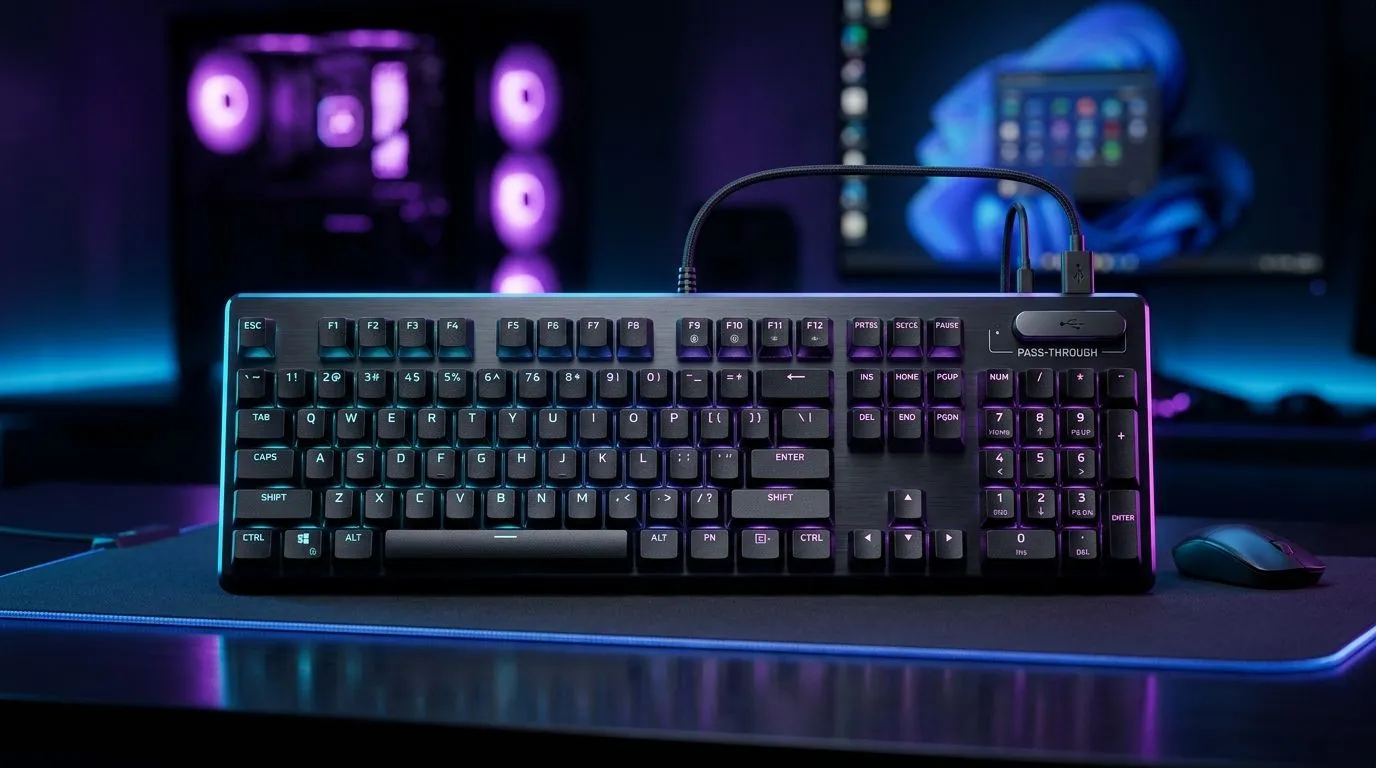
If your desk looks like a spaghetti bowl of charging cables, you are not alone… and you are not stuck. South African gamers spend hours tuning DPI, swapping switches, and optimising audio. So why tolerate a cable mess that trips your chair, blocks your monitor arm, and ruins the vibe? A USB pass-through keyboard for desk cable clutter is one of those small upgrades that makes your whole station feel more intentional. 🔧
A USB pass-through keyboard adds a spare USB port on the front edge of the keyboard. Instead of routing a new device (like a phone or headset dongle) to the back of your PC, you plug it into the keyboard and connect once through the keyboard’s single USB cable.
In practice, that means:
When your keyboard has an easy front USB connection, your hot-swaps happen at the desk level. You are not leaning behind the tower every time you want to charge a controller or connect a headset.
Cable clutter usually forms near mouse and keyboard height. With pass-through, you can route one “clean” line while keeping your accessories within reach.
On Windows, use the PowerToys FancyZones utility to create custom snap layouts for your windows. It's a lifesaver for managing multiple apps on an ultrawide monitor, letting you organise your timeline, preview window, and asset folders perfectly for video editing.
Before you buy, decide what you want the keyboard to handle: raw responsiveness, or desk freedom.
Wired options keep latency consistent and remove battery management from the equation. If you want to explore current keyboard options available in South Africa, start with:
Wireless can reduce cable bulk even further. Still, the USB pass-through port can remain useful for charging phones or powering accessories. For wireless-focused buying:
If your desk already has a monitor arm and a USB hub, the pass-through still helps. It reduces the number of cables that need to reach your hub. If your hub is hidden under the desk, you will notice this immediately.
A cleaner desk is easier when your peripherals match. If you want a coordinated setup, consider adding a keyboard-mouse bundle so your cable plan is consistent from day one:
You can also browse for keyboard deals and build a setup around your budget in ZAR:
Before you hit “Add to cart”, check these:
That is it. Small decisions now, cleaner matches later. ✨
Ready to Find Your Perfect Match? The Mac vs Windows debate is complex, but for maximum power, choice, and value in South Africa, Windows is hard to beat. Explore our massive range of laptop specials and find the perfect machine to conquer your world.
A USB pass-through keyboard includes front-facing USB ports so you can plug in accessories without reaching behind your PC.
Yes. It lets you route frequent connections to the front ports, reducing dangling cables and improving cable management.
Use shorter runs to your keyboard hub area, group power separately from data, and keep monitor and USB cables on consistent paths.
Most accessories work well, but power-hungry devices may require their own charging or a powered USB hub.
Typically they do not impact key latency, but heavy USB traffic can matter for some setups—test your devices after connecting.
Check port placement, cable length support, compatibility, whether ports are USB 2.0 or USB 3.x, and switchable hub stability.
It depends. A pass-through keyboard is ideal for quick access, while a hub offers more ports and placement flexibility.
Use cable sleeves, strain relief, Velcro ties, and route away from power bricks to prevent heat buildup and tangles.
Top Monitor for RX 9070: Resolution & Refresh Rate picks evaluated on performance, value & SA availability with current Rand pricing from Evetech.
Read more
Valorant Settings on RX 9060 XT: Performance. Real-world benchmark data, FPS numbers & performance analysis. What SA gamers can actually expect.
Read more
Top Monitor for RTX 5060: Resolution & Refresh Rate picks evaluated on performance, value & SA availability with current Rand pricing from Evetech.
Read more
Top GPU and CPU Pairing for Mid-Range picks evaluated on performance, value & SA availability with current Rand pricing from Evetech.
Read more
Top GPU for Civilization VII: Every Resolution Tested picks evaluated on performance, value & SA availability with current Rand pricing from Evetech.
Read more
Top Case for RTX 3050: Airflow & Size Compatibility picks evaluated on performance, value & SA availability with current Rand pricing from Evetech.
Read more
RX 7800 XT The Witcher 4 Low Settings at 1440p. Real-world benchmark data, FPS numbers & performance analysis. What SA gamers can actually expect.

RTX 5070 GTA 6 High Settings at 1440p: FPS Results. Real-world benchmark data, FPS numbers & performance analysis. What SA gamers can actually expect.

Does RTX 5070 Run Hot in South African Climate Detailed answer with SA data, expert analysis & practical recommendations for local buyers.

How Long Will the RX 7900 XTX Last for Gaming Detailed answer with SA data, expert analysis & practical recommendations for local buyers.

Every spec on PCIe 5.0 explained in plain English. What matters for gaming and creator work in 2026, what's marketing fluff, and how each number translates to real-world performance.

Every spec on bios explained in plain English. What matters for gaming and creator work in 2026, what's marketing fluff, and how each number translates to real-world performance.

Every spec on gaming setups explained in plain English. What matters for gaming and creator work in 2026, what's marketing fluff, and how each number translates to real-world performance.

Every spec on cooling systems explained in plain English. What matters for gaming and creator work in 2026, what's marketing fluff, and how each number translates to real-world performance.

Every spec on 10tb enough storage explained in plain English. What matters for gaming and creator work in 2026, what's marketing fluff, and how each number translates to real-world performance.

External HDD vs External SSD: real-world performance, SA pricing, power draw and which one delivers better value for your build. The clear answer — without the fluff.

What to prioritise when shopping for external hard drive in South Africa: the specs that matter, Rand value tiers, and the trade-offs between budget and flagship picks in 2026.

Desktop External HDDs vs Portable Drives: real-world performance, SA pricing, power draw and which one delivers better value for your build. The clear answer — without the fluff.