

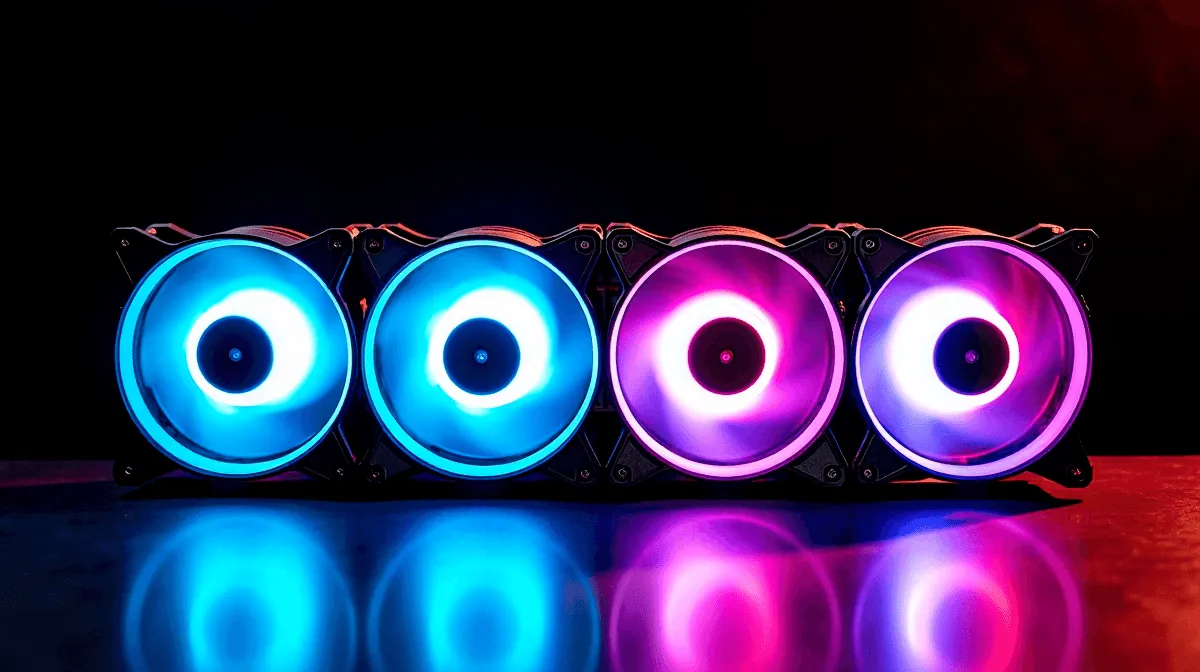
Best Budget ARGB Case Fans Under R500 in South Africa
Finding quality ARGB case fans under R500 in South Africa requires knowing where to look and understanding which brands deliver value without compromising airflow or durability. Budget ARGB fans can match or exceed the performance of premium options while keeping your build affordable—crucial for SA gamers working with limited budgets or those building multiple systems.
What to Expect From Budget ARGB Fans
ARGB fans under R500 typically offer:
- Airflow: 40–70 CFM (solid for case cooling)
- Noise: 20–28 dB at medium speed (acceptable for gaming)
- RPM Range: 1,200–2,000 RPM (sufficient PWM control)
- LED Count: 8–12 individually addressable LEDs
- Build Quality: Decent plastic frames with rubber mounting dampeners
- Warranty: 1–2 years (shorter than premium brands but adequate)
The trade-off compared to R800+ fans is typically durability (bearing lifespan) rather than immediate performance. A R300–500 ARGB fan will cool as well as a R800 fan on day one, but may show wear after 3–5 years of continuous operation. For most SA builders planning to upgrade hardware in 2–3 years anyway, budget ARGB fans represent excellent value.
Key Specifications to Compare
When evaluating budget ARGB fans, focus on these measurable specs:
Airflow (CFM): Higher CFM moves more air. For intake fans, aim for 50+ CFM. For exhaust, 40+ CFM. Don't buy below 40 CFM unless space constraints force it.
Static Pressure (mmH2O): Important if the fan will push air through obstacles (radiators, grilles). Intake/exhaust fans need 2–3 mmH2O. If you're planning a radiator setup, verify the fan can handle 4+ mmH2O.
Noise Level (dB): Budget fans often max out at 25–28 dB. Premium fans achieve sub-20 dB at the same RPM, but budget options at moderate speeds (40–60% PWM) are acceptably quiet for gaming.
RPM Range: Confirm the fan supports at least 1,200–2,000 RPM. Fans with narrower ranges (e.g., 1,500–1,800 RPM) limit your cooling flexibility.
LED Count and Addressability: More LEDs create smoother gradients and effects. 12+ LEDs per fan looks significantly better than 6–8 LEDs. Confirm the ARGB connector is standard 3-pin (5V, GND, Data)—not proprietary.
Where to Find Budget ARGB Fans in South Africa
SA retailers and online shops stock budget ARGB options, though availability fluctuates:
Evetech (evetech.co.za): The primary SA retailer for PC components with consistent ARGB fan inventory. Check their case fans section regularly—stock varies but they often carry budget options under R500. Evetech typically holds prices steady and offers quick delivery to major SA cities.
major international retailers.co.za and International Retailers: Imported ARGB fans from international sources are sometimes cheaper due to exchange rates, but delivery is slower (2–4 weeks) and warranty support is limited for SA customers. Only use this option if local sources are exhausted.
Facebook Tech Communities: SA gaming and PC building groups on Facebook sometimes have members selling surplus or slightly-used ARGB fans at discounted prices. Inspect fans carefully before purchase (check for physical damage, test LEDs in person).
Budget ARGB Fan Brands in South Africa
These brands consistently offer ARGB fans under R500 with acceptable quality:
Generic/No-Name Brands (R250–350): Many Chinese manufacturers produce ARGB fans sold under generic branding (sometimes labeled "RGB Case Fan 120mm" with minimal branding). Characteristics:
- Extremely budget-friendly
- Variable quality (some reliable, some fail quickly)
- Basic LED effects, limited customisation
- High risk of bearing failure after 2–3 years
Recommendation: Only buy if you're testing a cooling setup and willing to replace fans later. Avoid for permanent builds.
Known Budget Brands (R350–500):
While premium brands like Corsair, NZXT, and Be Quiet command R800+, mid-range manufacturers deliver solid ARGB fans in the R400–500 range:
Thermalright/Thermalright-adjacent brands: If available in SA (check Evetech regularly), Thermalright offers exceptional value—high airflow, lower noise than competitors, good ARGB implementation. Often R400–450 per fan.
GameMax/Mars Gaming: Budget-focused brands from China and Europe. Their ARGB fans typically deliver 50–60 CFM at moderate noise. Quality is adequate for 2–3 years. Expect to find them R350–450 at SA retailers.
RGB/ARGB "No Logo" Bulk Sellers: Wholesalers sometimes sell directly-imported ARGB fans under minimal branding. Quality control is hit-or-miss, but pricing can be R250–350 for bulk orders (5+fans). Only buy if you're building multiple systems and can accept potential failures.
Performance-Per-Rand Comparison
Here's a rough performance breakdown for ARGB fans at different SA price points:
R250–350:
- Generic brands, variable quality
- 40–50 CFM, 22–26 dB
- Basic LED control, limited effects
- Lifespan: 1–2 years
- Value: Extremely cheap, but quality unpredictable
R350–450:
- Thermalright, GameMax, similar brands
- 50–70 CFM, 20–25 dB
- Better ARGB implementation, more LED effects
- Lifespan: 2–4 years
- Value: Good balance of price and reliability
R450–550:
- Higher-end budget brands, entry-level premium
- 60–80 CFM, 18–24 dB
- Robust ARGB controllers, professional effects
- Lifespan: 3–5 years
- Value: Best option for permanent builds
R600–800:
- Premium brands (Corsair, NZXT entry-level)
- 70–90 CFM, 16–22 dB
- Excellent ARGB software integration
- Lifespan: 5–7 years
- Value: Higher cost, better longevity
For most SA builders, the R350–500 range offers the best balance of cost and reliability.
Recommended Budget ARGB Setups for Different Budgets
Tight Budget (R1,200–1,500 for 3 fans):
- Buy 3 generic ARGB fans at R300–400 each
- Pros: Lowest upfront cost, ARGB effects included
- Cons: High replacement risk, may need to rebuy in 2 years
- Best for: Short-term builds, secondary gaming rigs, testing setups
Moderate Budget (R1,500–1,800 for 3 fans):
- Buy 3 Thermalright or GameMax ARGB fans at R450–550 each
- Pros: Good airflow, reliable operation, professional ARGB control
- Cons: Still budget-focused, not premium quality
- Best for: Main gaming rigs, systems kept 3–4 years
Flexible Budget (R2,000+ for 3 fans):
- Buy 2 budget ARGB fans (R400 each) + 1 premium fan (R800)
- Pros: Balanced performance, front intake budget, rear exhaust premium (cooler air extracted efficiently)
- Cons: Slightly higher cost
- Best for: Long-term gaming builds, future-proofing
Budget ARGB Fan Installation Tips
Budget ARGB fans sometimes have lower build tolerances, making installation slightly trickier:
Tip 1: Check Mounting Holes Before installing, ensure all four mounting holes are aligned. Some budget fans have slightly off-center holes. If holes don't align perfectly, use rubber dampening grommets (included with most fans) to absorb slight misalignment.
Tip 2: Test LEDs Before Final Mount After connecting the ARGB header to your motherboard, power on and verify LEDs light up before fully securing the fan. This catches defective fans immediately while the motherboard is still accessible.
Tip 3: Route Cables Carefully Budget fan cables are often thinner and more fragile than premium fans. Avoid sharp bends and secure cables away from fan blades during installation.
Tip 4: Use Rubber Dampeners Budget fans often have slightly looser blade tolerances, causing more vibration at high speeds. Always use the included rubber pads to isolate vibration from your case.
Tip 5: Monitor Temperatures After installation, check CPU and GPU temperatures under load. If temps are higher than expected, verify fan orientation is correct and nothing obstructs airflow.
Maintenance and Longevity for Budget Fans
Prolong the lifespan of budget ARGB fans with simple maintenance:
Monthly:
- Visually inspect fan blades for dust buildup
- Listen for unusual noise (grinding, clicking)
- Confirm LED effects display correctly
Quarterly:
- Gently vacuum dust from fan grilles
- Check that mounting screws haven't loosened (vibration can gradually loosen them)
Annually:
- Remove fans, wash rubber dampeners in warm water, let dry before reinstalling
- Deep-clean blade surfaces with compressed air or soft brush
- Test ARGB functions to ensure no LED failure
Regular maintenance extends budget fan lifespan by 1–2 years compared to neglected fans.
When Budget ARGB Isn't Worth It
Avoid budget ARGB fans if:
- You're building a high-end gaming rig (R15,000+) where component quality should match
- You're planning to keep your build for 5+ years (budget fans typically fail by year 3–4)
- You need radiator cooling (budget fans lack sufficient static pressure for dense radiators)
- You're building in an extremely dusty environment (budget fans clog faster due to looser tolerances)
In these scenarios, invest in R600–800 fans from established brands like Corsair, NZXT, or Lian Li for better reliability.
Comparing Specific Retailers
When shopping budget ARGB fans at SA retailers, compare these factors:
Evetech:
- Reliable stock, clear specifications, good return policy
- Often competitive pricing on brands they stock
- Fast delivery (1–3 days in major cities)
- Recommendation: Start here first, check their case fan selection regularly
International Import:
- Broader selection but longer delivery (2–4 weeks)
- International brands sometimes cheaper after currency conversion
- Warranty support can be complicated for SA customers
- Recommendation: Use as backup only, prioritise local retailers
Generic Online Retailers:
- Often lowest prices (R200–350)
- Minimal customer support
- High risk of defects
- Recommendation: Avoid unless buying bulk for resale or testing
Making Your Budget ARGB Purchase Decision
- Define your budget per fan – Are you aiming for R300, R400, or R500?
- Check Evetech's current stock – See what's available in your price range
- Read reviews – Check SA tech forums (Reddit r/SouthAfrica, Facebook PC gaming groups) for user experiences with specific models
- Verify ARGB compatibility – Confirm your motherboard has ARGB headers
- Calculate total cost – 3 intake fans + potential hub splitter (R100–150) should stay under your total budget
- Plan for replacement – Budget an extra R500 after 3 years for replacement/upgrades
Budget ARGB fans let you build a visually impressive, well-cooled gaming PC without expensive premium components. By shopping smart and understanding what specs matter, SA builders can create professional-looking builds at student-friendly prices.
Explore Evetech's current case fan inventory to find the best budget ARGB options matching your build and budget. Regular stock updates mean checking back weekly often reveals new sub-R500 options.
Bulk Purchase Tip
"Start your budget build today—browse affordable ARGB case fans at Evetech and find options under R500 for your next gaming rig."











