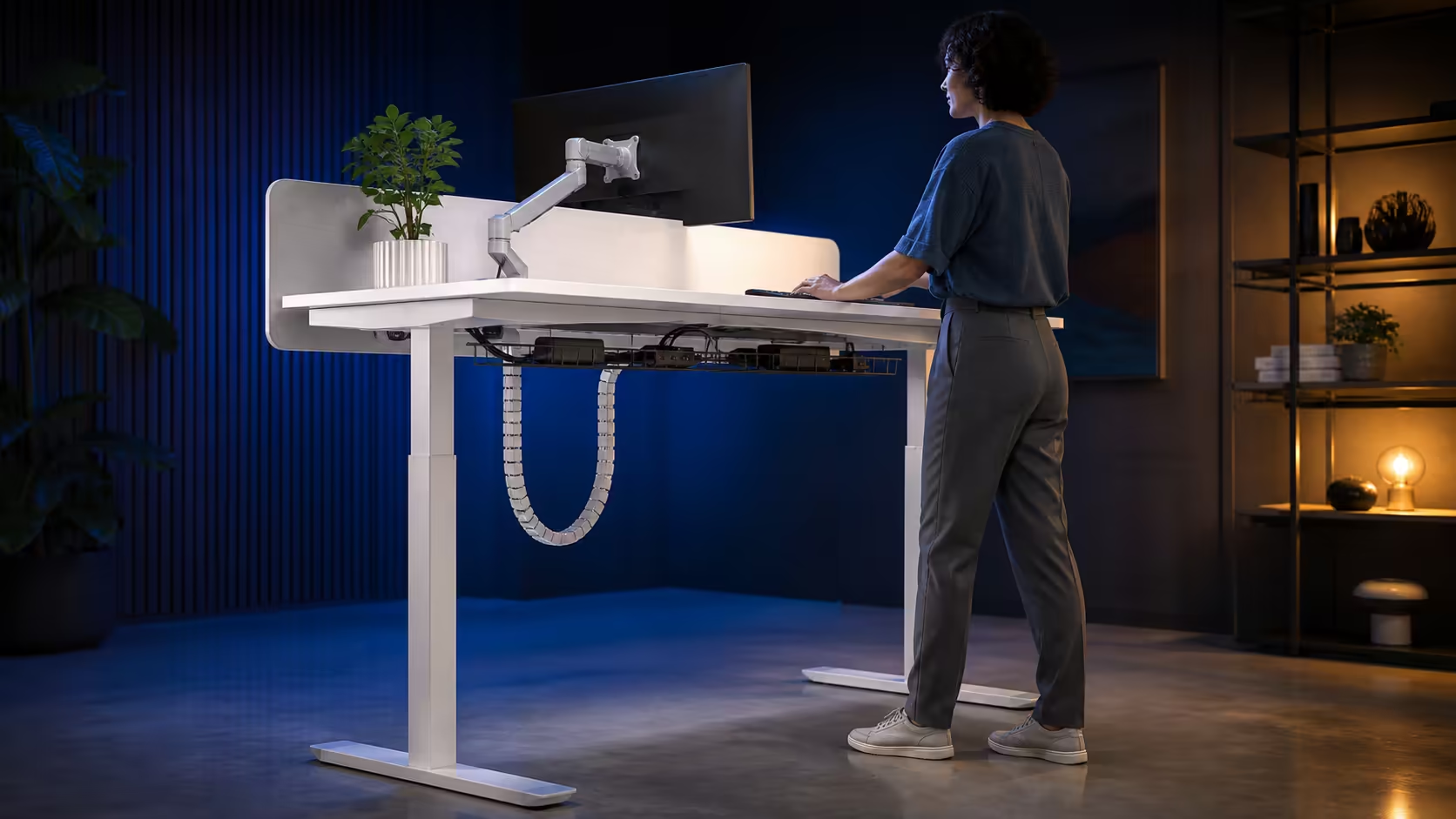
Hybrid work asks one station to handle focused typing, calls, shared equipment and sometimes evening play. The best electric desk features for hybrid work are the ones that make those changes quick and controlled. At R4,999, the white AROZZI Arena Nordico combines 71-115cm powered movement with stored heights and accessible cable management.
Quick Answer
Prioritise a range that fits each user, memory presets for repeatable changes, a stable frame and cable access for laptops and screens. The R4,999 Arena Nordico delivers electric 71-115cm travel, an LED controller, rear mount flexibility and paired baskets that release for a flexible South African workstation.
🎛️ Saved heights suit changing work modes
A seated preset can support long keyboard blocks, while a standing key can prepare the desk for a call or review session. The value is not the number of buttons; it is the ability to return to positions that were tested around relaxed arms and clear viewing.
If two people share the office, label keys by user and posture. Each should calibrate independently because body proportions and footwear differ. The Evetech gaming desk category lets households compare mechanisms after those needs are written down.
Manual adjustment remains available for a guest or an unusual task, preserving saved positions for everyday work.
Control placement matters in a shared station. Buttons should be visible, reachable and clear of papers or dangling headset leads. A user must be able to stop movement immediately if a chair arm or drawer enters the path.
Build the routine around handovers. At the end of an office day, disconnect the work laptop and leave the desk at a neutral height with its charger accessible. The next remote session can begin without tracing plugs through an under-desk knot.
💻 Rear-panel flexibility helps equipment change
Hybrid workers often connect a laptop to a larger screen, then remove it later. A monitor arm can free the surface and correct screen height at both desk positions. The Arena Nordico adjustable rear panel creates a zone for mounting and organised cable entry.
Place the laptop charger and docking leads near an accessible basket edge. Permanent display and power routes can sit deeper. Quick release allows one failed adaptor to be reached without untying the entire installation.
If a personal and work computer share the monitor, label video and USB leads at both ends. Switching becomes faster when the correct connector can be identified by touch and sight. Avoid routing a temporary connection across the keyboard area, where it will interfere with the next posture change.
Test the monitor arm with the laptop open and closed. A notebook screen may become a secondary display during home days, changing the best location of the main panel. Preserve a clear surface zone for it instead of crowding the electric control.
🔌 Cable travel must survive daily docking
Keep leads that move with the desktop supported underneath. Use one controlled service loop for connections to a wall socket or floor-standing computer, then watch that loop at 71cm and 115cm. It should neither pull tight above nor collect around feet below.
The AROZZI workstation selection provides matching context, and the broad gaming setup range helps account for chairs and other station pieces. Device changes should fit the route instead of crossing it as temporary tangles.
South African hybrid workspaces vary from dedicated rooms to a corner of a shared living area. White Scandinavian styling may reduce visual weight in the latter, but fit, stability and safe movement deserve the first checks. A desk that changes mode easily is more useful than one that merely looks adaptable.
Review the layout after both an office day and a remote day. The equipment that remains attached should have a permanent route; everything that travels should connect at the edge without disturbing it. This two-day test exposes friction that a static setup photo cannot show.
Keep ordinary movement in the plan too. Standing at the same screen is not a substitute for walking away, collecting water or changing rooms for a short break. The desk adds posture choices inside work; it does not need to carry the full responsibility for movement.
Frequently Asked Questions
Which feature matters most for two regular users?
A fitting height range comes first, followed by clearly assigned memory presets. Each person needs individual seated and standing calibration.
Why is a rear panel useful in hybrid work?
It helps define monitor-mount and cable-entry space, keeping a laptop and paper work area clearer during different tasks.
Can quick-release baskets help with docking?
Yes. Frequently changed laptop power and connection leads can remain near an accessible end while permanent equipment stays organised.
Should a standing preset be used for every call?
Only if it feels comfortable for that task. Presets are options, not rules; alternate according to work demands and personal tolerance.
What is the local price anchor for these features?
The white Arena Nordico is R4,999. That includes its electric range, memory controller, steel frame and integrated management areas.
Ready to make one desk handle office days and remote days cleanly?
Browse Evetech gaming desks with your users, devices and docking routine listed beside the feature set.