

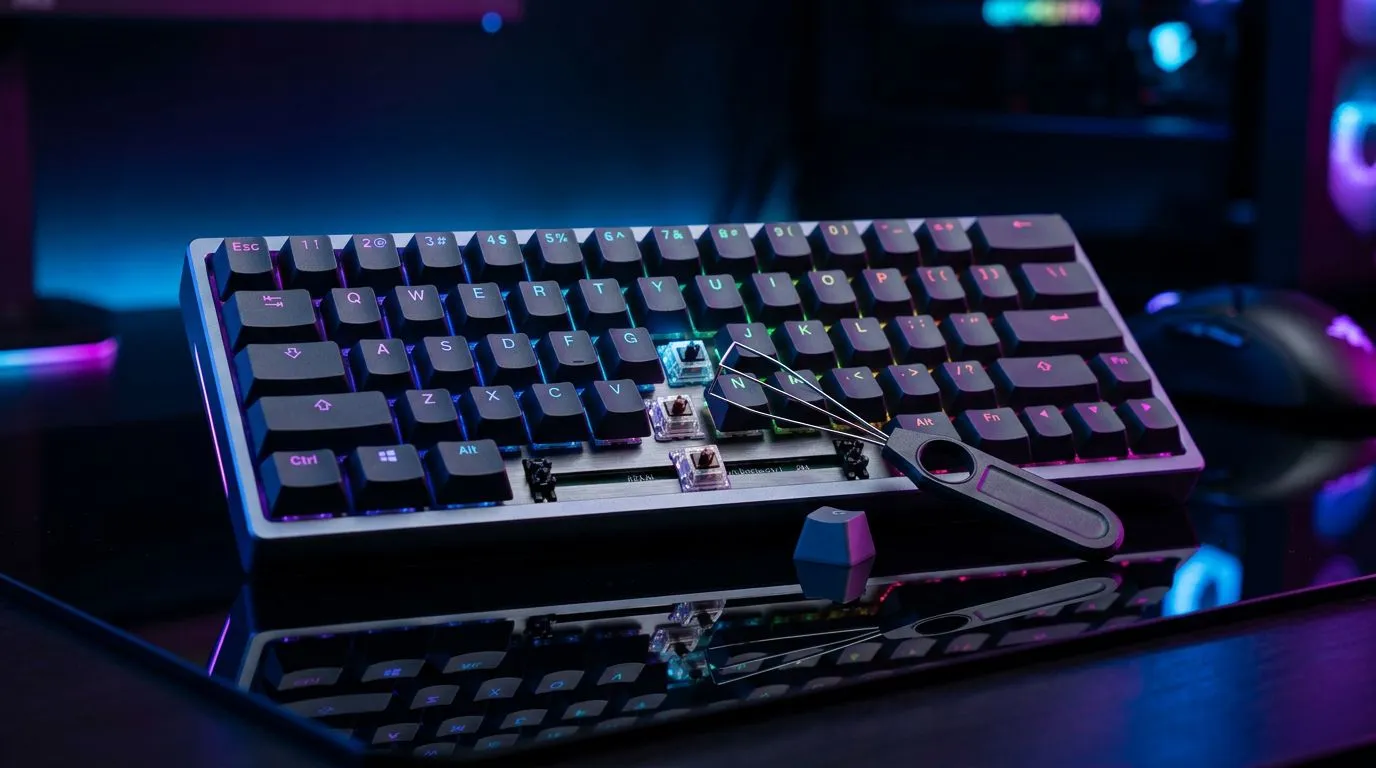
Hot-swappable sockets for gaming keyboards: a quick reality check 🔧
If you build your setup like the rest of us… tweaking every detail… hot-swappable switches are suddenly on the menu. But should you choose Hot-Swappable Sockets for Gaming Keyboards: Should You Choose? Or is it just hype for people with too many spare parts?
Here
’s the short version: hot-swap sockets let you change switches without soldering. That means faster upgrades, easier repairs, and less risk when you’re still figuring out your ideal feel. ⚡
What “hot-swappable” actually changes (and what it doesn’t)
Hot-swappable sockets mean the keyboard supports swapping compatible switches while the board remains solder-free. You pull a switch, insert another, and you’re back in-game.
Important: hot-swapping does not automatically guarantee better performance. Your main advantages come from:
- Personalisation (sound, feel, actuation feel)
- Maintenance (swap a bad switch instead of sending the whole board away)
- Upgrade path (try different switch types over time)
Should you choose it for gaming?
For gaming, your results usually depend on ergonomics and actuation consistency. The switch “feel” can matter, especially in high cadence scenarios. If you’re the type to switch between FPS and MMO, or you’re chasing a specific sound profile for LAN days, hot-swappable can be a smart move… because you’ll iterate.
Hot-Swappable Sockets for Gaming Keyboards: Should You Choose? for your budget and upgrade path? 💸
In South Africa, value is everything. A hot-swappable keyboard can cost more upfront, but it can save you money later if you:
- buy a keyboard once, then upgrade switches gradually
- experiment without paying for solder work
- replace individual switches instead of replacing the keyboard
That’s the real “upgrade path” argument.
A practical decision framework (no overthinking)
Ask yourself these questions:
- Do you plan to change switches within 6 to 12 months? If yes, hot-swap is worth considering.
- Do you hate tools and waiting? Hot-swap is faster and less hassle.
- Are you buying a keyboard-mouse combo to start fresh? Consider pairing your keyboard choice with sensible upgrades like proper connectivity and budget allocation.
Compare keyboards by connectivity first (then switch type)
Before you fall in love with switch tech, confirm the basics that affect reliability:
- Wired is consistently stable for competitive play.
- Wireless is great for desks with cable-management priorities, but you’ll want good battery behaviour and a quality wireless implementation.
If you’re browsing right now, Evetech has options depending on whether you want wired or wireless behaviour:
Hot-swappable sockets for gaming keyboards: what to look for before you buy ✨
Hot-swapping is mostly about compatibility and build quality. A few checks save you from the “why won’t it fit?” frustration.
1) Switch compatibility (the #1 gotcha)
Hot-swap boards still require the correct switch footprint. If your board uses a standard hot-swap layout, you’re generally safe… but always verify before you buy switches separately.
2) Stabiliser quality
Even with great switches, poor stabilisers can make spacebar and larger keys feel uneven. If you’ve ever heard that annoying rattle, you know why this matters. Look for boards that are designed with stabilisers that don’t sound like cheap plastic.
3) Keycap fit and travel feel
Hot-swappable doesn’t prevent compatibility issues with certain keycaps. If you plan to change keycaps later, check that the keycap profile and stem type match.
4) Software support (for macros and layers)
Not every keyboard uses the same mapping software. If you want consistent macro behaviour across games, choose a board with clear programming support.
Productivity Pro Tip ⚡
On Windows, set a consistent gaming profile using software profiles and test switch swaps in short sessions. Swap one change at a time (feel first, then sound). It’s the easiest way to learn what actually improves your aim and reaction timing without second-guessing everything after every tweak.
Upgrade Path: where to start with a keyboard you can evolve 🚀
If you’re building an upgrade path, don’t jump straight to the most expensive part. Start with the board that gives you options.
A good starting move is to look at established keyboard deals, then decide if hot-swappable helps your long-term plan:
- browse hot gaming keyboard deals
- If you’re comparing affordability in one go, check these keyboard options too: cheapest gaming keyboard picks in South Africa
And if you’re entering the hobby and want a simpler spend, consider a combo so you can focus your budget:
Hot-Swappable Sockets for Gaming Keyboards: should you choose them? ✅
So… should you choose Hot-Swappable Sockets for Gaming Keyboards: Should You Choose? If you want control over your feel, you like experimenting, and you care about upgrading without soldering, then yes. It fits South African gamers who tinker, practise, and keep improving.
If you’re the “buy once, forget it” type, hot-swappable might still be fine, but you’ll likely get less value from it. In that case, prioritise typing comfort and consistent key stability first.
Finally, remember: great switches won’t fix a bad desk setup… but they can make your daily gaming sessions feel right. That’s usually the difference you notice fast.
Ready to Find Your Perfect Match? The Mac vs Windows debate is complex, but for maximum power, choice, and value in South Africa, Windows is hard to beat. Explore our massive range of laptop specials and find the perfect machine to conquer your world.











