


Best RTX 5090 Under R12000 in South Africa 2026
Top RTX 5090 Under R12000 picks evaluated on performance, value & SA availability with current Rand pricing from Evetech.
Read more360mm radiator compatibility — checklist: • measure clearance • verify top/front mounts • check radiator+fan thickness • confirm GPU/drive-cage clearance. Learn step-by-step measurements and quick fit tips. 🔧💧
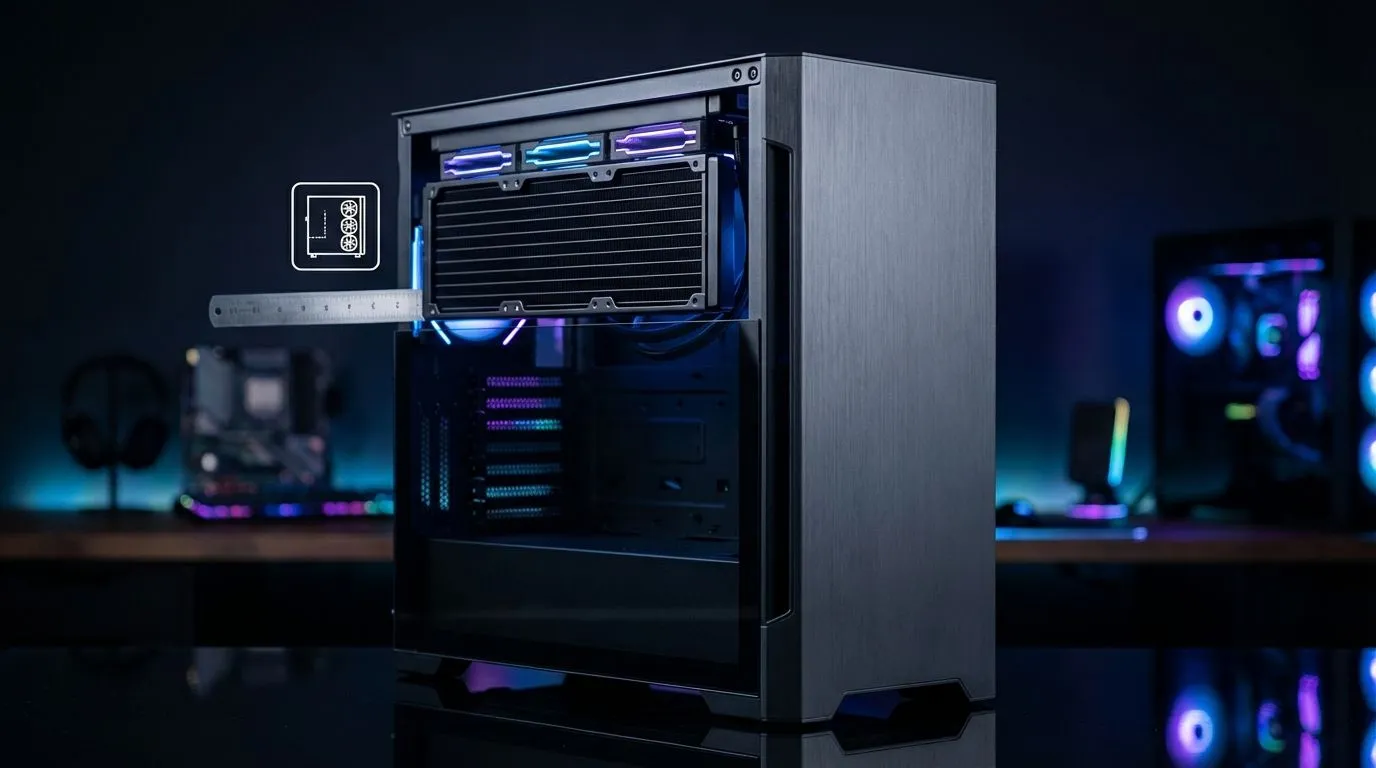
Nothing kills the excitement of a new PC build faster than unboxing a massive triple-fan cooler only to realise it won't fit. Whether you are upgrading your rig for the latest AAA titles or building from scratch, checking your 360mm radiator compatibility is the most critical step before hitting that "buy" button. Let's make sure your case can handle the heat... and the size. 🔧
When you start browsing the wide range of CPU coolers available today, the 360mm variant stands out as the sweet spot for high-end performance. For most South African gamers running overclocked i7 or i9 processors, investing in a liquid cooler (AIO) is the best way to maintain stable frame rates during a summer heatwave in Gauteng. ⚡
A common mistake is assuming a 360mm radiator is exactly 360mm long. In reality, the "360mm" refers to the fan mounting area (three 120mm fans). The actual radiator housing is often closer to 395mm or 400mm because of the end tanks where the tubes connect. When looking specifically at 360mm radiator options, you must check your case manual for the "Maximum Radiator Length" spec, not just the fan support.
Always try to mount your radiator at the top of the case as an exhaust. This ensures that air bubbles stay trapped at the top of the radiator loop rather than the pump, which extends the lifespan of your cooler and keeps the operation whisper-quiet.
Even if your case supports the length, you might run into "thickness" issues. A standard radiator is about 27mm to 30mm thick... but you have to add another 25mm for the fans. If your motherboard has chunky VRM heatsinks or if you are using high-profile RGB RAM, the top of the case might be too cramped. In these tight scenarios, some builders find they might need to settle for a 240mm radiator instead to ensure everything clears the memory modules. 🚀
If top mounting isn't an option, many modern cases allow for front mounting. This provides the coolest air to your CPU but can limit the maximum length of your graphics card. If you have a massive triple-fan GPU, measure the distance from the back of the case to the front intake fans. Subtract about 55mm for the radiator and fan combo to see if your GPU will still fit.
Different brands offer varying tube lengths and radiator thicknesses. For example, the thermal performance of Deepcool units is highly regarded for their anti-leak technology and sleek aesthetics. Alternatively, the premium aesthetics of CORSAIR coolers offer incredible software integration through iCUE, allowing you to sync your pump's RGB with the rest of your South African gaming setup. ✨
Before you finalise your purchase, double-check the mounting offset of your case. Some cases are designed to shift the radiator further away from the motherboard tray... this is a lifesaver for 360mm radiator compatibility.
Ready to Find Your Perfect Match? Ensuring your cooling fits is the first step toward a stable, high-performance PC. Whether you need a massive triple-fan setup or a compact solution, we have the stock to keep you frosty. Explore our massive range of liquid coolers and find the perfect machine to conquer your world.
Not always. Measure available radiator length and mounting points; many mid towers lack three 120mm mounting slots required for a 360mm radiator.
Measure the mounting area length, depth, and clearance for fans plus radiator thickness. This is the core step for how to measure case for 360mm radiator.
Possibly. Check GPU length versus radiator+fan offset—front mount compatibility often requires moving drive cages or choosing low-profile fans.
Yes. Radiator thickness plus fan depth affects clearance and airflow. Use radiator thickness and fan clearance 360mm guidelines when planning your build.
Full towers and many modern mid towers list 360mm support. Search for cases advertising 360mm radiator support or check case spec dimensions.
Top mount depends on headroom and motherboard VRM clearance. Confirm top mount compatibility and measured clearance above the CPU socket.
Sometimes. Removing or relocating drive cages improves front mount compatibility and creates space for radiator and fan assemblies.
Top RTX 5090 Under R12000 picks evaluated on performance, value & SA availability with current Rand pricing from Evetech.
Read more
When Will the RTX 6090 Launch in South Africa Detailed answer with SA data, expert analysis & practical recommendations for local buyers.

Top Valorant Settings for RTX 5070: FPS Optimisation picks evaluated on performance, value & SA availability with current Rand pricing from Evetech.

RDNA 3.5 Graphics in Ryzen AI 400? Can You Game. Plain-English explanation of what it means, why it matters & how it affects your buying decisions in SA.

GPU Price Index : December Report. Current stock data & price tracking for SA buyers. See what is available and where prices are heading.

Core i5-14600K + B760 + RTX 5060 Build Under. Full parts list, Rand pricing & expected performance. Build confidently with SA-available components.

RX 7600 Apex Legends at 4K: FPS Benchmark. Real-world benchmark data, FPS numbers & performance analysis. What SA gamers can actually expect.

RX 7900 XTX GTA 6 at 4K: FPS Benchmark & Optimal. Real-world benchmark data, FPS numbers & performance analysis. What SA gamers can actually expect.

Head-to-head comparison of RTX 5070 vs RX 9070 XT: Gaming Performance for SA gamers. Performance benchmarks, Rand pricing & which delivers better value.

Top Laptop with Ryzen 5 + RTX 4090 Laptop: Picks picks evaluated on performance, value & SA availability with current Rand pricing from Evetech.

Top Budget GPU for Marvel Rivals picks evaluated on performance, value & SA availability with current Rand pricing from Evetech.

Valorant Settings on RTX 5070: Performance. Real-world benchmark data, FPS numbers & performance analysis. What SA gamers can actually expect.

Top Budget GPU for Assassins Creed Shadows picks evaluated on performance, value & SA availability with current Rand pricing from Evetech.