

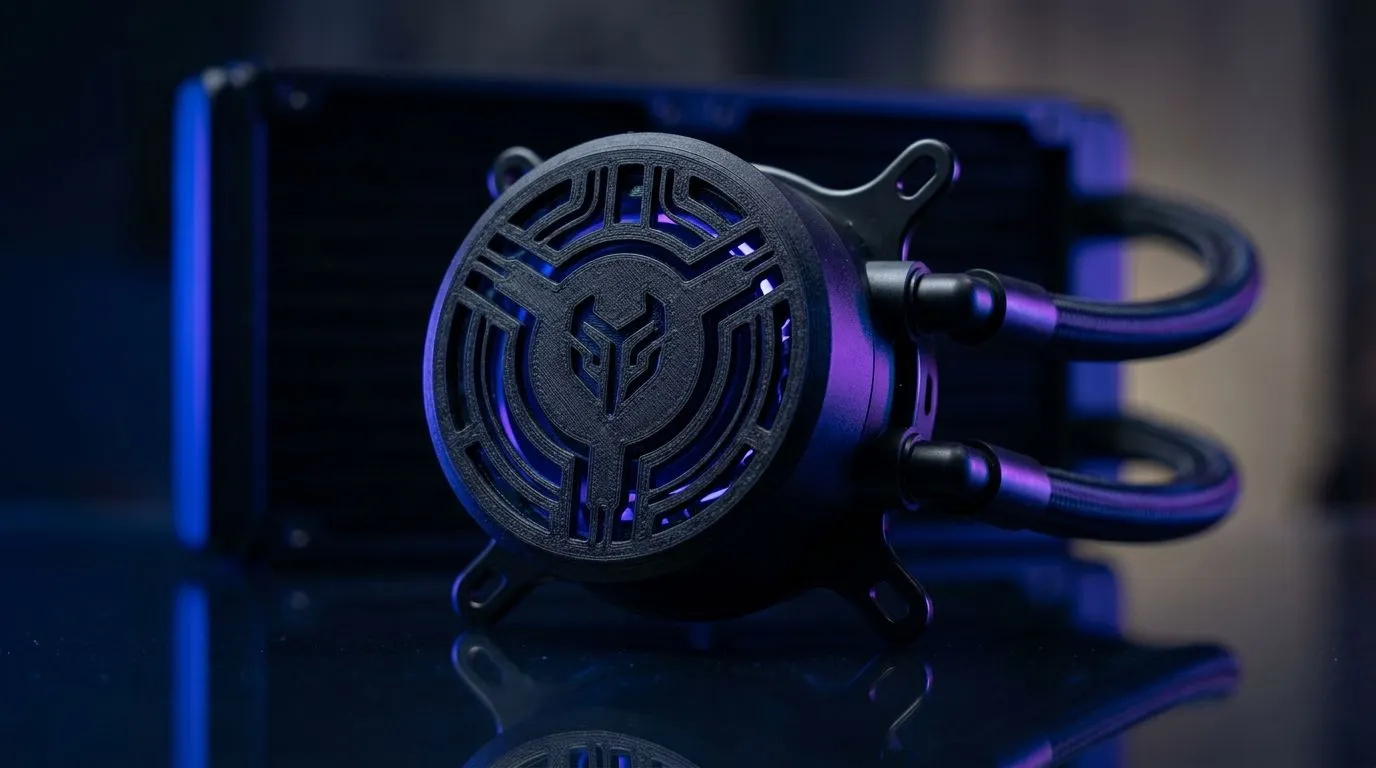
Customise Your AIO Pump Top Cover With a 3D Printed Design: why this tiny mod feels huge
If your PC looks like “function over form”… you’re not alone. But once you’ve poured money into a solid build, you start noticing the little things. 😄
That includes your AIO pump top. It’s one of those parts you see every day… especially in clear cases and side panels. So why not customise it? A 3D printed design can add branding, colour-matching, or even a cleaner aesthetic for your liquid cooler setup. 🔧
In this Build Lab guide, I’ll walk you through a safe, practical way to personalise your AIO pump top cover using a 3D printed piece. No risky myths. Just smart steps and common-sense checks.
Customise Your AIO Pump Top Cover With a 3D Printed Design: start with the right liquid cooler
Before you print anything, confirm your pump cover shape and mounting method. Different AIO models vary in pump housing size, screw positions, and inlet/outlet placement. If you guess, you risk a cover that doesn’t fit… or worse, interferes with airflow.
A quick way to reduce headaches is to identify your cooler first, then pick a compatible design approach. If you’re still choosing an AIO (or upgrading), browse options here for Liquid/AIO support:
- Explore general CPU coolers (AIO/liquid) options: CPU coolers on Evetech
- If you already know you want an AIO: Liquid Cooler (AIO) CPU coolers
- For Corsair compatibility hunting: CORSAIR Liquid Coolers (AIO)
- For Deepcool variants: Deepcool Liquid Coolers (AIO)
Measure like a builder, not a gambler
Print success depends on fit. Do these measurements before you model:
- Pump cover outer dimensions (width, height, depth).
- Screw hole positions and spacing.
- Clearance zones around tubes and any branding plates.
- Whether your pump cover sits flush or uses a separate mount.
If you’re unsure about radiator sizing, choose based on your case and cooling needs. For example, 240mm and 360mm AIO setups are commonly available:
- 240mm radiator options: 240mm Liquid Cooler (AIO)
- 360mm radiator options: 360mm Liquid Cooler (AIO)
Customise Your AIO Pump Top Cover With a 3D Printed Design: design choices that protect performance
Let’s be honest… the goal is aesthetics. But an AIO isn’t a decorative item. You want the pump to run smoothly and your system to stay cool.
Here’s what matters most when designing a 3D printed pump top cover:
- Heat tolerance: Your pump and nearby components generate heat. Use a filament designed for higher temperatures (or print parts that don’t trap heat against electronics).
- No blocked airflow paths: If your cooler relies on pump-top geometry for airflow clearance, keep vents open.
- Avoid pressure on tubes: A printed cover should never force the hoses into a bend radius they didn’t come with.
- Leave inspection access: You may need to check the pump or routing later.
Material & finish tips for a cleaner look ✨
- For best appearance, use settings that reduce layer lines (slower layer, proper cooling, and good top layers).
- If you’re painting, do a light sand and prime. The goal is a smooth finish that matches your build’s theme.
- Consider printing in a sturdier filament if the cover catches on the case side panel during installation.
3D print fit check before you commit 🚀
Print a “prototype” version in a lighter setting:
- Print at lower resolution and thickness first.
- Test fit with the AIO on the table (not installed).
- Only then print the final piece.
This saves you time when your first model is slightly off. It happens. Even to experienced builders.
Fit Check Pro Tip 🔧
On a first print, leave an extra 0.5–1.0 mm clearance around any screw bosses and cable tube paths. Then test-fit the cover before printing the final version. That small buffer usually prevents “almost fits” frustration when tolerances stack up.
Customise Your AIO Pump Top Cover With a 3D Printed Design: installation steps that avoid headaches
Here’s a safe, practical workflow:
- Power down and unplug your PC.
- If your AIO is installed, avoid unnecessary moving. If you must remove the pump assembly, do it carefully and follow your cooler’s installation instructions.
- Confirm you’re not covering any moving parts or sensor elements.
- Test the cover without tightening fully, then tighten gradually.
- Re-route tubes so the cover doesn’t create tension.
What to watch for after you install
After reassembly:
- Power on and monitor temperatures in your usual software.
- Listen for unusual pump sounds (a gentle hum is normal; grinding or rattling isn’t).
- If temps spike beyond your normal gaming baseline, stop and check fit and tube pressure.
If you want to optimise your build around cooling, start by choosing the right AIO class for your case size. Evetech lists AIO options with different radiator sizes and brands, which makes it easier to align your parts before modding: browse CPU coolers.
Customise Your AIO Pump Top Cover With a 3D Printed Design: matching aesthetics to your South African gaming setup
A lot of builds here lean into personal identity. RGB fans, custom desk lighting, and “my PC looks like my setup” energy. That pump top cover is perfect for micro-theme choices like:
- Company logos for your sim rig or team vibes
- Colour-matched covers for white or black builds
- Minimal designs that look “OEM+” instead of “DIY chunky”
One last thing… if you’re building in a LAN-heavy lifestyle, a cleaner exterior also helps when you’re troubleshooting cables and components. Less clutter. Easier checks. Less time swearing at your own cable management.
Ready to Find Your Perfect Match? If you’re planning a cool custom build and want parts that fit properly the first time, start with the right cooling and system components. Explore our massive range of laptop specials and find the perfect machine to conquer your world.
Customise Your AIO Pump Top Cover With a 3D Printed Design: why this tiny mod feels huge
If your PC looks like “function over form”… you’re not alone. But once you’ve poured money into a solid build, you start noticing the little things. 😄
That includes your AIO pump top. It’s one of those parts you see every day… especially in clear cases and side panels. So why not customise it? A 3D printed design can add branding, colour-matching, or even a cleaner aesthetic for your liquid cooler setup. 🔧
In this Build Lab guide, I’ll walk you through a safe, practical way to personalise your AIO pump top cover using a 3D printed piece. No risky myths. Just smart steps and common-sense checks.
Customise Your AIO Pump Top Cover With a 3D Printed Design: start with the right liquid cooler
Before you print anything, confirm your pump cover shape and mounting method. Different AIO models vary in pump housing size, screw positions, and inlet/outlet placement. If you guess, you risk a cover that doesn’t fit… or worse, interferes with airflow.
A quick way to reduce headaches is to identify your cooler first, then pick a compatible design approach. If you’re still choosing an AIO (or upgrading), browse options here for Liquid/AIO support:
- Explore general CPU coolers (AIO/liquid) options: CPU coolers on Evetech
- If you already know you want an AIO: Liquid Cooler (AIO) CPU coolers
- For Corsair compatibility hunting: CORSAIR Liquid Coolers (AIO)
- For Deepcool variants: Deepcool Liquid Coolers (AIO)
Measure like a builder, not a gambler
Print success depends on fit. Do these measurements before you model:
- Pump cover outer dimensions (width, height, depth).
- Screw hole positions and spacing.
- Clearance zones around tubes and any branding plates.
- Whether your pump cover sits flush or uses a separate mount.
If you’re unsure about radiator sizing, choose based on your case and cooling needs. For example, 240mm and 360mm AIO setups are commonly available:
- 240mm radiator options: 240mm Liquid Cooler (AIO)
- 360mm radiator options: 360mm Liquid Cooler (AIO)
Customise Your AIO Pump Top Cover With a 3D Printed Design: design choices that protect performance
Let’s be honest… the goal is aesthetics. But an AIO isn’t a decorative item. You want the pump to run smoothly and your system to stay cool.
Here’s what matters most when designing a 3D printed pump top cover:
- Heat tolerance: Your pump and nearby components generate heat. Use a filament designed for higher temperatures (or print parts that don’t trap heat against electronics).
- No blocked airflow paths: If your cooler relies on pump-top geometry for airflow clearance, keep vents open.
- Avoid pressure on tubes: A printed cover should never force the hoses into a bend radius they didn’t come with.
- Leave inspection access: You may need to check the pump or routing later.
Material & finish tips for a cleaner look ✨
- For best appearance, use settings that reduce layer lines (slower layer, proper cooling, and good top layers).
- If you’re painting, do a light sand and prime. The goal is a smooth finish that matches your build’s theme.
- Consider printing in a sturdier filament if the cover catches on the case side panel during installation.
3D print fit check before you commit 🚀
Print a “prototype” version in a lighter setting:
- Print at lower resolution and thickness first.
- Test fit with the AIO on the table (not installed).
- Only then print the final piece.
This saves you time when your first model is slightly off. It happens. Even to experienced builders.
Fit Check Pro Tip 🔧
On a first print, leave an extra 0.5–1.0 mm clearance around any screw bosses and cable tube paths. Then test-fit the cover before printing the final version. That small buffer usually prevents “almost fits” frustration when tolerances stack up.
Customise Your AIO Pump Top Cover With a 3D Printed Design: installation steps that avoid headaches
Here’s a safe, practical workflow:
- Power down and unplug your PC.
- If your AIO is installed, avoid unnecessary moving. If you must remove the pump assembly, do it carefully and follow your cooler’s installation instructions.
- Confirm you’re not covering any moving parts or sensor elements.
- Test the cover without tightening fully, then tighten gradually.
- Re-route tubes so the cover doesn’t create tension.
What to watch for after you install
After reassembly:
- Power on and monitor temperatures in your usual software.
- Listen for unusual pump sounds (a gentle hum is normal; grinding or rattling isn’t).
- If temps spike beyond your normal gaming baseline, stop and check fit and tube pressure.
If you want to optimise your build around cooling, start by choosing the right AIO class for your case size. Evetech lists AIO options with different radiator sizes and brands, which makes it easier to align your parts before modding: browse CPU coolers.
Customise Your AIO Pump Top Cover With a 3D Printed Design: matching aesthetics to your South African gaming setup
A lot of builds here lean into personal identity. RGB fans, custom desk lighting, and “my PC looks like my setup” energy. That pump top cover is perfect for micro-theme choices like:
- Company logos for your sim rig or team vibes
- Colour-matched covers for white or black builds
- Minimal designs that look “OEM+” instead of “DIY chunky”
One last thing… if you’re building in a LAN-heavy lifestyle, a cleaner exterior also helps when you’re troubleshooting cables and components. Less clutter. Easier checks. Less time swearing at your own cable management.
Ready to Find Your Perfect Match? If you’re planning a cool custom build and want parts that fit properly the first time, start with the right cooling and system components. Explore our massive range of laptop specials and find the perfect machine to conquer your world.











