

Should You Buy a 240Hz monitor or Build a PC in South Africa?
Should You Buy a 240Hz monitor or Build a PC. Full parts list, Rand pricing & expected performance. Build confidently with SA-available components.
Read moreBuild the ultimate workstation with the MSI RTX 5090 32G Lightning Z. We explore the cooling, power, and CPU pairings needed to dominate South Africa's most demanding creative and AI workloads. 🚀💻
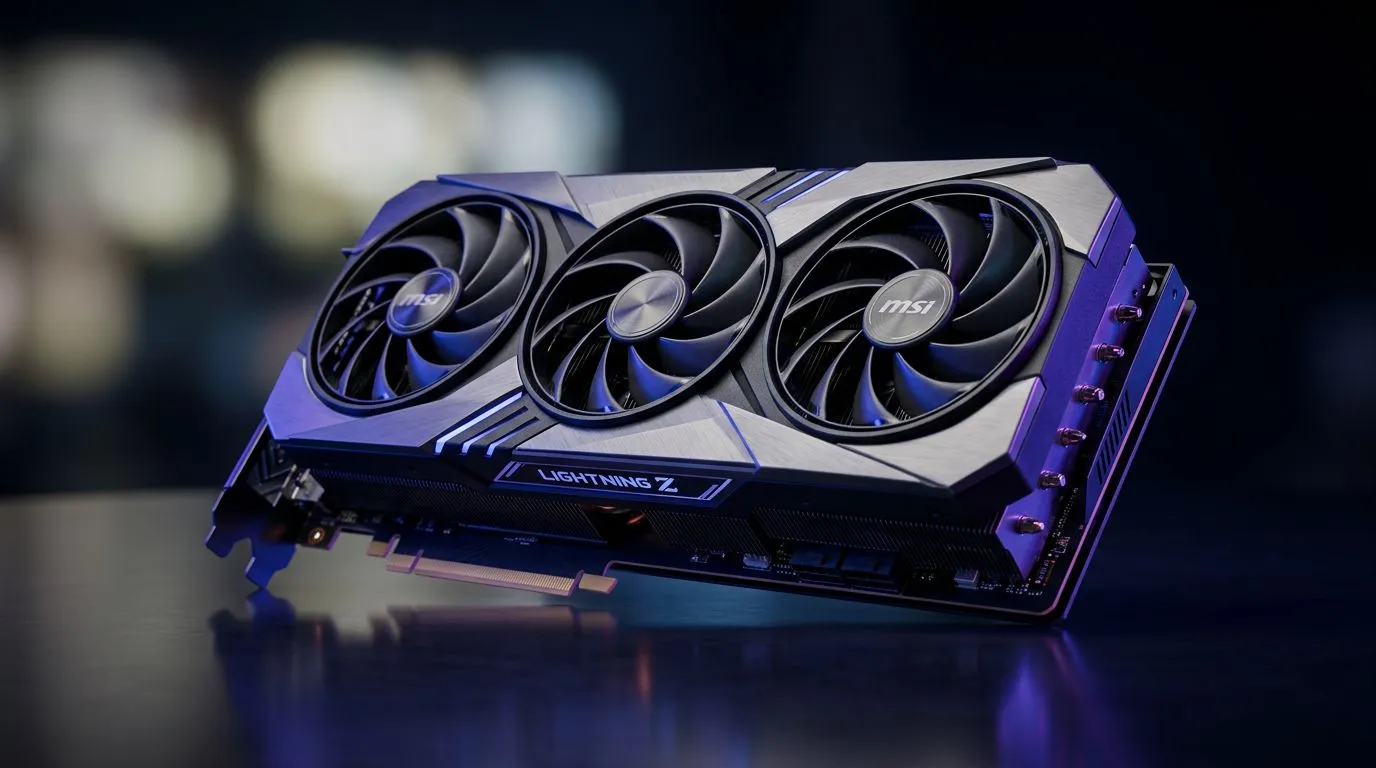
If you’re building a serious workstation, you want two things… speed you can feel, and reliability you can trust. In South Africa, that means buying parts that make sense for your daily workload and also hold up through load shedding, long renders, and big game patches. MSI’s Lightning line has always leaned into enthusiast cooling and high-performance design. Now we’ll talk through how to plan a workstation around the MSI RTX 5090 32G Lightning Z so it performs for both gaming and heavy work. 🔧
An “ultimate workstation” isn’t just about raw GPU power. It’s the whole workflow: storage for quick asset access, enough RAM for your current projects, and a CPU that won’t idle while your GPU does all the work. In real life, that’s what stops timelines from stretching… especially when you’re editing 4K footage, compiling shaders, or running AI-assisted tools.
For the MSI RTX 5090 class of GPU, you’re targeting:
Before you buy, double-check your platform decisions:
Start with the GPU, then build around it. The MSI Lightning Z series is aimed at users who care about thermals and sustained performance, so your case and airflow shouldn’t be an afterthought. ⚡
Here’s a simple way to plan your buy:
If you’re still deciding on brand or variants, Evetech stocks multiple options. Browse MSI-focused graphics cards here: MSI graphics cards at Evetech
Gamers in South Africa often do “half of both worlds”: a bit of editing, streaming, and then a few intense sessions after work. That’s why the GPU you choose needs to work in both modes.
A good pairing strategy looks like this:
If you’re evaluating NVIDIA vs Radeon alternatives for workstation workflows, you can explore Radeon options here: Radeon graphics cards at Evetech
And if you want to stick to NVIDIA-focused builds (common for many creator tools), you can browse GeForce options here: GeForce graphics cards at Evetech
For a wider look at what’s available across brands and categories: All graphics cards at Evetech
Buying the parts is step one. Getting consistent performance is step two. Here are practical steps that workstation owners learn the hard way.
Yes, it sounds boring. It also prevents heat buildup near the GPU and keeps your fans from ramping during long renders.
Creators often run into “random” slowdowns that are really driver regressions or outdated firmware. Keep systems updated, then test your workflow.
After you install Windows and drivers, run a short GPU/CPU stress session and a quick render test. If everything is stable, you can stop worrying and start building.
On Windows, use the PowerToys FancyZones utility to create custom snap layouts for your windows. It's a lifesaver for managing multiple apps on an ultrawide monitor, letting you organise your timeline, preview window, and asset folders perfectly for video editing.
Not everyone needs every extra upgrade. The best workstation builds scale with your workload:
A workstation should feel smooth on day one and remain dependable after months of builds.
You’ve got the core idea now: plan around the GPU, support it with airflow, storage, and power, then validate with quick tests. If you want the next step to be easy, let Evetech help you match parts to your budget and workload.
Ready to Find Your Perfect Match? The Mac vs Windows debate is complex, but for maximum power, choice, and value in South Africa, Windows is hard to beat. Explore our massive range of laptop specials and find the perfect machine to conquer your world.
Yes, with 32GB of VRAM, the RTX 5090 Lightning Z is exceptional for local AI model training, inference, and complex data processing tasks in professional environments.
You need a high-quality 1200W or 1600W 80 Plus Platinum PSU to ensure stable power delivery for the RTX 5090 and a high-end multi-core CPU workstation setup.
For maximum productivity, pair the RTX 5090 with high-core-count processors like the Intel Core i9 or AMD Ryzen 9 series to prevent system bottlenecks during rendering.
Due to its massive cooling array, the Lightning Z requires a spacious full-tower chassis with excellent airflow and clearance for its length.
Absolutely. The 32GB of VRAM and massive CUDA core count make the RTX 5090 the premier choice for real-time 8K video editing and color grading.
The Lightning Z series offers superior binning, enhanced power delivery components, and premium cooling solutions, making it ideal for sustained heavy-duty workstation loads.
Should You Buy a 240Hz monitor or Build a PC. Full parts list, Rand pricing & expected performance. Build confidently with SA-available components.
Read more
Should You Buy a VA monitor or Build a PC. Full parts list, Rand pricing & expected performance. Build confidently with SA-available components.
Read more
Every spec on PCIe 5.0 explained in plain English. What matters for gaming and creator work in 2026, what's marketing fluff, and how each number translates to real-world performance.

A head-to-head look at WiFi 7: real-world performance, ZAR pricing and which option delivers better value for SA builders. The clear answer — no fluff.

Everything you need to set up and tune PCIe 5.0 properly: the prep work, the settings that actually matter, and the mistakes to skip. Written for SA builders in 2026.

Everything you need to set up and tune X870E Motherboard properly: the prep work, the settings that actually matter, and the mistakes to skip. Written for SA builders in 2026.

Wondering what a 512GB SSD capacity really holds? This guide breaks down how many games, photos, and documents fit on 512GB, with real-world ranges 📦💾

Every spec on vrm explained in plain English. What matters for gaming and creator work in 2026, what's marketing fluff, and how each number translates to real-world performance.

Every spec on motherboard explained in plain English. What matters for gaming and creator work in 2026, what's marketing fluff, and how each number translates to real-world performance.

Premium vs Midrange Motherboards in South Africa: real-world performance, SA pricing, power draw and which one delivers better value for your build for SA buyers. The clear answer — without the fluff.
Wondering what a 512GB SSD capacity really holds? This guide breaks down how many games, photos, and documents fit on 512GB, with real-world ranges 📦💾
Every spec on PCIe 5.0 explained in plain English. What matters for gaming and creator work in 2026, what's marketing fluff, and how each number translates to real-world performance.
A head-to-head look at WiFi 7: real-world performance, ZAR pricing and which option delivers better value for SA builders. The clear answer — no fluff.

Every spec on USB4 explained in plain English. What matters for gaming and creator work in 2026, what's marketing fluff, and how each number translates to real-world performance.