

Best Intel Keyboard Under R3000 in SA 2026
Top Intel Keyboard Under R3000 picks evaluated on performance, value & SA availability with current Rand pricing from Evetech.
Read morePlanning an MSI RTX 5090 Lightning Z build? We break down the estimated ZAR budget for a high-performance system in South Africa to ensure you're ready for launch day. 🚀💻
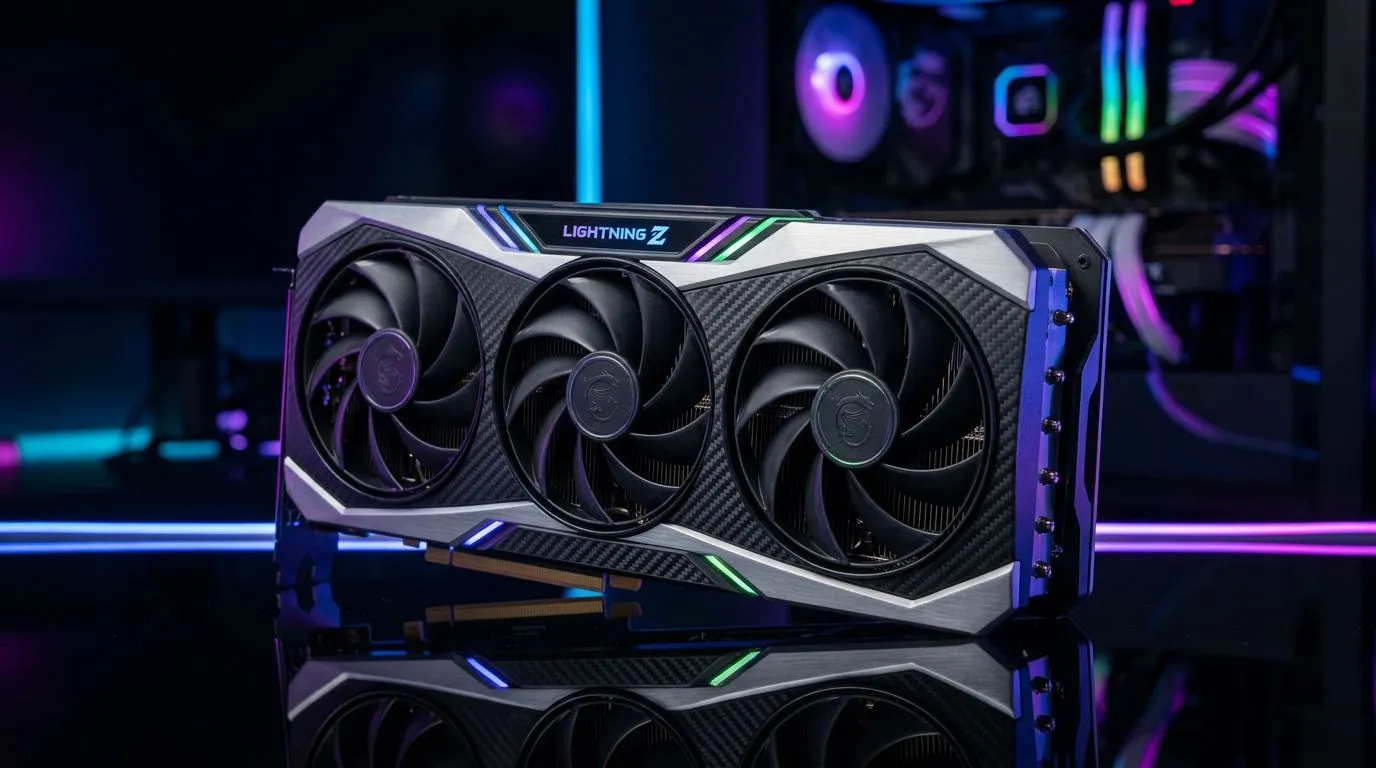
If you’re planning a serious upgrade for 1440p high refresh or 4K gaming, the “Lightning Z” name alone will get your attention. But in South Africa, the real boss fight is the budget… and timing. Should you buy now, or wait for a better window? And what else do you need alongside an MSI RTX 5090 Lightning Z so your build doesn’t get bottlenecked?
In this Build Lab guide, we’ll map a realistic MSI RTX 5090 Lightning Z build budget for South Africa, show what to prioritise, and point you to the right Evetech parts to assemble your wishlist.
Your total spend won’t be only the graphics card. It’s usually driven by four things: CPU pairing, power supply quality, cooling, and the storage + RAM baseline for modern games.
A top-tier GPU can sit underutilised if your CPU is too weak, especially in esports titles and high-FPS modes. When you’re pairing a flagship card, aim for a modern mid-to-high-end CPU and good single-core performance. For a practical starting point, don’t guess. Build around the platform you already have, or upgrade the CPU first if your current one is old.
A Lightning-series card is built for performance. That means a stable, correctly sized power supply matters. The safest route is to pick a reputable PSU with enough headroom for transient spikes, plus a case airflow plan that keeps temperatures in check during long sessions.
Most gamers notice storage and RAM in everyday play more than they expect. If you want quicker map loads and fewer stutters in busy areas, target a modern NVMe SSD and comfortable RAM capacity.
Prices move, but tiering helps. Think of these as budget “shapes” you can fill with current Evetech stock.
This tier is for players who want less tweaking and more gaming time… especially for demanding titles and streamed sessions.
If you play Valorant, Fortnite, or Warzone-style games often, the CPU and memory tuning starts paying back quickly.
If you do capture, overlays, or video edits between matches, this is where your budget shifts from “peak FPS” to “flow”.
Before you purchase, check these items in order. It prevents the most common “great GPU, meh experience” mistakes.
On Windows, use the PowerToys FancyZones utility to create custom snap layouts for your windows. It's a lifesaver for managing multiple apps on an ultrawide monitor, letting you organise your game launchers, chat, browser guides, and capture tools without fiddling every time. Keeping your workflow organised makes testing changes (like settings or driver updates) much faster.
Want to build with confidence and compare prices quickly in ZAR? Start by browsing MSI options on Evetech. If you’re also comparing across brands, it helps to keep your target tier in view.
When you’ve narrowed the GPU, you can build outward confidently… motherboard choice, RAM speed support, airflow, and PSU headroom all start to click into place.
A strong MSI RTX 5090 Lightning Z build budget isn’t about spending every last rand. It’s about spending where it matters: stable power, sensible CPU pairing, and fast storage so your rig feels premium every day. If you get those right, the build will perform like the spec sheet promises.
Ready to Find Your Perfect Match? The Mac vs Windows debate is complex, but for maximum power, choice, and value in South Africa, Windows is hard to beat. Explore our massive range of laptop specials and find the perfect machine to conquer your world.
While official pricing fluctuates, an enthusiast-grade build featuring the RTX 5090 Lightning Z typically requires a significant investment for top-tier components.
For an RTX 5090 Lightning Z, we recommend a high-efficiency 1200W or 1500W ATX 3.1 power supply to handle the transient power spikes of flagship GPUs.
The Lightning Z is a massive card. Ensure your build budget includes a full-tower chassis with sufficient clearance for its length and thermal requirements.
Pairing a 5090 with a bottleneck-prone CPU is counterproductive. Allocate budget for a premium processor, 64GB DDR5 RAM, and high-speed NVMe storage.
Keep an eye on our Launch Radar and Daily Drop sections for the latest updates on GPU availability and pre-order dates for the South African market.
Yes, we provide various payment options to help you manage the cost of your dream PC build. Check our checkout page for current financing partners.
Top Intel Keyboard Under R3000 picks evaluated on performance, value & SA availability with current Rand pricing from Evetech.
Read more
Top Budget Hall Effect Keyboards Under R2,000 picks evaluated on performance, value & SA availability with current Rand pricing from Evetech.
Read more
Top Nvidia Keyboard Under R5000 picks evaluated on performance, value & SA availability with current Rand pricing from Evetech.
Read more
Top ASUS Keyboard Under R3000 picks evaluated on performance, value & SA availability with current Rand pricing from Evetech.
Read more
Top Wireless Keyboard Under R3000 picks evaluated on performance, value & SA availability with current Rand pricing from Evetech.
Read more
Top Samsung Keyboard Under R5000 picks evaluated on performance, value & SA availability with current Rand pricing from Evetech.
Read more
Snapdragon X2 NPU Explained: How 80 TOPS Changes. Plain-English explanation of what it means, why it matters & how it affects your buying decisions in SA.

HBM? High Bandwidth Memory Used in GPUs and AI. Plain-English explanation of what it means, why it matters & how it affects your buying decisions in SA.

How much should you spend on sim racing accessories in South Africa for a realistic setup? We break down budgets by quality tiers, so you buy smart gear and avoid overspending 🎮💸

G-Sync and FreeSync? Variable Refresh Rate. Plain-English explanation of what it means, why it matters & how it affects your buying decisions in SA.

AMD Laptop: Value. SA-focused analysis with local pricing data, real-world insights & actionable buying advice.

How MacBook Neo Handles 30+ Chrome Tabs with Only. SA-focused analysis with local pricing data, real-world insights & actionable buying advice.

Why Apple Put 8GB RAM in MacBook Neo: The A18 Pro. SA-focused analysis with local pricing data, real-world insights & actionable buying advice.

Upgrade your work laptop with a New Motherboard. Step-by-step instructions with SA-specific tips, common pitfalls to avoid & expert recommendations.

MacBook Pro 16-Inch M5 Max: Complete Specs,. Everything you need to know with SA pricing, step-by-step instructions & expert recommendations.

Travelling With a MacBook: Travellers. Everything you need to know with SA pricing, step-by-step instructions & expert recommendations.

Back-to-School Parent Guide: Laptops. Everything you need to know with SA pricing, step-by-step instructions & expert recommendations.

MacBook Air 13-Inch M5: Complete Specs, Features. Everything you need to know with SA pricing, step-by-step instructions & expert recommendations.