


Glorious Keyboard Switches Explained: Which Switch Is Right for You?
Glorious Keyboard Switches Explained: Which. Plain-English explanation of what it means, why it matters & how it affects your buying decisions in SA.
Read moreATX vs m-ATX vs ITX compatibility in gaming cases made simple. Learn standoff support, I/O cutouts, and clearance checks before you buy—so your build fits right the first time 🧩🎮
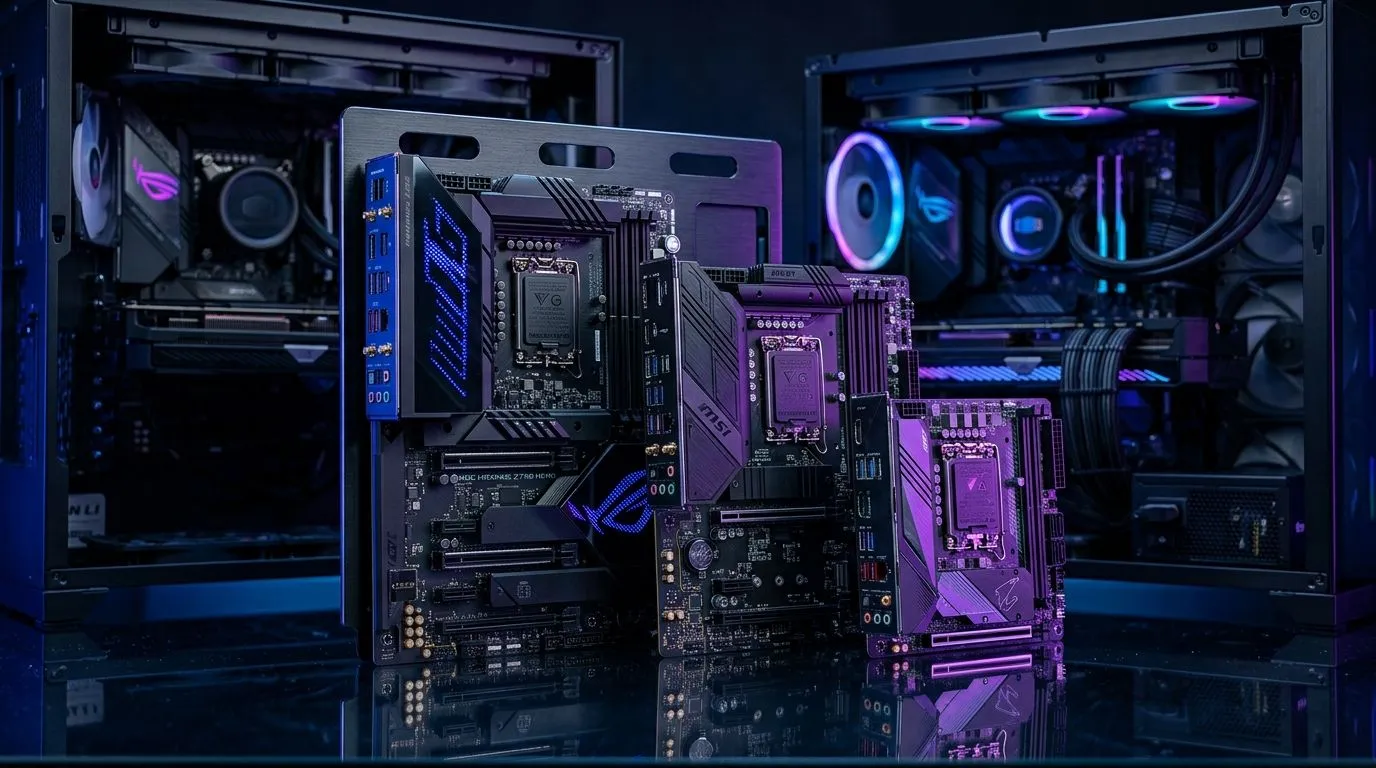
South African gamers know the thrill of building the perfect gaming rig. But when choosing your case, understanding ATX vs m-ATX vs ITX compatibility can save you headaches and cash. These motherboard sizes dictate your build’s size, airflow, and upgrade potential. Whether upgrading or starting fresh, picking the right case is key to unlocking smooth gameplay without bottlenecks.
ATX, m-ATX (micro-ATX), and ITX (mini-ITX) are motherboard form factors that define their dimensions and mounting points. ATX boards are the largest, typically 305 × 244 mm, offering extra slots for GPU upgrades, RAM, and multiple storage drives. Micro-ATX keeps it mid-size at 244 × 244 mm, balancing expansion and compactness. Mini-ITX, at 170 × 170 mm, focuses on small builds without sacrificing too much performance.
Choosing a gaming case that supports your motherboard form factor ensures a snug fit and effective cooling. For bigger ATX builds, you’ll want a spacious case with good airflow. Smaller ITX builds call for compact cases but expect tighter interiors.
If you’re exploring models, the wide range of computer cases at Evetech cover all sizes and price points — crucial for matching your motherboard.
Cases influence more than just looks. When pairing your board with the right case, consider: airflow paths, fan mounts, GPU length, and PSU clearance.
If you're eyeing compact performance, ITX gaming cases offer portability but can restrict GPU size or cooling options. Meanwhile, m-ATX cases provide a sweet spot, ideal for those wanting a smaller rig without cutting too many corners.
Brands like Fractal Design PC cases are praised locally for combining sleek design with solid airflow in mid-tower sizes that accommodate ATX and m-ATX boards.
For budget-conscious buyers aiming for gaming cases under R1500 that still support various motherboard sizes, checking out Gamdias affordable models can offer great value.
Before purchasing, verify your PSU length and GPU dimensions fit inside the chosen case – many SA gamers upgrade GPUs and PSU later.
For an overview of sleek and gaming-optimised chassis, browse the Gamdias gaming case range to find options balancing style and function.
Mastering ATX vs m-ATX vs ITX compatibility saves you costly returns and upgrade troubles. A well-chosen case powers your gaming ambitions smoothly and comfortably.
Check local stock specs and read reviews to get the best fit for your build goals and budget in South Africa. Building your dream rig is just a case away.
Find Your Ideal Gaming Case Today Ready to upgrade your PC build? Explore the full selection of Evetech computer cases designed to fit ATX, m-ATX, and ITX motherboards perfectly. Shop now at Evetech for performance that leaves lag in the dust.
Yes in most cases. You must confirm the case supports the ITX mounting pattern and has compatible standoff positions and enough CPU/GPU clearance.
Not usually. m-ATX and ATX share the same general layout family but use different mounting hole patterns, so check standoff support for your exact form factor.
Look up the case spec sheet for supported motherboard sizes, mounting hole patterns, radiator support, and GPU length. Match your build’s dimensions.
It depends on the case and motherboard. Many cases use the motherboard’s I/O shape; confirm the case is compatible with the motherboard’s I/O shield type.
Yes. ITX builds often fit inside smaller footprints, but you must still verify CPU cooler height, GPU length, PSU length, and radiator thickness.
ATX offers more expansion and easier cooling. m-ATX balances space and features. ITX is best for compact builds but may reduce expansion options.
Rarely. m-ATX cases typically support up to m-ATX. Check the supported motherboard list first to avoid incompatibility with mounting points.
Glorious Keyboard Switches Explained: Which. Plain-English explanation of what it means, why it matters & how it affects your buying decisions in SA.
Read more
Winter Keyboard Buying Guide. Everything you need to know with SA pricing, step-by-step instructions & expert recommendations.
Read more
Keyboard Buying Guide. Everything you need to know with SA pricing, step-by-step instructions & expert recommendations.
Read more
LGBTQ+ Gamers Keyboard Guide: January Edition. Everything you need to know with SA pricing, step-by-step instructions & expert recommendations.
Read more
Keyboard Maintenance Guide Gamers. Everything you need to know with SA pricing, step-by-step instructions & expert recommendations.
Read more
Accessibility Focused Keyboard Guide: January. Everything you need to know with SA pricing, step-by-step instructions & expert recommendations.
Read more
Snapdragon X2 NPU Explained: How 80 TOPS Changes. Plain-English explanation of what it means, why it matters & how it affects your buying decisions in SA.

HBM? High Bandwidth Memory Used in GPUs and AI. Plain-English explanation of what it means, why it matters & how it affects your buying decisions in SA.

How much should you spend on sim racing accessories in South Africa for a realistic setup? We break down budgets by quality tiers, so you buy smart gear and avoid overspending 🎮💸

G-Sync and FreeSync? Variable Refresh Rate. Plain-English explanation of what it means, why it matters & how it affects your buying decisions in SA.

AMD Laptop: Value. SA-focused analysis with local pricing data, real-world insights & actionable buying advice.

How MacBook Neo Handles 30+ Chrome Tabs with Only. SA-focused analysis with local pricing data, real-world insights & actionable buying advice.

Why Apple Put 8GB RAM in MacBook Neo: The A18 Pro. SA-focused analysis with local pricing data, real-world insights & actionable buying advice.

Upgrade your work laptop with a New Motherboard. Step-by-step instructions with SA-specific tips, common pitfalls to avoid & expert recommendations.

MacBook Pro 16-Inch M5 Max: Complete Specs,. Everything you need to know with SA pricing, step-by-step instructions & expert recommendations.

Travelling With a MacBook: Travellers. Everything you need to know with SA pricing, step-by-step instructions & expert recommendations.

Back-to-School Parent Guide: Laptops. Everything you need to know with SA pricing, step-by-step instructions & expert recommendations.

MacBook Air 13-Inch M5: Complete Specs, Features. Everything you need to know with SA pricing, step-by-step instructions & expert recommendations.