


Glorious Keyboard Switches Explained: Which Switch Is Right for You?
Glorious Keyboard Switches Explained: Which. Plain-English explanation of what it means, why it matters & how it affects your buying decisions in SA.
Read moreATX vs Micro-ATX vs ITX cases explained so you can choose the right form factor for cooling, expansion, and desk fit. Get the best match for your build today 👇🧠
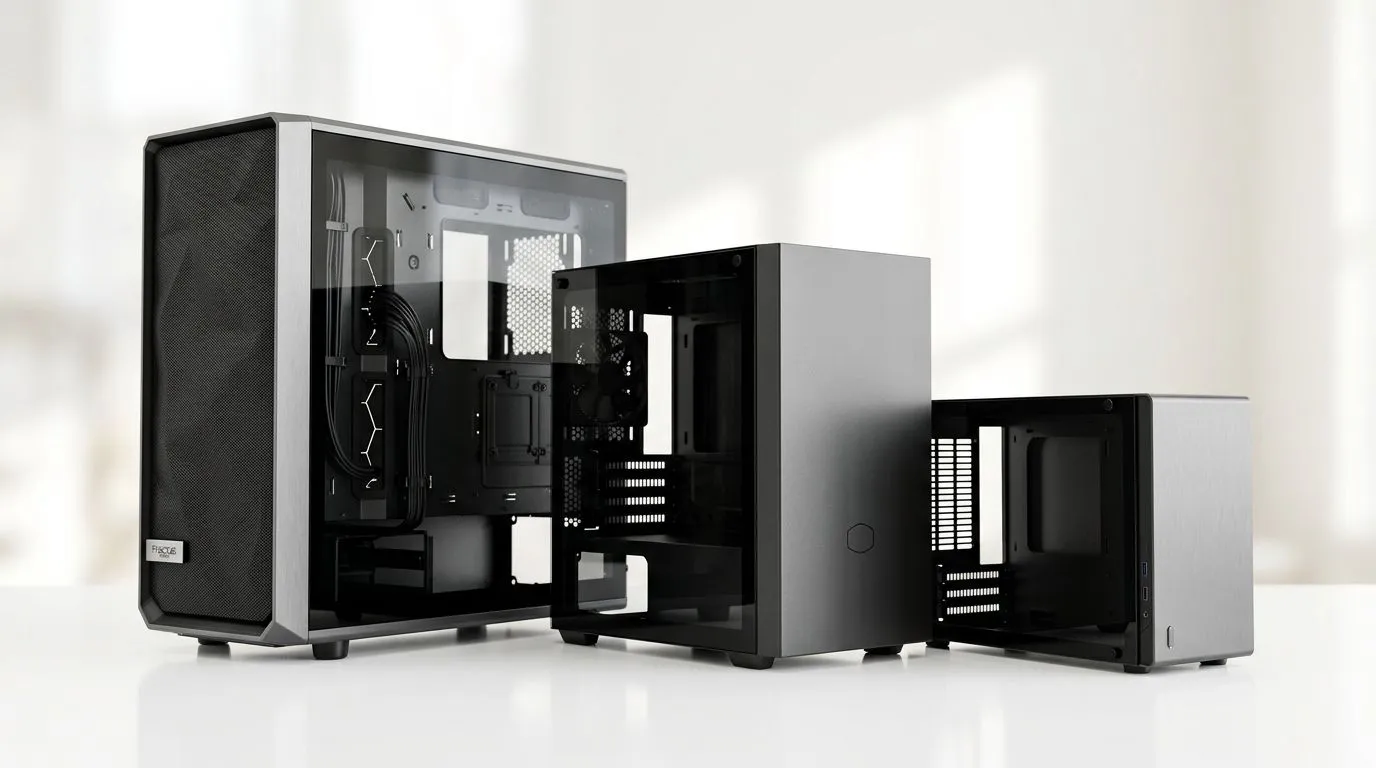
Choosing a PC case is one of those decisions that looks simple... until you start pricing parts, checking motherboard sizes, and wondering whether your GPU will actually fit. For South African gamers, that choice matters even more when you want airflow, upgrade room, and value for money. The right case can keep temperatures down, reduce noise, and save you from a frustrating rebuild later. ⚡
The case form factor is about more than appearance. It affects motherboard compatibility, cable space, cooling options, and how easy your build is to work on. ATX cases are usually the most forgiving. They offer more room for large graphics cards, extra storage, and better airflow planning. If you like full-sized builds and future upgrades, that extra space helps.
Micro-ATX cases sit in the middle. They are often the sweet spot for gamers who want a smaller footprint without giving up too much flexibility. You can still build a strong gaming PC, but the layout is tighter. That means smarter parts selection and cleaner cable management.
ITX cases are the most compact option. They look sleek and save desk space, but they demand careful planning. Small cases can run hotter if airflow is poor, so component choice matters. For a first build, they can be tricky. For a minimalist setup, they are brilliant ✨
Think about your actual setup, not just the spec sheet. If you use a large air cooler, multiple drives, or a long GPU, ATX gives you breathing room. If you want a tidy mid-tower build that still handles modern gaming hardware, Micro-ATX is often enough.
If you are building a compact LAN rig, a living-room PC, or a clean desk setup, ITX can make sense. Just remember that smaller cases usually mean more planning, higher part compatibility checks, and sometimes more expensive miniaturised components.
For a broad look at current options, browse Evetech’s computer case range. It is a practical starting point when comparing sizes and layouts.
Airflow is where many buyers get caught out. A larger case often makes it easier to move air through the system. That can help keep your CPU and GPU quieter under load. A smaller case can still perform well, but only if the front intake, exhaust path, and component spacing are sensible.
If you are buying for gaming, remember this simple rule: hotter parts usually need better airflow. That is why case design matters as much as style. Front panel openness, dust filtering, and fan placement all affect how the machine behaves during long sessions.
When comparing cases, check GPU clearance, radiator support, and front-panel airflow before you fall in love with the design. A case that looks perfect online can become a headache if your graphics card is too long or your cooler has no room.
Budget also plays a role. A well-priced case can free up money for a better GPU, SSD, or power supply. If you prefer premium finishes and thoughtful layouts, explore Fractal Design PC cases for cleaner design choices and quality-focused builds. If you want something more aggressive in look and features, Gamdias gaming cases are worth a look too.
Shopping on a tighter budget? You can also browse Gamdias gaming cases under R1500 to find practical options without overspending. In South Africa, that kind of filtering makes the decision much easier.
If you want maximum upgrade room, choose ATX.
If you want balance, choose Micro-ATX.
If you want compact and clean, choose ITX.
That is the short version. The better version is this... match the case to your parts, your desk, and your long-term plans. A good case should make the build easier today and less limiting tomorrow 🚀
Ready to Find Your Perfect Match? The Mac vs Windows debate is complex, but for maximum power, choice, and value in South Africa, Windows is hard to beat. Explore our massive range of laptop specials and find the perfect machine to conquer your world.
Gaming performance depends on parts, but ATX and micro-ATX usually offer easier cooling and more expansion. ITX fits small builds with tighter compatibility checks.
Yes. Micro-ATX is smaller than ATX, yet many mATX cases still support strong airflow and radiator sizes. You just need to verify cooler and GPU clearances.
Maybe. ITX cases often limit GPU length and sometimes thickness. Check GPU clearance, power connector space, and whether you need a bracket or bracket-free design.
ATX typically offers the most expansion slots, micro-ATX offers fewer, and ITX offers the least. If you need multiple add-in cards, prioritize ATX.
Start with motherboard support, then check PSU type, GPU clearance, CPU cooler height, radiator support, and cable space for a clean build.
You can, but planning is key. Choose an ITX case designed for airflow, verify radiator support, and use well-matched fans to avoid thermal throttling.
ATX is usually the easiest thanks to more space for cable routing and part installation. Micro-ATX can still be beginner-friendly if you double-check clearances.
If upgrades like extra drives or add-in cards matter, ATX is often the safer long-term choice. ITX can work, but options are more constrained.
Glorious Keyboard Switches Explained: Which. Plain-English explanation of what it means, why it matters & how it affects your buying decisions in SA.
Read more
Winter Keyboard Buying Guide. Everything you need to know with SA pricing, step-by-step instructions & expert recommendations.
Read more
Keyboard Buying Guide. Everything you need to know with SA pricing, step-by-step instructions & expert recommendations.
Read more
LGBTQ+ Gamers Keyboard Guide: January Edition. Everything you need to know with SA pricing, step-by-step instructions & expert recommendations.
Read more
Keyboard Maintenance Guide Gamers. Everything you need to know with SA pricing, step-by-step instructions & expert recommendations.
Read more
Accessibility Focused Keyboard Guide: January. Everything you need to know with SA pricing, step-by-step instructions & expert recommendations.
Read more
Snapdragon X2 NPU Explained: How 80 TOPS Changes. Plain-English explanation of what it means, why it matters & how it affects your buying decisions in SA.

HBM? High Bandwidth Memory Used in GPUs and AI. Plain-English explanation of what it means, why it matters & how it affects your buying decisions in SA.

How much should you spend on sim racing accessories in South Africa for a realistic setup? We break down budgets by quality tiers, so you buy smart gear and avoid overspending 🎮💸

G-Sync and FreeSync? Variable Refresh Rate. Plain-English explanation of what it means, why it matters & how it affects your buying decisions in SA.

AMD Laptop: Value. SA-focused analysis with local pricing data, real-world insights & actionable buying advice.

How MacBook Neo Handles 30+ Chrome Tabs with Only. SA-focused analysis with local pricing data, real-world insights & actionable buying advice.

Why Apple Put 8GB RAM in MacBook Neo: The A18 Pro. SA-focused analysis with local pricing data, real-world insights & actionable buying advice.

Upgrade your work laptop with a New Motherboard. Step-by-step instructions with SA-specific tips, common pitfalls to avoid & expert recommendations.

MacBook Pro 16-Inch M5 Max: Complete Specs,. Everything you need to know with SA pricing, step-by-step instructions & expert recommendations.

Travelling With a MacBook: Travellers. Everything you need to know with SA pricing, step-by-step instructions & expert recommendations.

Back-to-School Parent Guide: Laptops. Everything you need to know with SA pricing, step-by-step instructions & expert recommendations.

MacBook Air 13-Inch M5: Complete Specs, Features. Everything you need to know with SA pricing, step-by-step instructions & expert recommendations.