


GTA 6 Max Settings on RTX 5070: Complete Guide
GTA 6 Max Settings on RTX 5070. Tested & verified settings for best FPS and visual quality on SA hardware budgets.
Read moreBusiness laptop ports explained: learn which connections matter for productivity, security, and docking—USB-C, Thunderbolt, HDMI, Ethernet and more. 🔌💼
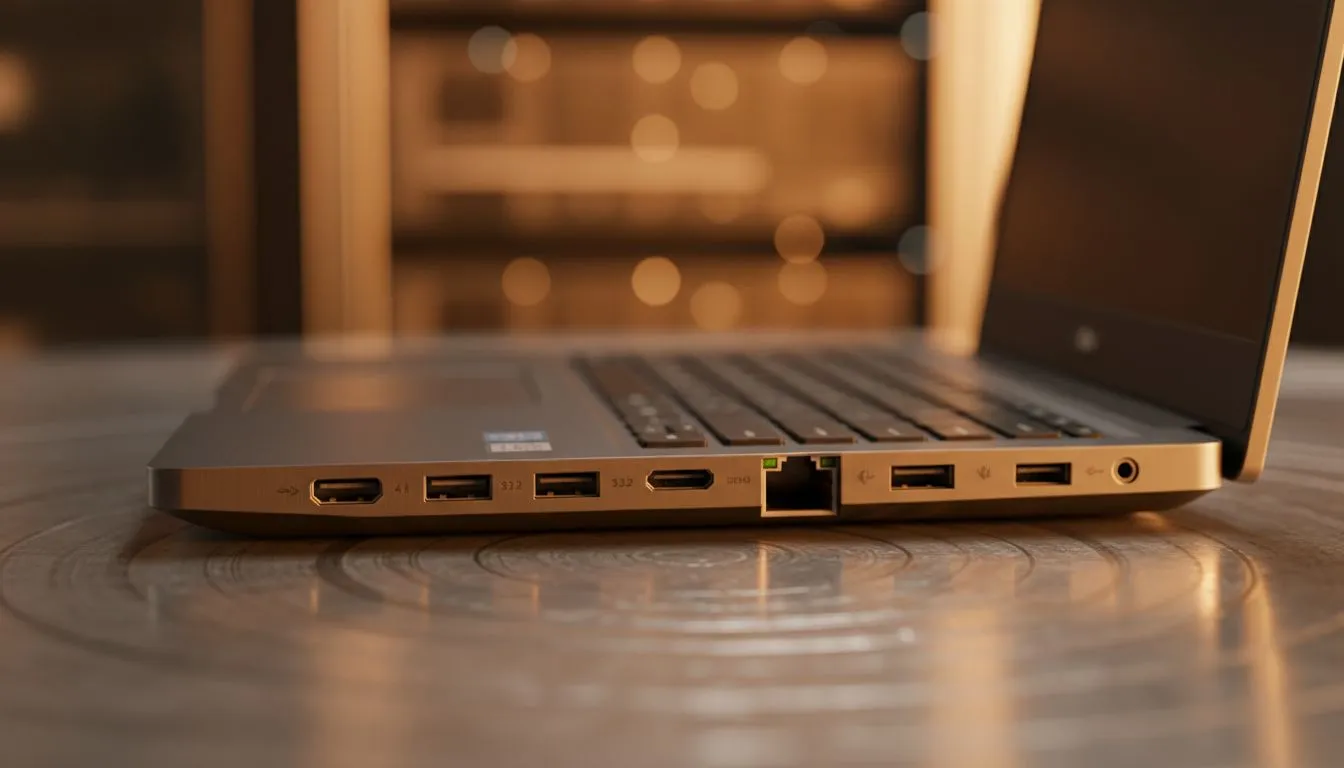
Buying a business laptop in South Africa often feels like a balancing act between power and portability. But there is one thing professionals overlook until they are in a boardroom: the ports. Nothing kills a presentation faster than a missing adapter. This guide breaks down the essential business laptop ports you need to stay productive, whether you are at the office or working from a local coffee shop. 🔧
When you look at the Business Laptop Ports: Complete Guide to Which Connections You Need, the first thing to check is the USB configuration. Not all USB ports are created equal. Modern professionals should prioritise USB-C... specifically those with Power Delivery and DisplayPort Alt Mode. This allows you to charge your machine and output video through a single cable.
For those who need maximum throughput for external drives or docking stations... Thunderbolt 4 is the gold standard. You will frequently find this high-speed tech on the latest Intel laptops on special at Evetech. It ensures your workspace remains clean and efficient.
While wireless tech is great... physical video ports are still king in South African offices. A dedicated HDMI port is vital for connecting to older projectors or boardroom TVs without fumbling for a dongle. If you are looking for a balance of efficiency and integrated graphics power... exploring current Ryzen laptop deals is a smart move. Many of these units offer excellent multi-monitor support right out of the box. ⚡
Stability is another factor often ignored. While Wi-Fi 6 is fast... a physical Ethernet (RJ45) port is a lifesaver during important video calls or when the office router is struggling. If your chosen laptop is too slim for a full-sized port... ensure you have a reliable USB-C hub ready.
On Windows, use the PowerToys FancyZones utility to create custom snap layouts for your windows. It's a lifesaver for managing multiple apps on an ultrawide monitor, letting you organise your timeline, preview window, and asset folders perfectly for video editing.
Many South African professionals now opt for "crossover" machines. These are laptops that handle spreadsheets by day and high-end rendering or gaming by night. If you need a machine that does it all... checking out the best gaming laptop deals can actually lead you to the best business hardware. These devices often feature the most robust port selections... including multiple video outputs and high-speed data lanes.
For creative professionals or those working in 3D design... the port requirements are even stricter. You might need a machine with GeForce RTX gaming laptops on special to drive multiple 4K displays through dedicated DisplayPort or HDMI 2.1 connections. 🚀
You do not need to spend a fortune to get a well-connected machine. There are plenty of reliable gaming laptops under R20k that offer a full suite of ports... including USB-A for your legacy peripherals like mice and keyboards. Always check the side profile of the laptop before buying. Ensure there is at least one USB-A port... two USB-C ports... and a dedicated display output to future-proof your setup. ✨
Ready to Find Your Perfect Match? The Mac vs Windows debate is complex, but for maximum power, choice, and value in South Africa, Windows is hard to beat. Explore our massive range of laptop specials and find the perfect machine to conquer your world.
Essential ports: USB-C/Thunderbolt for power and accessories, HDMI/DisplayPort for monitors, Ethernet for stable networks, plus one USB-A for legacy devices.
If you need consistent wired internet or secure VPN access, choose a model with an Ethernet port or use a docking station with Ethernet.
USB-C with Power Delivery often handles charging and docking, but Thunderbolt provides faster data and multi-display support for heavier setups.
Pick HDMI for wide projector and TV compatibility; choose DisplayPort for higher refresh rates and daisy-chaining in multi-monitor setups.
SD card readers help photographers and field staff transfer media quickly; skip it if you rarely use cards and prefer a lightweight laptop.
Keep at least one or two USB-A ports for mice and legacy dongles; otherwise plan for USB-C adapters, hubs, or a docking station.
Look for a Kensington lock slot and TPM hardware for encryption; these security ports and features protect devices from theft and tampering.
GTA 6 Max Settings on RTX 5070. Tested & verified settings for best FPS and visual quality on SA hardware budgets.
Read more
Cyberpunk 2077 Max Settings on RTX 5080. Tested & verified settings for best FPS and visual quality on SA hardware budgets.
Read more
Starfield Max Settings on RTX 5070 Ti. Tested & verified settings for best FPS and visual quality on SA hardware budgets.
Read more
AMD RX 9050 XT: Rumoured Specs, Price & Release. SA-focused analysis with local pricing data, real-world insights & actionable buying advice.

Can RTX 4080 Super Run AI Workloads for SA Developers Detailed answer with SA data, expert analysis & practical recommendations for local buyers.

Can RTX 4090 Run AI Workloads for SA Developers Detailed answer with SA data, expert analysis & practical recommendations for local buyers.

Top Settings for Intel Arc B580 at Ultrawide 1440p picks evaluated on performance, value & SA availability with current Rand pricing from Evetech.

RTX 4060 CS2 Low Settings at 1080p: FPS Results. Real-world benchmark data, FPS numbers & performance analysis. What SA gamers can actually expect.

Visual Artifacts: Possible GPU Issue Issue #1. Diagnosis steps, proven fixes & when to seek professional help. SA-specific support info included.

Can the RTX 4090 Handle 1440p 144Hz Gaming. Performance testing verdict with real data & practical recommendations for SA buyers.

Top ASUS GPU Under R15000 picks evaluated on performance, value & SA availability with current Rand pricing from Evetech.
GTA 6 Max Settings on RTX 5070. Tested & verified settings for best FPS and visual quality on SA hardware budgets.
Cyberpunk 2077 Max Settings on RTX 5080. Tested & verified settings for best FPS and visual quality on SA hardware budgets.
Starfield Max Settings on RTX 5070 Ti. Tested & verified settings for best FPS and visual quality on SA hardware budgets.

Top RTX 5090 Under R5000 picks evaluated on performance, value & SA availability with current Rand pricing from Evetech.