


RTX 4060 Ti Throttling Under Load: SA Temperature Guide
RTX 4060 Ti Throttling Under Load: Temperature. Everything you need to know with SA pricing, step-by-step instructions & expert recommendations.
Read moreChoose the right gaming PC case size by planning radiator clearance, GPU length, and front I/O. Avoid fitment headaches and build faster with cleaner airflow and better connections. 🎮🧊
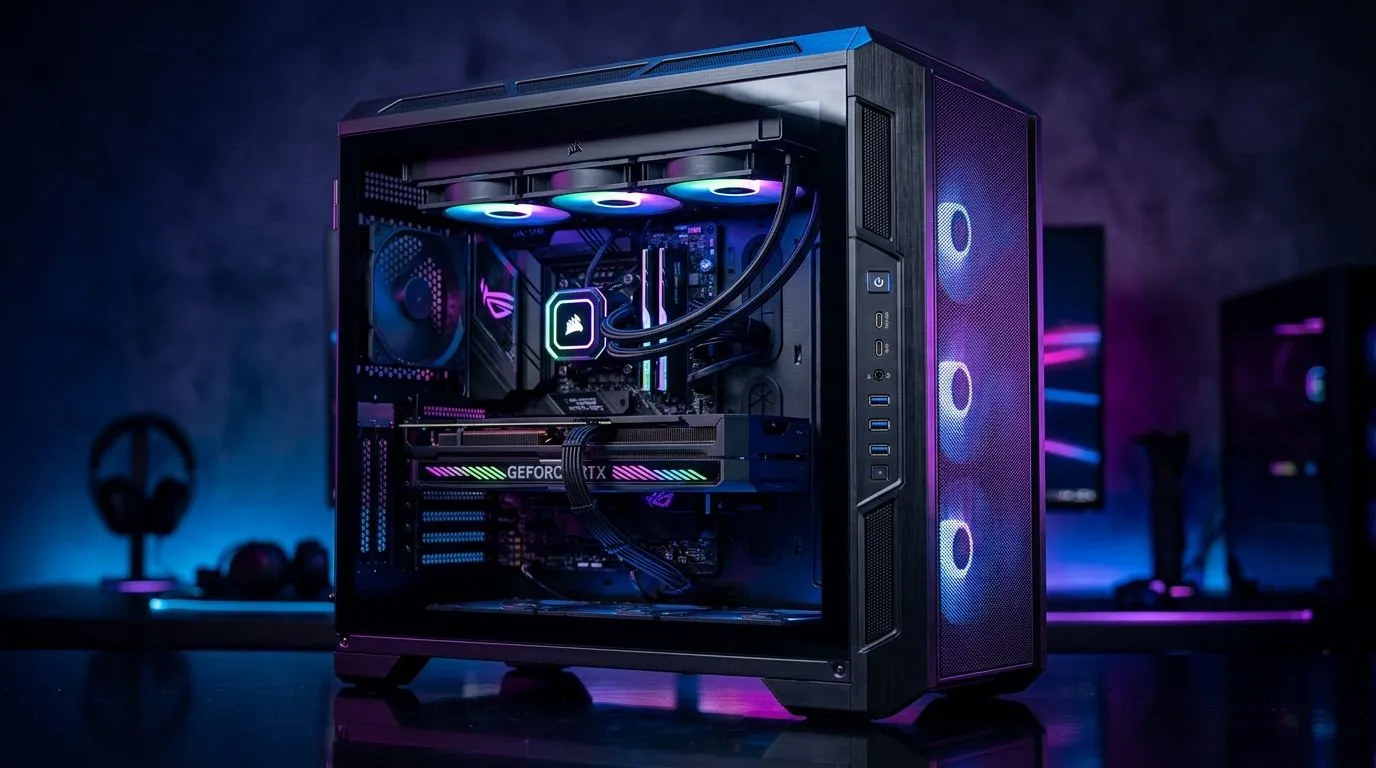
South African gamers know that building a powerful rig goes beyond flashy specs. The size of your gaming PC case can make or break your setup — especially when it comes to radiator compatibility, GPU length, and front I/O access. Whether you’re upgrading or building from scratch, understanding the right case size keeps airflow smooth, components cool, and your rig future-proof. Ready to unlock the room your build truly deserves?
Liquid cooling is popular in gaming rigs for good reason. Radiators come in various standard sizes — 120mm, 240mm, 360mm, and beyond. Your case needs to support the radiator length comfortably for optimal performance. Too small, and you’ll struggle with airflow or mounting options; too big, and you’re wasting space.
Full tower and mid-tower cases usually support up to 360mm radiators. If you prefer compact builds, mini or micro-ATX cases may limit you to 120mm or 240mm radiators. The Fractal Design PC cases lineup, for example, is well-known for versatile water-cooling support and sound dampening—ideal for gamers seeking quiet performance.
Always double-check your radiator thickness clearance alongside length. A thick radiator may block RAM or PSU cables if your case is tight.
Graphics cards are bigger than ever. Some of the latest GPUs stretch beyond 320mm, so you must measure your case’s GPU clearance before upgrading. Space isn’t only about fitting the card but allowing airflow and future upgrades. Stuffy cases heat up your components and throttle performance.
Many gaming cases specify maximum GPU length to help you avoid surprises. For instance, some cases from Gamdias gaming cases cater specifically to bigger GPUs, trading compactness for high-end compatibility. If you’re shopping with a budget, check their under R1500 options too—affordable but spacious.
Front I/O ports matter more than most gamers realise. You want quick access to USB, audio jacks, or fan controls without reaching behind your case. A well-designed front panel also improves airflow when it features mesh or vents.
Mid and full towers often include multiple USB 3.0 ports, Type-C connectors, and audio combos. Smaller cases may have fewer or more basic I/O options. For a balance of space, airflow, and front panel features, explore the wide range of computer cases Evetech offers.
Choosing a gaming PC case isn’t just about looks. It’s about cooling efficiency, component compatibility, and daily convenience. Think about radiator sizes your cooler supports, confirm your GPU length fits comfortably, and assess front I/O features that simplify your experience. With these boxes ticked, your rig will perform reliably and look sharp.
Ready to Build Your Perfect Gaming Rig? Find a high-quality gaming PC case that matches your specs and style—Shop now at Evetech for performance that leaves lag in the dust.
Start with your GPU length, planned cooler height, and radiator size you want. Then verify motherboard form factor and airflow fan support.
Check the case specs for 120/240/280/360 mm radiator support and whether it supports top, front, or side mounting for your radiator size.
Measure your GPU model against the case’s maximum GPU length, and account for space lost to front radiators, drive cages, or thick fan stacks.
Yes. Front I/O affects quick access to USB, audio, and connectivity for capture cards, controllers, headsets, and streaming gear.
Often it can. A front radiator and fans can take space that reduces maximum GPU length, so always cross-check radiator thickness and fan clearance.
Choose a case with strong airflow: enough intake fans, clear radiator support, and proper cable routing space so fans can breathe.
Confirm radiator size support, GPU length, cooler height, and front I/O layout. Compact cases can be tight but work well with careful planning.
RTX 4060 Ti Throttling Under Load: Temperature. Everything you need to know with SA pricing, step-by-step instructions & expert recommendations.
Read more
Apex Legends Max Settings on RTX 4080. Tested & verified settings for best FPS and visual quality on SA hardware budgets.
Read more
GPU Buying Guide. Everything you need to know with SA pricing, step-by-step instructions & expert recommendations.
Read more
GPU Terms Guide. Everything you need to know with SA pricing, step-by-step instructions & expert recommendations.
Read more
AMD Adrenalin Download & Setup Guide: GPU. Clear setup instructions with SA-specific considerations, troubleshooting tips & recommended components.
Read more
Back-to-School GPU Buying Guide. Everything you need to know with SA pricing, step-by-step instructions & expert recommendations.
Read more
Can RTX 4080 Super Run AI Workloads for SA Developers Detailed answer with SA data, expert analysis & practical recommendations for local buyers.

Can RTX 4090 Run AI Workloads for SA Developers Detailed answer with SA data, expert analysis & practical recommendations for local buyers.

Top Settings for Intel Arc B580 at Ultrawide 1440p picks evaluated on performance, value & SA availability with current Rand pricing from Evetech.

RX 7600 Overclocking Guide: Safe OC Settings for. Real-world benchmark data, FPS numbers & performance analysis. What SA gamers can actually expect.

RTX 4060 CS2 Low Settings at 1080p: FPS Results. Real-world benchmark data, FPS numbers & performance analysis. What SA gamers can actually expect.

Visual Artifacts: Possible GPU Issue Issue #1. Diagnosis steps, proven fixes & when to seek professional help. SA-specific support info included.

Can the RTX 4090 Handle 1440p 144Hz Gaming. Performance testing verdict with real data & practical recommendations for SA buyers.

Top ASUS GPU Under R15000 picks evaluated on performance, value & SA availability with current Rand pricing from Evetech.
RTX 4060 Ti Throttling Under Load: Temperature. Everything you need to know with SA pricing, step-by-step instructions & expert recommendations.
Apex Legends Max Settings on RTX 4080. Tested & verified settings for best FPS and visual quality on SA hardware budgets.
GPU Buying Guide. Everything you need to know with SA pricing, step-by-step instructions & expert recommendations.
GPU Terms Guide. Everything you need to know with SA pricing, step-by-step instructions & expert recommendations.