


Glorious Keyboard Switches Explained: Which Switch Is Right for You?
Glorious Keyboard Switches Explained: Which. Plain-English explanation of what it means, why it matters & how it affects your buying decisions in SA.
Read moreWant linear mechanical switches that feel smooth and predictable? This guide breaks down linear switch types, key specs, and what makes each variant different—so you choose confidently. 🔧✨
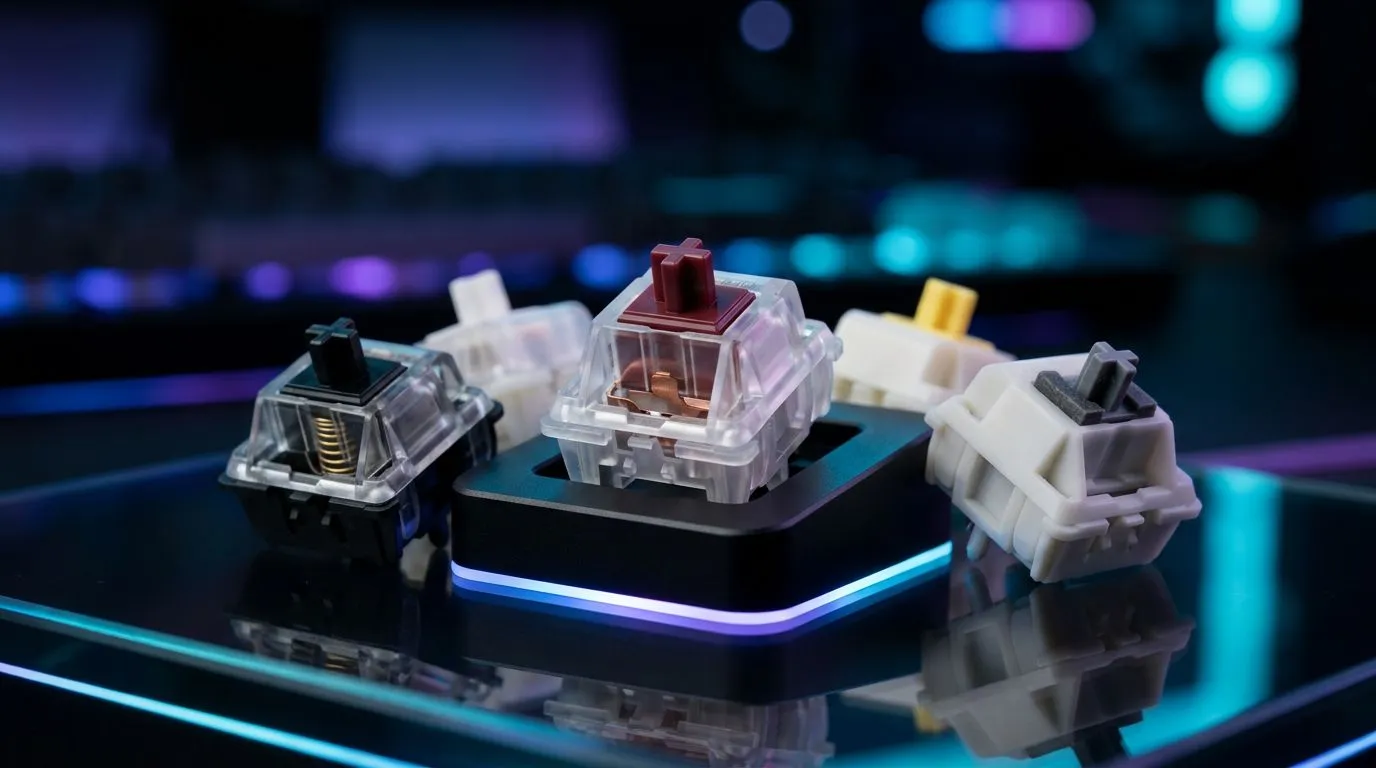
If you’ve ever tried a keyboard in-store and thought, “Why does this feel so smooth?”, you’re already halfway to understanding linear switches. In South Africa, where LAN nights, daily commuting, and long Discord sessions all compete for your attention, switch feel matters. Linear mechanical switches are the quiet, steady workhorses. No tactile bump. No click. Just consistent key travel… and that satisfying repeat rate for gaming and typing alike.
In this guide, we’ll break down the main types, what they feel like, and how to choose with confidence based on your playstyle and budget.
A linear switch is designed to move straight down when you press. That means:
You’ll typically notice two things in your hands:
That’s why linear switches are popular for competitive FPS titles where rapid, repeat presses are common. They also suit typists who prefer a smooth “flow” instead of a noticeable bump.
When you’re comparing linear options, look for these (not everything is always listed, but when it is, it helps):
Not all linear switches are the same. The “family” differences usually come down to spring weight, lubrication, and design.
Standard linear switches are a safe starting point. They’re widely available and usually predictable. If you’re buying a keyboard in the entry range, this is where most “good for gaming” options sit.
What to expect:
Lubed switches reduce friction, which can make the press feel less “scratchy”. The result is often a more even travel from top to bottom.
What to expect:
Some mechanical systems use optical actuation. If you’re on an optical keyboard platform, the experience can feel extremely consistent for rapid inputs. The trade-off is that you’re tied to that platform’s switch system.
What to expect:
Note: Switch ecosystems vary by keyboard model. Always verify compatibility before you buy.
Heavier actuation and stronger springs can help you avoid accidental inputs, especially if your desk setup encourages resting fingers on the keys. This can be helpful for high-precision play or for typists who bottom out hard.
What to expect:
Here’s the real-world breakdown many South African gamers recognise after a few evenings.
In FPS and rhythm-style games, you want your fingers to trust the key movement. Linear switches reward that consistency:
But… if you’re the type who bottom-outs aggressively, you might want:
Linear switches can feel effortless for fast typing, especially if you rely on speed rather than tactile cues. Still, some people miss feedback when proof-reading. If you like knowing “where you are” during a press, tactile switches may suit you better. If you prefer flow, linear is often a strong choice.
compare linear switches in a way that matches real gaming, press the same key repeatedly for 60 seconds and focus on two things: 1) how quickly your fingers start feeling comfortable, and 2) whether you hear the key as “sharp” or “thuddy”. If the sound is sharp, it’s often the keycap and housing, not just the switch. That means you can fix a lot by choosing better keycaps or a board with a more damped case, even if the switch is already solid.
If you’re heading online, don’t just filter by “linear”. Your keyboard choice matters as much as the switch type.
Many keyboards already include linear switches and have optimised stabilisers and case acoustics. If you buy an entire prebuilt board, you get a cohesive sound and feel, which is often what people want for gaming.
Here are good places to start:
Linear switches don’t change whether you’re wired or wireless… but your overall input consistency and convenience can.
For wireless players:
For wired players who want zero fuss:
If you’re building a complete setup, it often makes sense to bundle. For example:
If you’re still deciding, use this simple mapping:
The best match is the one that feels repeatable after 20 minutes, not just exciting in the first 10 seconds.
Ready to Find Your Perfect Match? The Mac vs Windows debate is complex, but for maximum power, choice, and value in South Africa, Windows is hard to beat. Explore our massive range of laptop specials and find the perfect machine to conquer your world.
Linear mechanical switches are smooth keys with no tactile bump or click. They’re valued for consistent feel and fast, predictable typing and gaming.
Actuation force (in grams) changes how much pressure you need to trigger the key. Lighter springs feel easier, while heavier springs reduce accidental presses.
Travel distance is how far the key moves end to end. Linear switch travel affects the timing and bottom-out feel, especially during repeated keystrokes.
Yes. Many players prefer linear mechanical switches for smooth keystrokes and fast rhythm. The best choice depends on desired actuation and bottom-out.
Linear switches feel smooth throughout; tactile switches add a noticeable bump. Choose tactile if you want feedback, or linear for uninterrupted motion.
Lubing can reduce friction and smooth out the sound and feel. If you want a more refined linear switch experience, lubed linear switches are often worth it.
Pre-travel is the distance before actuation; bottom-out is the final compression. Together they shape timing, control, and the intensity of the bottom-out.
Most mechanical switches use standard MX-style stems, but not all boards are compatible. Check your keyboard’s switch type before buying linear mechanical switches.
Glorious Keyboard Switches Explained: Which. Plain-English explanation of what it means, why it matters & how it affects your buying decisions in SA.
Read more
Winter Keyboard Buying Guide. Everything you need to know with SA pricing, step-by-step instructions & expert recommendations.
Read more
Keyboard Buying Guide. Everything you need to know with SA pricing, step-by-step instructions & expert recommendations.
Read more
LGBTQ+ Gamers Keyboard Guide: January Edition. Everything you need to know with SA pricing, step-by-step instructions & expert recommendations.
Read more
Keyboard Maintenance Guide Gamers. Everything you need to know with SA pricing, step-by-step instructions & expert recommendations.
Read more
Accessibility Focused Keyboard Guide: January. Everything you need to know with SA pricing, step-by-step instructions & expert recommendations.
Read more
Snapdragon X2 NPU Explained: How 80 TOPS Changes. Plain-English explanation of what it means, why it matters & how it affects your buying decisions in SA.

HBM? High Bandwidth Memory Used in GPUs and AI. Plain-English explanation of what it means, why it matters & how it affects your buying decisions in SA.

How much should you spend on sim racing accessories in South Africa for a realistic setup? We break down budgets by quality tiers, so you buy smart gear and avoid overspending 🎮💸

G-Sync and FreeSync? Variable Refresh Rate. Plain-English explanation of what it means, why it matters & how it affects your buying decisions in SA.

AMD Laptop: Value. SA-focused analysis with local pricing data, real-world insights & actionable buying advice.

How MacBook Neo Handles 30+ Chrome Tabs with Only. SA-focused analysis with local pricing data, real-world insights & actionable buying advice.

Why Apple Put 8GB RAM in MacBook Neo: The A18 Pro. SA-focused analysis with local pricing data, real-world insights & actionable buying advice.

Upgrade your work laptop with a New Motherboard. Step-by-step instructions with SA-specific tips, common pitfalls to avoid & expert recommendations.

MacBook Pro 16-Inch M5 Max: Complete Specs,. Everything you need to know with SA pricing, step-by-step instructions & expert recommendations.

Travelling With a MacBook: Travellers. Everything you need to know with SA pricing, step-by-step instructions & expert recommendations.

Back-to-School Parent Guide: Laptops. Everything you need to know with SA pricing, step-by-step instructions & expert recommendations.

MacBook Air 13-Inch M5: Complete Specs, Features. Everything you need to know with SA pricing, step-by-step instructions & expert recommendations.