

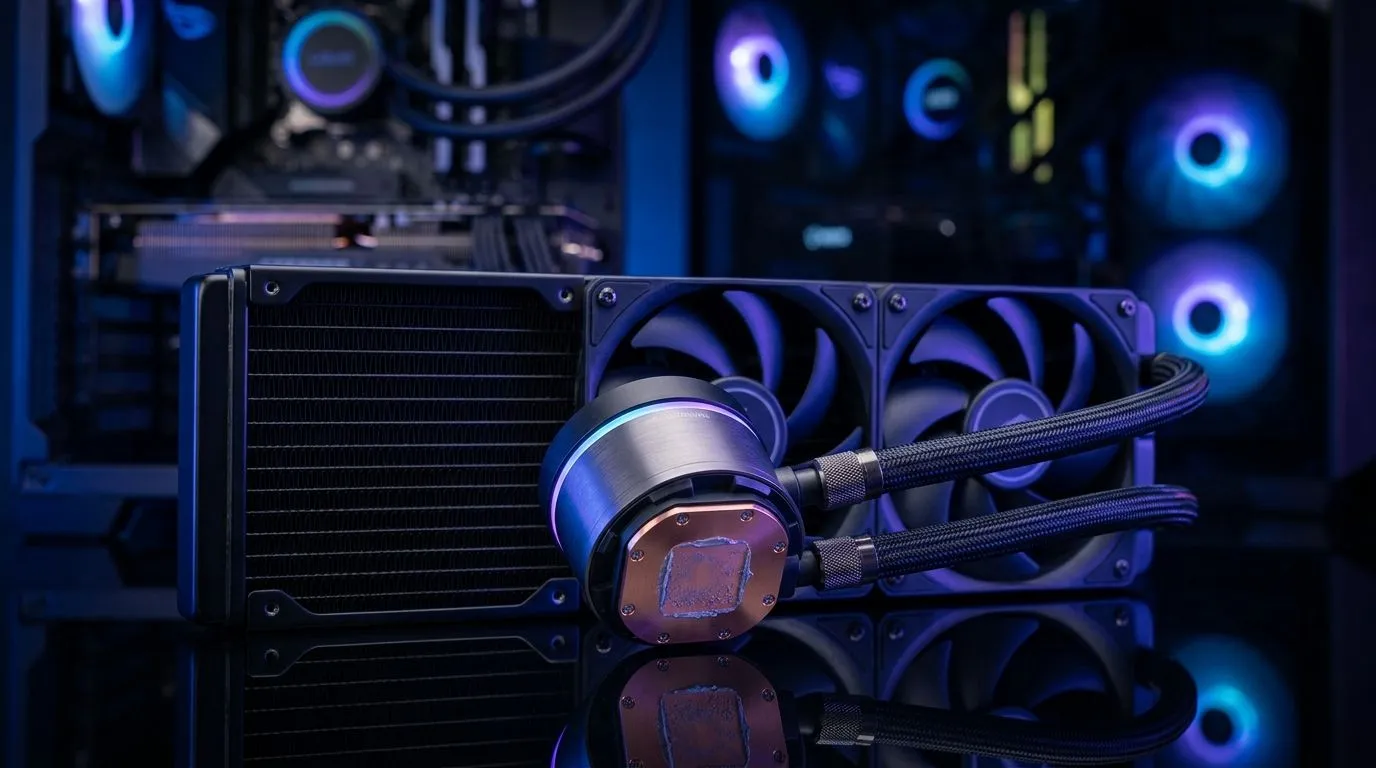
Liquid-cooling components explained: copper base, pump head, radiator, tubing
South African gamers, if your GPU and CPU scream under load, a water loop might be the calm you need. This guide breaks down liquid cooler components: copper base, pump head, radiator, tubing — and how each part affects thermals and noise. Read fast for clear buying tips, local context, and links to fans and accessories you'll actually want to fit into your build. 🔧 Learn what to prioritise before you spend a chunk of ZAR.
Copper base: conduction, contact and microchannels
The copper base or cold plate directly touches the CPU IHS. Copper's conductivity moves heat into the coolant fast. Surface finish matters: smooth cold plates need good mounting pressure; microchannels increase area at the cost of easier clogging. For fan mounts and clearances, see Deepcool options on Evetech to match your radiator setup: Deepcool options on Evetech.
Pump head and flow: choosing reliable circulation
The pump head houses the impeller and usually the CPU block. A strong, quiet pump keeps steady flow to avoid hotspots. Brands like Corsair offer integrated AIO pump heads with well-documented performance; consider warranty and service in South Africa. Browse Corsair pump and AIO listings for options and support: Corsair pump and AIO listings.
Radiator: size, fins and fan compatibility
Radiator surface area moves heat from coolant into the air. Choose thickness and fin density based on your case airflow and noise tolerance. Most radiators use 120mm or 140mm fans; match fan size to radiator mounts for optimal static pressure. Evetech lists these fan sizes so you can pair a high-static-pressure model to your rad and avoid bottlenecks.
Tubing and fittings: flexible vs hardline choices
Tubing is simple but critical. Soft tubing is easy to fit and service; hardline acrylic or PETG looks sharp but needs bending tools. Choose fittings that match your tubing ID and radiator barbs for leak-free seals. If aesthetics matter, consider RGB setups for show builds: RGB fan options.
Installation, maintenance and local tips
Install with patience. Bleed air via high points and run pumps at low speed first. Flush pre-filled loops annually; replace soft tubing every few years in warm coastal climates to avoid early yellowing. For fan choices consider RGB fans for show builds and non-lit for stealth rigs—Evetech categorises both to help pick the best fit: Non-lit options.
Choosing parts in South Africa: warranty, support and value
Buy where support matters. Local warranty and parts access save long waits. Compare pump warranties and radiator materials before you spend. Evetech stock pages make it easy to check brands, sizes and lighting variants so you can budget in ZAR and avoid surprises. For general fan choices and accessories browse Evetech’s case fan category: Case fans and accessories.
Maintenance Pro Tip ⚡
Bleed your loop with the pump running at low speed and tilt the case to coax trapped air into the reservoir. Use distilled water in custom loops and change coolant annually in warm coastal areas. Keep spare clamps and a tubing cutter in your toolkit.
Happy building.
Ready to Find Your Perfect Match? The Mac vs Windows debate is complex, but for maximum power, choice, and value in South Africa, Windows is hard to beat. Explore our massive range of laptop specials and find the perfect machine to conquer your world.










