


Complete Guide: Setting Up Monitor Light
Setting Up Monitor Light. Tested & verified settings for best FPS and visual quality on SA hardware budgets.
Read moreWondering, “Do you need hot-swappable switches for a gaming keyboard?” This guide helps you decide based on cost, upgrade path, and maintenance—without regret. 🎮🔧
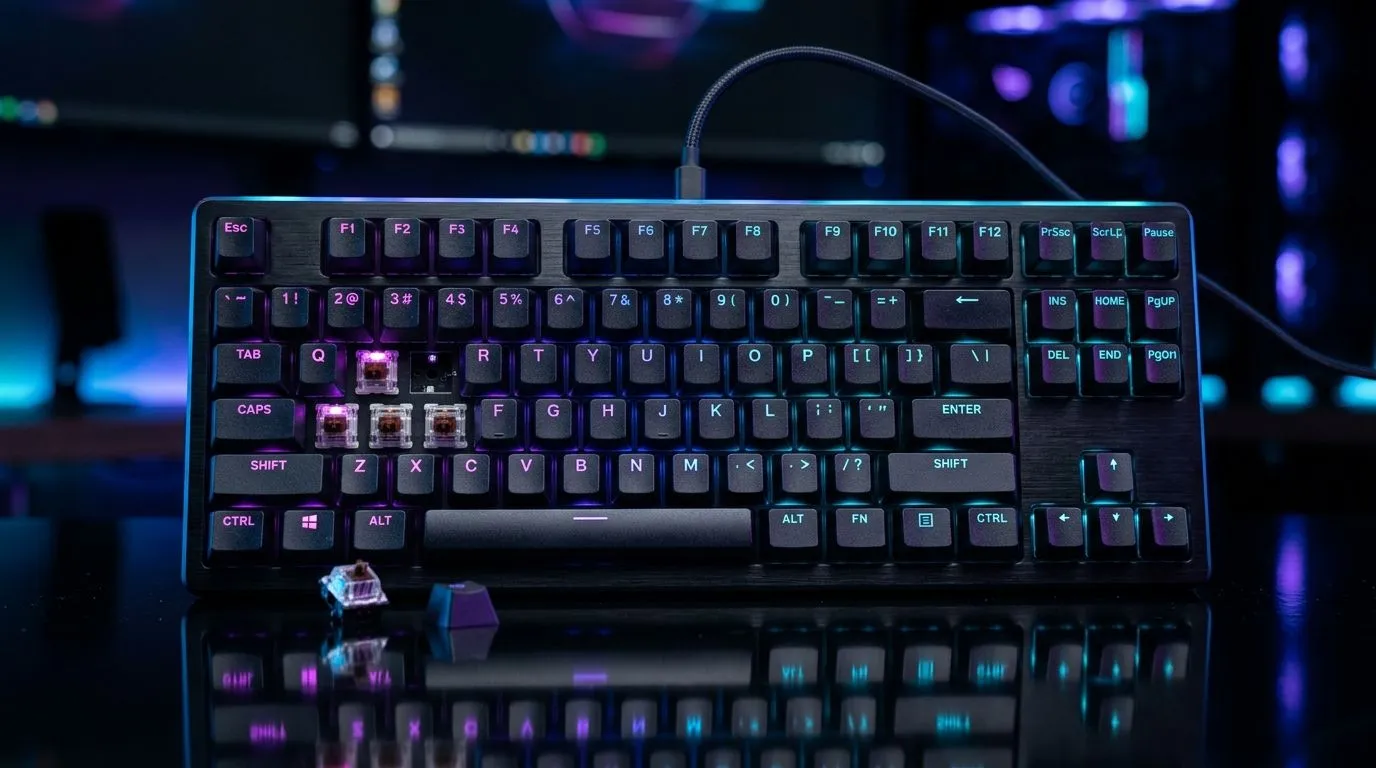
South African gamers live in the details... the sound, the feel, the speed of your setup. One minute you’re practising flicks, the next you’re hating that mushy keypress. That’s where hot-swappable switches come in 🔧 But do you truly need them for a gaming keyboard, or is it extra cost you’ll never use?
If you’ve ever wanted to tweak your keyboard without soldering, this guide is for you. We’ll break down what hot-swappable really means, when it matters for gaming, and when it’s smarter to skip.
Hot-swappable keys let you swap the switch under each keycap without opening a soldering iron. That means you can change the switch feel (and sound) fast.
Not directly. Your mouse sensor, polling rate, and key response still matter most. Switching to a different linear, tactile, or clicky switch can change:
Most people don’t keep one keyboard switch forever. A few months in, you might want:
With hot-swap, you test changes without turning your keyboard into a project.
Hot-swappable switches are worth considering if you’re the type who upgrades based on feel, not just specs. For example:
If you’re not sure whether you prefer linear or tactile, hot-swap reduces risk. You can try multiple switch types over time. That’s also helpful in households where “keyboard noise” is a whole thing 😅
If you’ve used the same switch type for years (like a particular linear), and you’re not planning to change, hot-swap might be unnecessary.
South African buyers often do the sensible thing: spend where it impacts performance. A hot-swap board can cost more upfront, and the savings only show up if you actually swap.
If you want to optimise your purchase, start by choosing your connectivity based on your setup. Wired is reliable and often simpler for competitive play. Wireless is convenient for clean desks, especially when cable management starts becoming a cry for help ⚡
You can browse keyboard deals here:
Here’s the quick way to think about it:
Hot-swap is the best option when you’re unsure. If you already know your preference, a fixed-switch keyboard can still be a smart buy, especially if you’re chasing ZAR value.
Switches can change comfort and confidence, but they won’t magically boost your rank. They can make your keyboard feel better. Comfort leads to fewer errors. Fewer errors lead to better outcomes.
On gaming PCs, set a consistent actuation feel by pairing switch choice with software tweaks. In many keyboards, you can adjust per-key functions through the manufacturer driver. If your keys feel “too sensitive” after swapping, revisit your driver’s key remap and any gaming mode settings so your muscle memory stays reliable during ranked matches.
Before you pay extra, ask these questions:
If you answered “yes” to the first three, hot-swappable makes sense. If you’re sure you’ll stay with one feel, skip it and put the ZAR into a better mouse, mousepad, or monitor.
If you’re shopping now, use Evetech to compare options quickly across price tiers and connectivity types. Hot-swap can be a real upgrade... but only when it matches how you play and upgrade.
Ready to Find Your Perfect Match? The Mac vs Windows debate is complex, but for maximum power, choice, and value in South Africa, Windows is hard to beat. Explore our massive range of laptop specials and find the perfect machine to conquer your world.
Not always. If you want easy switch changes for different sounds or feels, hot-swappable switches help. For a fixed switch you love, soldered is fine.
Hot-swappable keyboards are easier to upgrade and experiment. Soldered boards can be sturdier and sometimes sound tighter, depending on the build.
Usually no. If you will keep the same switches long-term, you may save money by choosing a quality non-hot-swap keyboard.
Typically, latency depends more on the keyboard controller, polling rate, and firmware. Switch type mainly affects feel, not raw input speed.
Pros: easier switch swaps, faster experimentation, and simpler upgrades. Cons: higher cost, potential long-term contact variability, and limited compatibility.
Yes. Hot-swappable boards let you swap in new switches without soldering, making it easier to tune sound, actuation, and travel for your play style.
Not always. Check the keyboard's hot-swap socket type (for example, 3-pin/5-pin support) to ensure compatibility before you buy switches.
Setting Up Monitor Light. Tested & verified settings for best FPS and visual quality on SA hardware budgets.
Read more
Assassins Creed Shadows Ultrawide Support: 21:9. Clear setup instructions with SA-specific considerations, troubleshooting tips & recommended components.
Read more
Complete Gaming Setup Guide for the Collector. Clear setup instructions with SA-specific considerations, troubleshooting tips & recommended components.
Read more
Will the Steam Deck 2 Have an OLED Screen? Leaked. Plain-English explanation of what it means, why it matters & how it affects your buying decisions in SA.
Read more
Setting Up Ultrawide 144Hz. Tested & verified settings for best FPS and visual quality on SA hardware budgets.
Read more
Kingdom Come: Deliverance 2 Ultrawide Support. Clear setup instructions with SA-specific considerations, troubleshooting tips & recommended components.
Read more
When Will the RTX 6090 Launch in South Africa Detailed answer with SA data, expert analysis & practical recommendations for local buyers.

Top Valorant Settings for RTX 5070: FPS Optimisation picks evaluated on performance, value & SA availability with current Rand pricing from Evetech.

RDNA 3.5 Graphics in Ryzen AI 400? Can You Game. Plain-English explanation of what it means, why it matters & how it affects your buying decisions in SA.

GPU Price Index : December Report. Current stock data & price tracking for SA buyers. See what is available and where prices are heading.

Core i5-14600K + B760 + RTX 5060 Build Under. Full parts list, Rand pricing & expected performance. Build confidently with SA-available components.

RX 7600 Apex Legends at 4K: FPS Benchmark. Real-world benchmark data, FPS numbers & performance analysis. What SA gamers can actually expect.

RX 7900 XTX GTA 6 at 4K: FPS Benchmark & Optimal. Real-world benchmark data, FPS numbers & performance analysis. What SA gamers can actually expect.

Head-to-head comparison of RTX 5070 vs RX 9070 XT: Gaming Performance for SA gamers. Performance benchmarks, Rand pricing & which delivers better value.

Starfield Max Settings on RTX 5070. Tested & verified settings for best FPS and visual quality on SA hardware budgets.

Top RX 7800 XT Model Under R8,000 picks evaluated on performance, value & SA availability with current Rand pricing from Evetech.

RTX 5070 Valorant Optimised Settings: Graphics. Real-world benchmark data, FPS numbers & performance analysis. What SA gamers can actually expect.

Top Laptop with Core i7 + RX 7700S: Picks picks evaluated on performance, value & SA availability with current Rand pricing from Evetech.