

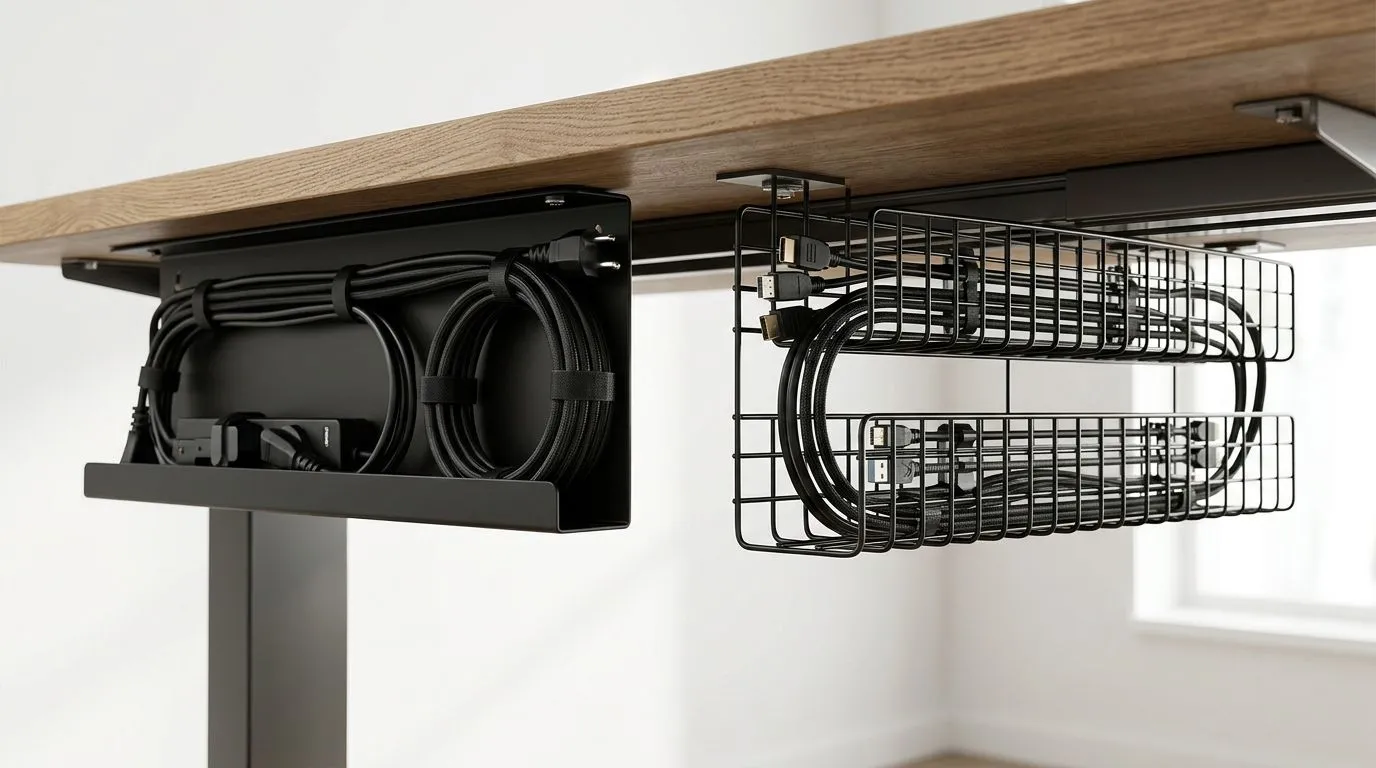
Single Cable Tray vs Dual Cable Baskets: Maintainability Guide for South African Setups 🔧
If your desk turns into a cable jungle every time you add a monitor, headset, or charger, you already know the pain. In South African gaming rooms, home offices, and battlestations, cable management is not just about looking neat. It affects airflow, cleaning, upgrades, and how fast you can swap gear when something fails. So when comparing a single cable tray vs dual cable baskets, the real question is simple… which setup stays easier to live with over time?
Single Cable Tray vs Dual Cable Baskets: What Maintainability Really Means
Maintainability is about how easily you can inspect, add, remove, and trace cables without tearing your whole desk apart. A tidy setup saves time when you upgrade a GPU, move to a new router, or replace a power strip. It also helps reduce accidental strain on connectors and makes dust cleanup easier.
A single tray is usually simpler. You have one route for most cables, so installation is quicker and the layout is easier to understand. Dual baskets, on the other hand, split cable loads into two zones. That can help if you run a heavier multi-device setup, or if you want to separate power from data lines for a cleaner service path.
For desk buyers, the best choice often depends on how often you change your gear. If you tinker often, less clutter usually wins.
Single Cable Tray vs Dual Cable Baskets: Where Each Option Fits Best
A single tray works well for smaller setups. Think one PC, one monitor, a charger, speakers, and maybe a console. It is usually easier to access and keeps maintenance fast. If you are the kind of person who still reworks your desk after payday, that simplicity matters.
Dual baskets suit bigger builds. They can make it easier to separate heavy power bricks from lighter signal cables. That can improve organisation, especially on longer desks or shared work and play stations. The trade-off is that you now maintain two spaces instead of one.
If you are shopping for a stronger desk base or a cleaner overall workstation layout, it may help to look at desk options like gaming desk setups built for South African homes. Choosing the right desk frame and underside clearance can matter just as much as the cable system itself.
Single Cable Tray vs Dual Cable Baskets: Real-World Maintenance Tips
The easiest system to maintain is the one you can reach without moving half your battlestation. A few practical habits help either setup:
Keep power and data separated
Run mains power on one side and USB, HDMI, and network cables on the other where possible. It makes tracing easier later.
Leave slack at connection points
Tight cables wear faster. A little slack protects ports when you move your desk or adjust your PC.
Label anything non-obvious
If you unplug often, small labels save time. That is especially useful for multi-monitor or streaming setups.
Clean on a schedule
Dust builds up fast under desks in dusty areas. A five-minute wipe every few weeks is easier than a full teardown.
Maintenance Tip ⚡
Keep a small zip-tie pack or Velcro strap set in the same drawer as your spare cables. When you upgrade a mouse, monitor, or console, you can tidy the routing immediately instead of leaving a temporary mess that becomes permanent.
Single Cable Tray vs Dual Cable Baskets: Which One Is Easier to Service?
If quick access matters most, a single tray usually wins. Fewer parts. Fewer places to forget a cable. Faster troubleshooting.
If your setup is heavier and more complex, dual baskets can be worth it. You get better separation and more room to organise components by purpose. That is handy for creators, streamers, or anyone running multiple power supplies and accessories.
For buyers comparing premium desk brands, it is worth checking whether the desk structure supports the cable solution properly. A well-designed desk from AutoFull gaming desk options can make under-desk access much easier, especially when you need to change something in a hurry.
Single Cable Tray vs Dual Cable Baskets: Buying for Long-Term Value
A cable system should save you time for years, not just look good on day one. That is why build quality matters. Strong mounting points, enough clearance, and easy access can matter more than fancy extras.
If you want a balance of style and function, Arozzi gaming desks are worth a look for buyers who care about clean presentation and practical desk space. A neat desk is easier to maintain, and easier to enjoy.
For more budget-conscious setups, it is still smart to check whether the desk can support your cable load without sagging or limiting access. The cheapest option is not always the cheapest to live with.
Single Cable Tray vs Dual Cable Baskets: The Bottom Line
Choose a single cable tray if you want simplicity, speed, and easy maintenance. Choose dual cable baskets if your setup is large, layered, or likely to grow. There is no universal winner. There is only the right fit for how you actually use your desk.
If you are comparing desk styles for a growing setup, Nitro gaming desk options can be a useful place to start. The best desk is the one that keeps your gear tidy now and manageable later.
In other words… plan for the next upgrade, not just today’s cable count. Your future self will thank you when the panel comes off and everything still makes sense ✨
Ready to Find Your Perfect Match? The Mac vs Windows debate is complex, but for maximum power, choice, and value in South Africa, Windows is hard to beat. Explore our massive range of laptop specials and find the perfect machine to conquer your world.











