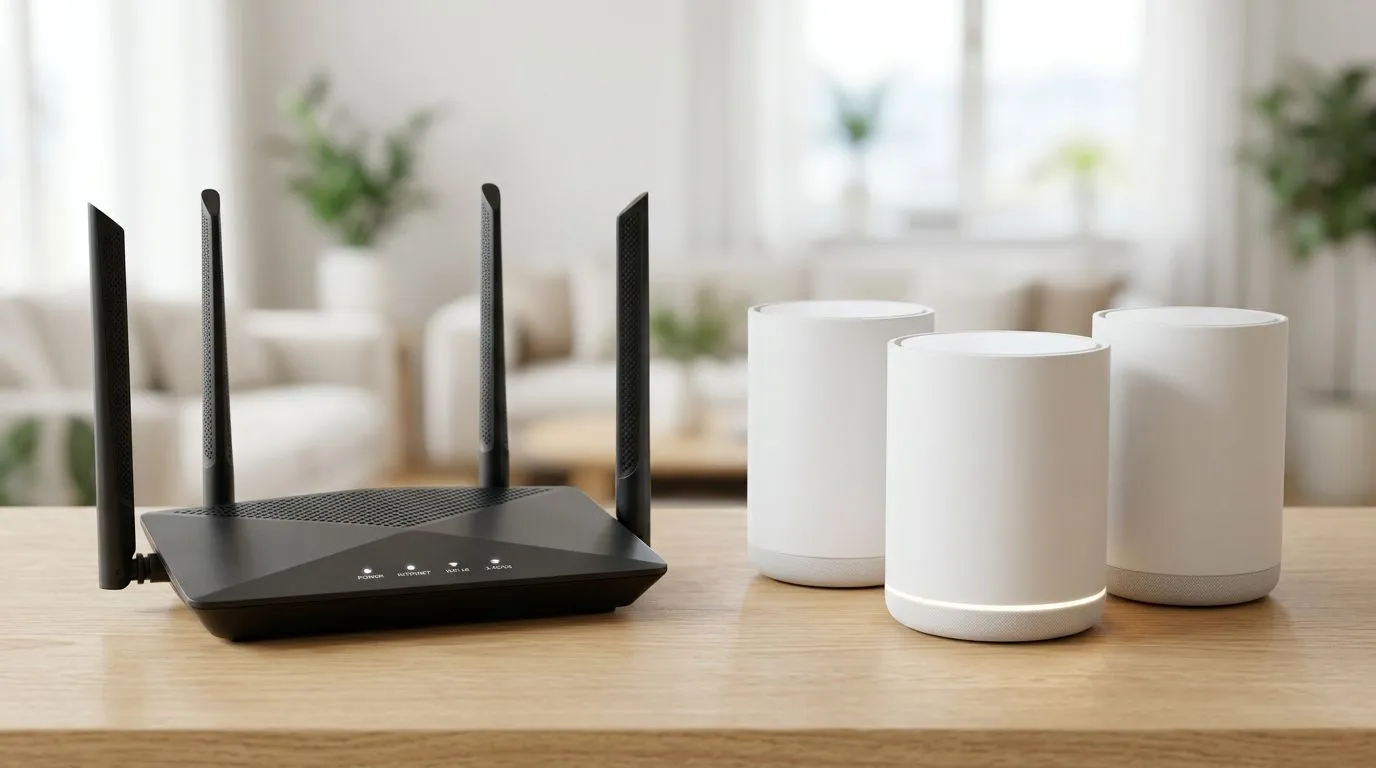
Single Router vs Mesh Setup: Why South African Homes Feel Different
Ever noticed how your Wi-Fi “works”... until you walk into the lounge? Then it drops to 1 bar, your downloads crawl, and party chat stutters. For South African gamers and home-office users, that isn’t a mystery. It’s physics, walls, and signal reach.
So how do you choose? In this Deep Dives guide, we’ll break down Single Router vs Mesh System: Choosing the Best Setup for Your Home based on real-world home layouts, speeds that matter, and what you can actually buy locally. ✨🎮
Single Router vs Mesh System: Choosing the Best Setup for Your Home for Real Life
Let’s start with the decision in plain terms.
When a single router wins 🔧
A single router is usually enough if:
- Your home is small to medium.
- Your gaming setup is in the same room as the router.
- There are fewer thick walls between you and the Wi-Fi.
- You’re willing to optimise placement (high, central, not inside a cupboard).
Single routers are also typically simpler to set up. For many households, that means fewer “why is it slow again?” moments.
When a mesh system wins ⚡
A mesh system is usually the better move if:
- Your home is larger or more spread out.
- You have multiple floors.
- The router can’t be placed centrally.
- You need consistent coverage in several rooms (or garden/garage).
Mesh systems use multiple nodes to extend coverage more evenly. Instead of one router “pushing harder”, you add coverage where it’s weak.
What gamers should prioritise when comparing Single Router vs Mesh System
Gaming needs more than peak speed. You want stable latency and less jitter. Even if your download rate looks fine on a speed test, gaming can still feel laggy when the signal is unstable.
Latency and jitter basics (no fluff)
- Latency: how fast your data travels.
- Jitter: how much that travel time varies.
Mesh often helps because you reduce “hop stress” in far corners… especially where a single router would struggle.
Placement matters more than most people think
- Put the router higher up.
- Keep it away from TVs, microwaves, and metal objects.
- Aim for a central location when using a single router.
If you’re currently using a router in a bedside cabinet or behind a TV, moving it can be the cheapest upgrade you’ll ever do. 🚀
Quick Win Pro Tip ⚡
On most routers, switching from “Auto” to a fixed 5GHz channel (or using the router’s recommended “best” channel) can reduce interference and make gaming feel smoother. If your router supports separate SSIDs for 2.4GHz and 5GHz, use 5GHz for devices that are close enough for strong signal.
Single Router vs Mesh System: Choosing the Best Setup for Your Home in common South African layouts
Let’s map this to what we actually see in SA homes.
Small flat or townhouse
- Single router is often enough.
- If your bedroom is far, consider a wired connection if possible, or place the router near the centre of the flat.
Standard house with thick walls
- Mesh tends to win.
- Thick plaster walls and brick can be brutal on Wi-Fi, especially on 2.4GHz.
Multi-floor homes
- Mesh is usually the safe bet.
- A single router on the ground floor rarely serves the top level well without help.
Cost, value, and the hidden “setup” costs
You’re not just paying for hardware. You’re paying for the time you’ll spend troubleshooting.
- If you go single router, your “cost” might show up as extra range extenders or a second device to patch dead zones.
- If you go mesh, you usually get a cleaner experience across rooms from day one… but you pay more upfront.
If you’re budgeting, think in terms of total setup effort and long-term stability, not only the first price you see.
Choosing between mesh and single: coverage options you can buy (and why)
Not every dead zone needs mesh. Sometimes the “best” solution is a carefully chosen add-on.
Start with the essentials: the network gear
If you’re reviewing Wi-Fi options, begin with Evetech’s networking components section so you can compare what fits your environment. For adapters and compatibility planning, see:
If you’re going single-router
If your home layout supports it, choose a router built for your device mix and coverage needs:
If you only need help in one or two spots
Range extenders can work, especially for light browsing and less latency-sensitive tasks. But gaming in the extender zone can be hit-or-miss depending on your signal quality:
If you rely on fibre at home
For many South African households, fibre changes the practical setup. Your fibre router placement and capabilities matter for how you distribute Wi-Fi in the rest of the home:
How to decide today: a simple checklist (takes 3 minutes)
Use this quick test before you buy anything.
- Where will your main devices be? (PC, console, work laptop)
- How many rooms/floors need stable Wi-Fi?
- How thick are your walls? (brick and concrete usually mean harder Wi-Fi)
- Can you place the router centrally and higher up?
- Would you rather pay more upfront for fewer dead zones, or start cheaper and patch issues?
If you’re answering “more rooms” or “multiple floors”, mesh is usually the calmer choice. If your devices are close to the router and your home is compact, a strong single router plus smart placement can be enough. ✨
Ready to lock in your network upgrade (and stop the lag)
If you’re tired of reconnecting during raids, tenders, or late-night work calls, it’s time to choose the setup that matches your home.
Ready to Find Your Perfect Match?
Choosing between a single router and a mesh system is easier when you can compare options side-by-side. Shop with Evetech and build a setup that fits your home, your devices, and your budget. Explore our massive range of laptop specials and pair it with the right networking gear for smoother gaming and smarter work.