Quick Answer
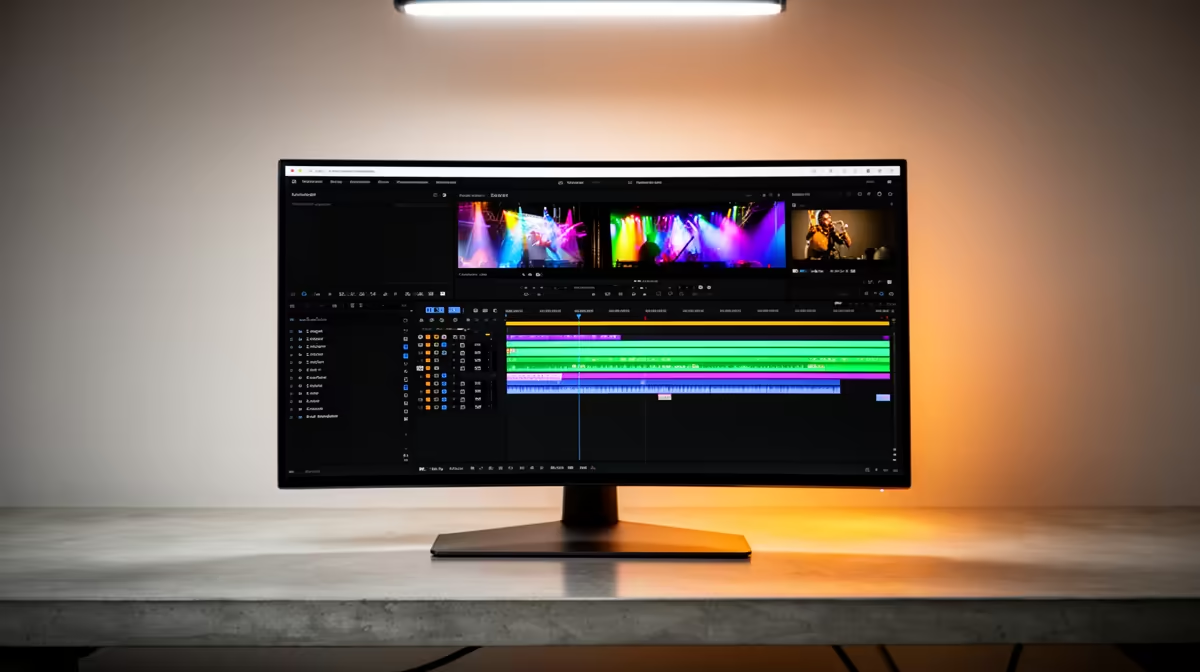
For Adobe Premiere Pro, an ultrawide monitor checklist means: 34-inch 1440p or wider, factory colour accuracy near 100% sRGB, and a stable 60Hz-plus refresh, from about R8,000. Timeline real estate and accurate colour matter most to editors, so prioritise resolution and colour over gaming features.
Why ultrawide suits Premiere Pro
A 21:9 ultrawide gives a long, uninterrupted timeline plus room for the program monitor and panels, cutting the constant window juggling of a standard screen. For colour work, look for a panel that covers sRGB accurately and ideally part of the wider gamuts; factory calibration saves you setup time. Resolution should be 1440p or higher for crisp footage.
The editor's checklist
Confirm: at least 1440p vertical-equivalent sharpness, strong sRGB coverage with low Delta-E, a matte or low-glare finish for long sessions, and enough ports for your laptop or workstation. A height-adjustable stand or arm helps posture during long edits. Gaming extras like very high refresh are unnecessary; spend that budget on colour and resolution instead.
Ports and ergonomics for editors
For Premiere Pro, confirm the ultrawide has the inputs your machine uses and ideally a USB-C connection if you edit on a laptop. A height-adjustable stand or arm keeps posture comfortable through long edits. A matte coating cuts glare in a bright room, which matters more for an editor than gaming features like very high refresh.
FAQ
Why use an ultrawide for video editing?
The 21:9 shape gives a longer timeline and room for panels alongside the preview, reducing window switching and speeding up edits in Premiere Pro.
What colour accuracy do editors need?
Aim for near 100% sRGB coverage with low Delta-E, ideally factory calibrated. Accurate colour ensures your edits look correct across devices.
Is a high refresh rate needed for editing?
No. 60Hz is fine for editing. Spend the budget on resolution and colour accuracy rather than gaming-grade refresh you will not use.
Pro Tip
For Premiere Pro, prioritise sRGB accuracy and resolution over refresh rate. A colour-accurate 1440p ultrawide serves an editor far better than a fast gaming panel.