

Best Marvel Rivals Settings for RTX 5060 Ti: FPS Optimisation Guide
Top Marvel Rivals Settings for RTX 5060 Ti: FPS picks evaluated on performance, value & SA availability with current Rand pricing from Evetech.
Read moreMonitor mounting and cable routing are essential for a clean, ergonomic workspace. Discover how to reclaim your desk space and manage messy cables like a pro. 🖥️✨
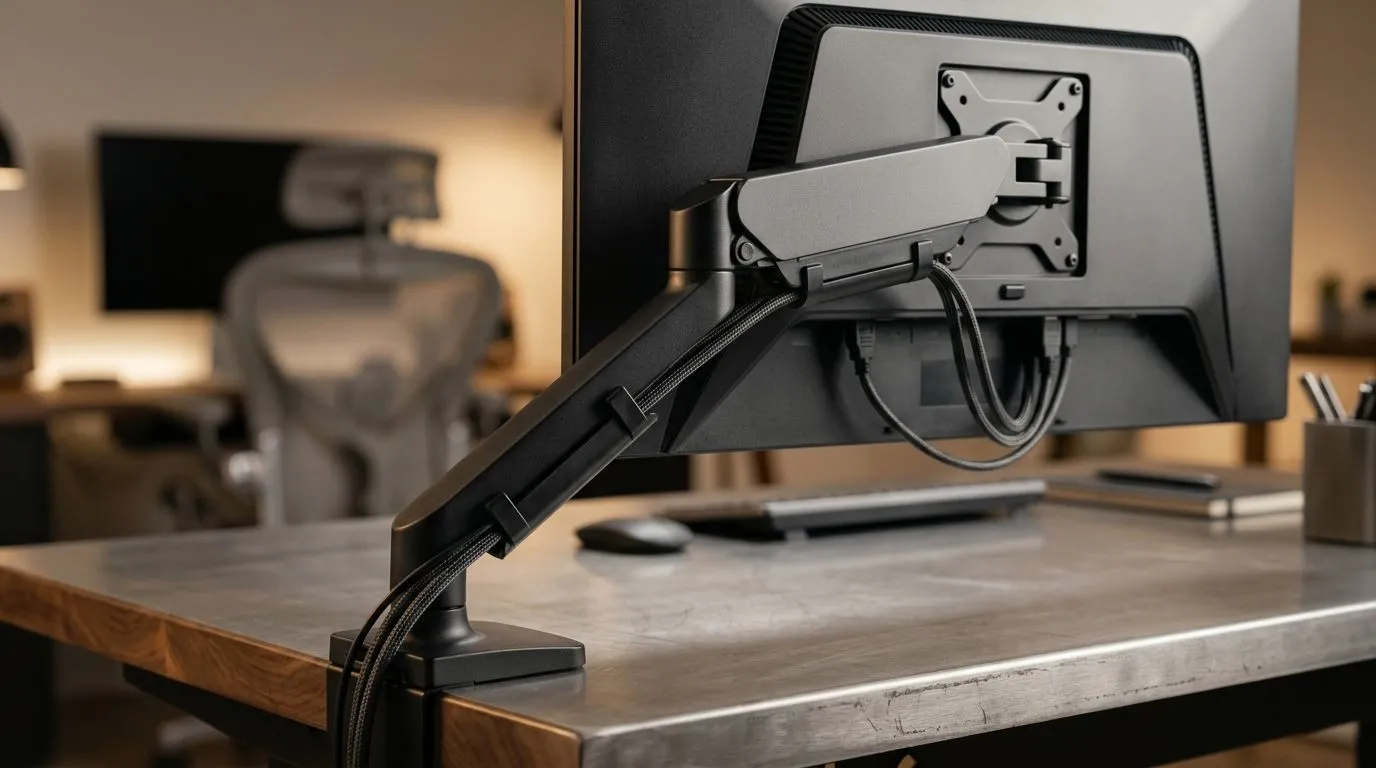
A messy desk kills the vibe fast. Wires creep across the surface. Monitors sit too low. Your mouse space shrinks. If you game, work, or both, a cleaner layout instantly feels better… and looks far more premium. That’s where smart monitor mounting and cable routing come in. With the right setup, you free space, improve posture, and make your rig easier to live with every day ⚡
A good desk setup is not just about style. It changes how you use your space. A mounted screen can create more room for a keyboard, mouse, controller, and even a notebook. It also helps you position the panel at a better height. That matters when you’re sitting through long sessions.
Cable routing helps too. Instead of cables dragging across the desk or hanging loose behind it, you guide them into a clean path. The result feels calmer. It also makes upgrades less painful later. Need to swap a monitor? No stress. Want to add a docking station? Easy.
If you’re building a proper gaming corner, the desk itself matters as much as the hardware. Browse a dedicated gaming desk to start with a solid base.
Start with the monitor position. Your screen should sit roughly at eye level. That keeps your neck from tilting down all day. If your desk is deep enough, push the monitor a little further back. You’ll usually get a more comfortable viewing distance too.
Next, think about the mounting method. If your monitor supports VESA mounting, an arm or bracket can make a huge difference. It gives you more flexibility for height, tilt, and alignment. That flexibility is useful in shared spaces, small rooms, and multi-monitor setups.
Cable routing should happen in layers. Keep power cables separate from signal cables where possible. Use Velcro ties instead of hard plastic when you know you’ll change things later. Run cables along the back edge of the desk, then down a single leg or channel. That simple habit keeps the build tidy and easier to maintain.
For a more premium finish, some desks pair especially well with specific brands. If you like clean lines and a sturdy feel, have a look at AutoFull gaming desks. If you want something with a more lifestyle-forward design, Arozzi gaming desks are worth a look. For a more budget-conscious route, check Nitro gaming desks.
Mount your monitor first, then route cables second. If you do it the other way around, you often end up redoing the whole cable path once the screen height changes.
Before you start fastening anything, unplug everything and lay the cables on the desk. Match each cable to its destination. Power, HDMI or DisplayPort, USB, and audio should each have a clear path. This takes a few minutes, but it prevents spaghetti later.
A simple setup usually works best:
If you use dual screens, align them before tightening anything. Even a small height difference can be distracting. You notice it most during gaming, video calls, and late-night browsing.
South African homes often deal with compact rooms, shared desks, and the odd power setup challenge. That makes efficient space use even more important. A well-mounted monitor and tidy cable path can help a smaller room feel more organised.
It also makes cleaning simpler. Dust is a real issue in many setups. Fewer loose cables means fewer places for grime to collect. That’s a small detail, but it matters when your PC lives in a warm room for most of the year.
If you are buying a new desk, look beyond the photos. Check depth, material, weight support, and whether the layout suits your gear. A proper gaming desk can save you from awkward upgrades later. It’s easier to build around a strong foundation than to patch a weak one.
The best desk setup is the one that works every day. Not just on day one. Good monitor mounting helps your posture and opens up space. Clean cable routing reduces stress and keeps your rig looking intentional. Together, they make your desk feel like a place you want to spend time in.
If you’re planning an upgrade, start with the desk. Then build out the rest. Small changes stack up fast. And once you’ve lived with a tidy setup, it’s hard to go back to cable chaos ✨
Ready to Find Your Perfect Match? The Mac vs Windows debate is complex, but for maximum power, choice, and value in South Africa, Windows is hard to beat. Explore our massive range of laptop specials and find the perfect machine to conquer your world.
Monitor mounts free up valuable desk space, provide better ergonomic viewing angles, and allow for height adjustments to reduce neck and eye strain.
Begin by grouping cables by device, using cable sleeves or ties, and routing them through the monitor arm channels or under-desk trays to hide them from view.
Most modern monitors are VESA compatible. Check the back of your display for a four-hole screw pattern; if present, it can be mounted to a standard monitor arm.
Use adhesive cable clips along the underside of the desk frame or utilize a dedicated cable management box to keep power strips and excess slack hidden.
While it doesn't boost hardware speed, proper cable routing improves airflow around your components and makes upgrading or cleaning your PC much easier.
Consider the weight of your monitor, the screen size, and your desk thickness. Ensure the mount supports your specific VESA pattern and weight requirements.
Top Marvel Rivals Settings for RTX 5060 Ti: FPS picks evaluated on performance, value & SA availability with current Rand pricing from Evetech.
Read more
Top Valorant Settings for RTX 5070: FPS Optimisation picks evaluated on performance, value & SA availability with current Rand pricing from Evetech.

RDNA 3.5 Graphics in Ryzen AI 400? Can You Game. Plain-English explanation of what it means, why it matters & how it affects your buying decisions in SA.

GPU Price Index : December Report. Current stock data & price tracking for SA buyers. See what is available and where prices are heading.

RX 9070 XT Elden Ring Nightreign at 4K: FPS. Real-world benchmark data, FPS numbers & performance analysis. What SA gamers can actually expect.

Core i5-14600K + B760 + RTX 5060 Build Under. Full parts list, Rand pricing & expected performance. Build confidently with SA-available components.

RX 7600 Apex Legends at 4K: FPS Benchmark. Real-world benchmark data, FPS numbers & performance analysis. What SA gamers can actually expect.

RX 7900 XTX GTA 6 at 4K: FPS Benchmark & Optimal. Real-world benchmark data, FPS numbers & performance analysis. What SA gamers can actually expect.

Head-to-head comparison of RTX 5070 vs RX 9070 XT: Gaming Performance for SA gamers. Performance benchmarks, Rand pricing & which delivers better value.

Top RTX 5070 Under R25,000 picks evaluated on performance, value & SA availability with current Rand pricing from Evetech.
Core i5-14600K + B760 + RTX 5060 Build Under. Full parts list, Rand pricing & expected performance. Build confidently with SA-available components.

Top Monitor for RX 9070: Resolution & Refresh Rate picks evaluated on performance, value & SA availability with current Rand pricing from Evetech.

Valorant Settings on RX 9060 XT: Performance. Real-world benchmark data, FPS numbers & performance analysis. What SA gamers can actually expect.