


Dedicated Media Keys for Streamers: Improve Workflow Fast
Dedicated media keys give streamers one-touch control to mute, switch scenes, clip highlights, and adjust audio — cutting task time and boosting consistency 🎛️⚡
Read moreBest multi-device keyboard checklist: - Compare Logitech K650, K580 and K780 by typing, battery, and multi-device switching; - Recommend top pick for work or study; - Quick buying tips and verdict ✅
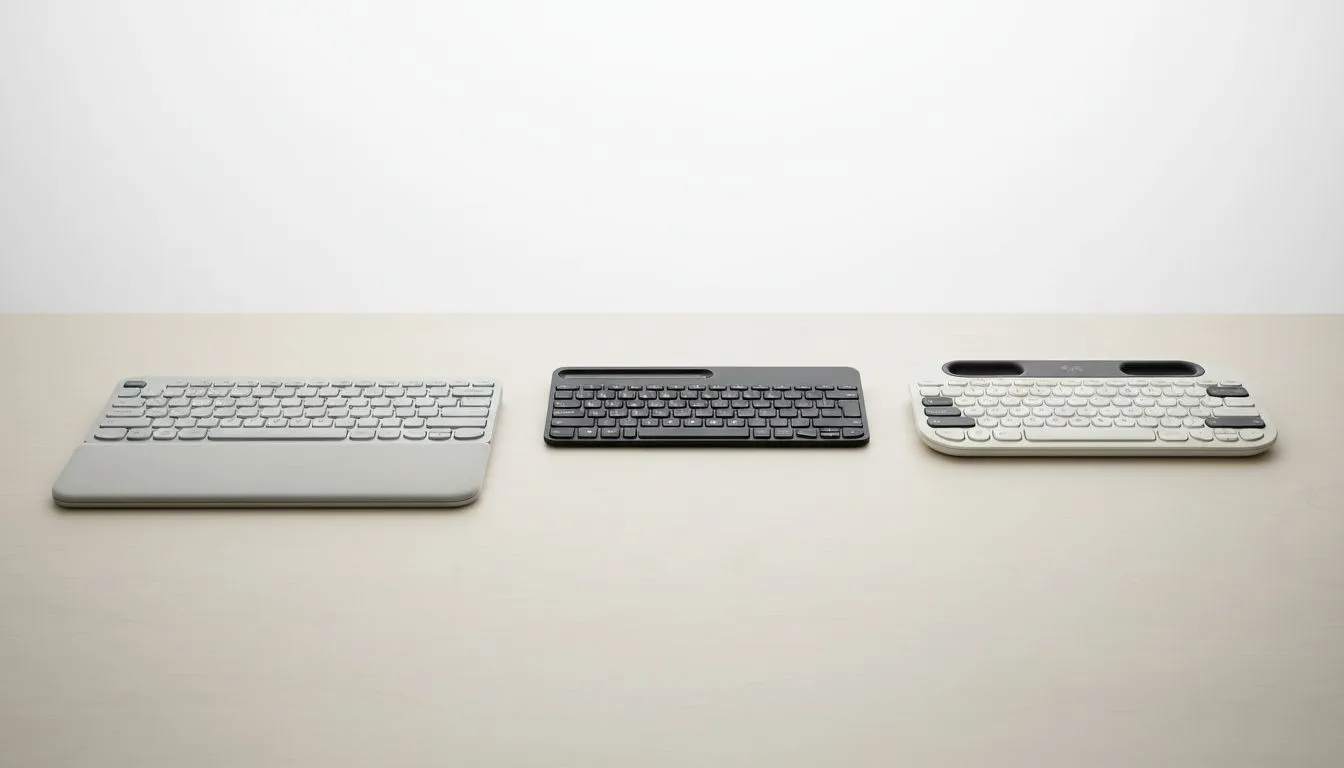
Tired of swapping cables every time you switch from your work laptop to your gaming rig? In South Africa, our desks are getting crowded with multiple screens and devices. Finding the best multi-device keyboard is no longer a luxury... it is a productivity necessity. Whether you are grinding through emails or managing a Discord chat on your tablet, Logitech’s K-series offers a solution for every budget. ⚡
Choosing between the K650, K580, and K780 depends entirely on your desk space and how you type. While many users hunt for the best gaming keyboard deals to save a few Rands, a dedicated productivity deck offers features that gaming boards often skip... such as dedicated OS-switching keys and integrated device cradles.
The Logitech K650 is designed for those who spend eight hours a day behind a screen. It features a deep, integrated palm rest and cushioned keys that make long typing sessions feel effortless. If you are looking for the cheapest gaming keyboard in South Africa that can still handle a spreadsheet, the K650 offers incredible value without sacrificing build quality. It uses Bluetooth or the Logi Bolt receiver to keep your connection stable even in "noisy" wireless environments.
Use the Logi Options+ app to remap the F-keys on your K-series keyboard. You can set specific shortcuts for South African accounting software or creative suites, allowing you to mute your mic or take a screenshot with a single tap across all connected devices.
If your desk is a bit cramped, the K580 is the minimalist's dream. It is ultra-slim, quiet, and features a built-in phone cradle at the top. This allows you to prop up your smartphone right above your keys. Many professionals prefer picking up a keyboard and mouse combo in this style to keep their aesthetic clean and cord-free. The K580 allows you to jump between two devices instantly with the Easy-Switch buttons.
The K780 is the powerhouse of the group. It features distinct circular keys and a solid rubber cradle that can hold even a large iPad Pro or a heavy tablet. Unlike basic wired keyboards that tether you to one spot, the K780 supports up to three devices simultaneously. It feels premium, stays planted on your desk, and includes a full number pad which is essential for data entry or macro mapping.
When comparing these three, the "best" depends on your environment. The K650 is for comfort lovers, the K580 is for those on the move, and the K780 is for the ultimate multi-tasker. While some still prefer wireless options for the portability, all three of these Logitech models ensure you stay connected to your phone, tablet, and PC without the clutter. 🔧
Ready to Find Your Perfect Match? Juggling multiple devices shouldn't be a struggle. Whether you need the comfort of the K650 or the versatility of the K780, we have the stock to level up your workspace. Explore our massive range of keyboard specials and find the perfect deck to conquer your daily tasks.
The Logitech Signature K650 delivers the softest, cushioned typing feel; K780 is bulkier and K580 is slimmer. Many users cite the K650 for comfort.
K780 shines at multi-device switching with dedicated Easy-Switch keys; K650 and K580 handle up to three devices reliably via Bluetooth.
The Logitech Signature K650 is the quiet Bluetooth keyboard choice with low-profile, dampened keys ideal for study or open-plan offices.
K580 and K780 offer long battery life measured in months to years; the Signature K650 is also efficient. See battery life K650 K580 K780 for exact figures.
All three support Mac and Windows layouts, but the K780 includes device-specific key legends and pairing tips for seamless multi-device use.
The K580 is the most compact, slim full-size option and works well when you need a number pad without a large footprint.
For study and remote work pick the Signature K650 for comfort, K580 for compact setups, or K780 if you need robust multi-device switching and a cradle.
Dedicated media keys give streamers one-touch control to mute, switch scenes, clip highlights, and adjust audio — cutting task time and boosting consistency 🎛️⚡
Read more
PBT vs ABS keycaps: Clear, local guide for South African gamers—compare feel, sound, durability and where to buy. Find the best material for your budget and playstyle 🎮🇿🇦
Read more
- Multi-Function Digital Dial: define benefits - Show gamer setups and macros - Offer buying and setup tips Multi-Function Digital Dial puts programmable control at your fingertips for faster actions and smoother streaming. 🎮⚙️
Read more
- Explain benefits; - Show the science; - Compare options; - Recommend picks. Magnetic wrist rest for gaming cuts wrist strain and boosts comfort during long sessions 🕹️✨
Read more
best gaming keyboard South Africa: Learn how to pick a low-latency mechanical keyboard, choose switches, layout and budget for competitive play 🎮⚡
Read more
Best wireless keyboard and mouse combo for small desks — curated, space-saving picks that boost comfort and productivity in tight setups. Find low-profile layouts, compact mice, and reliable range to fit your compact workstation. 🖱️⌨️
Read more
Discover webcams that automatically adjust light and color for crystal-clear video calls 🎥✨. Boost your streaming quality today!
Read more
Discover webcams that blend into your workflow 🎯 Capture moments while you work, stream, or create. Upgrade your setup with smart, multitasking tech!
Read more Dedicated media keys give streamers one-touch control to mute, switch scenes, clip highlights, and adjust audio — cutting task time and boosting consistency 🎛️⚡
Read more PBT vs ABS keycaps: Clear, local guide for South African gamers—compare feel, sound, durability and where to buy. Find the best material for your budget and playstyle 🎮🇿🇦
Read more - Multi-Function Digital Dial: define benefits - Show gamer setups and macros - Offer buying and setup tips Multi-Function Digital Dial puts programmable control at your fingertips for faster actions and smoother streaming. 🎮⚙️
Read more - Explain benefits; - Show the science; - Compare options; - Recommend picks. Magnetic wrist rest for gaming cuts wrist strain and boosts comfort during long sessions 🕹️✨
Read more