


Call of Duty Warzone 2 Settings on RX 7600: Best Performance
Call of Duty Warzone 2 Settings on RX 7600. Real-world benchmark data, FPS numbers & performance analysis. What SA gamers can actually expect.
Read moreDo reclining gaming chairs improve back comfort? Discover how adjustable tilt features and lumbar support help reduce strain during your longest gaming marathons. 🎮💺
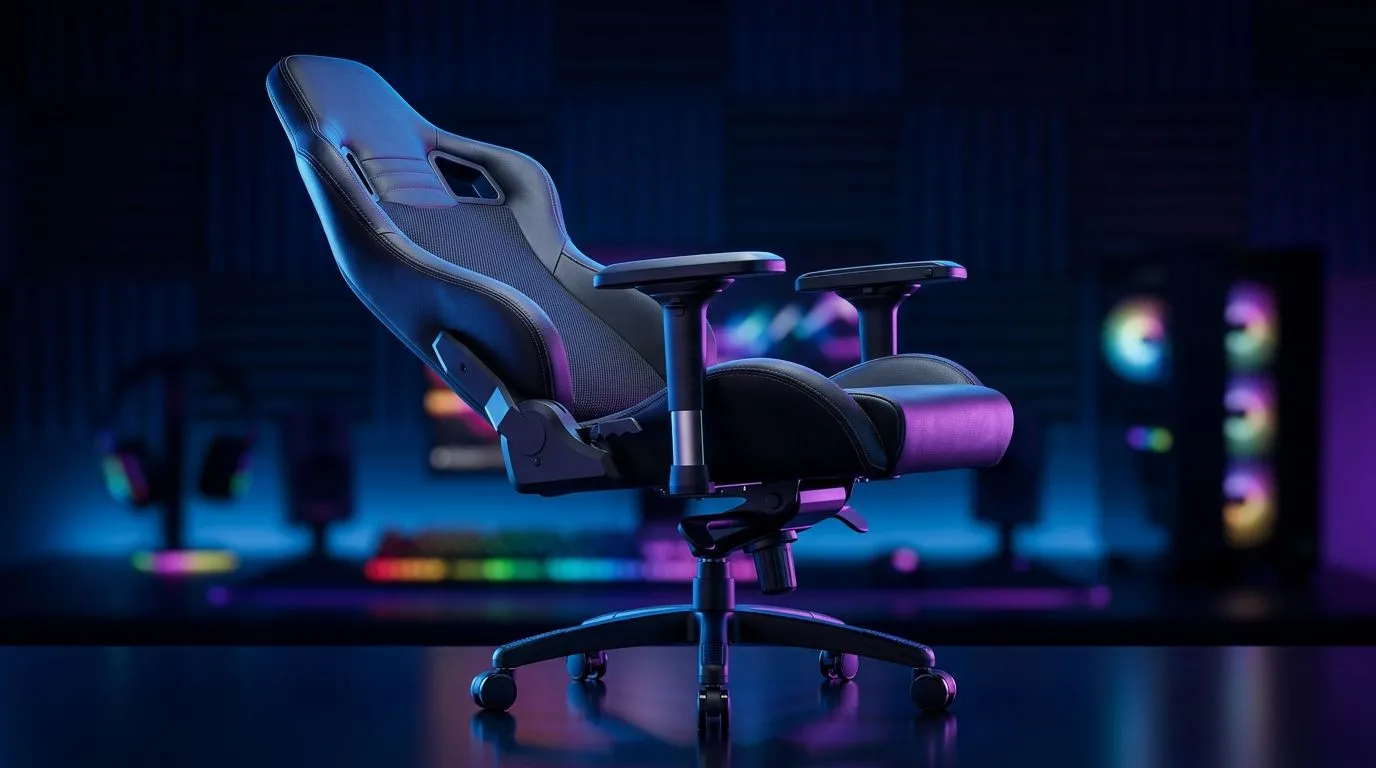
If your lower back starts complaining after a few ranked matches, you’re not imagining it. Long gaming sessions can put pressure on your spine, hips, and shoulders... especially if your chair is doing the bare minimum. A reclining gaming chair can help, but only if the rest of your setup supports healthy posture too. Let’s unpack what actually helps, what doesn’t, and how to choose wisely in South Africa 🔧
A recline function changes your sitting angle. That can reduce pressure on your lower back when used properly. In simple terms, a slight recline shifts some load away from your spine and can feel more relaxed than sitting bolt upright for hours.
But there’s a catch. Reclining is not the same as proper support. If the chair has weak lumbar support, poor cushioning, or a shallow seat, the recline may feel comfy at first and still leave you stiff later.
The best setup is usually a chair that lets you:
You want a backrest that moves smoothly and holds position. If it flops back too far, posture often gets worse, not better.
A good chair should let your feet rest on the floor or a footrest. If your feet dangle, your lower back may take more strain over time.
Lumbar support matters more than flashy stitching. Some chairs include a cushion... others use built-in contouring.
A lot of buyers focus on recline angle, but that’s only one piece of the puzzle. Seat height, armrest position, seat depth, and cushion density all influence comfort.
For longer sessions, these basics usually matter most:
If you’ve ever moved from a cheap office chair to a properly fitted gaming chair, you know the difference fast. The first hour feels fine on almost anything. The fourth hour tells the truth.
South African gamers often mix work, study, and play at the same desk. That makes comfort more important than looks.
Here’s the practical approach:
A chair alone won’t fix a bad desk. Your arms should rest comfortably while typing or using a mouse. If your desk sits too high, your shoulders will tense up.
Even a top-tier chair can’t beat movement. Stand up every 45 to 60 minutes, roll your shoulders, and reset your posture.
Some chairs include one. If not, a small cushion can help fill the gap in your lower back.
Use your chair’s recline for recovery, not slouching. A small lean-back during loading screens can ease pressure, but keep your lower back supported and your feet grounded for the best results.
A chair can only do so much if your battlestation is fighting you. That’s why many gamers end up upgrading both the chair and the surface they use.
If your current desk is cramped, unstable, or too shallow, a better seating position may still feel awkward. A wider and more stable workspace helps you keep everything aligned... monitor, keyboard, mouse, and elbows.
You can browse gaming desk options for a cleaner setup if you want to improve the full ergonomics picture. For buyers who prefer specific brands, AutoFull desk options, Arozzi desk options, and Nitro desk options can help narrow the search.
Yes, sometimes. A reclining gaming chair can improve comfort during long sessions if it has proper lumbar support, sensible cushioning, and adjustable ergonomics. It is not a magic fix, though. If your posture is poor, your desk is wrong, or you never move, the chair won’t save your back.
The smartest move is to treat comfort like a system:
That’s how you reduce fatigue over time, not just for the first hour of play.
If you’re shopping in ZAR, focus on value rather than the loudest spec sheet. A chair that fits your body well is usually worth more than one packed with features you won’t use.
Before you buy, ask yourself:
If the answer is mostly yes, you’re on the right track. Small comfort upgrades make a big difference when you game often. And in South Africa, where every rand matters, buying the right setup the first time is usually the smarter play 🚀
Ready to Find Your Perfect Match? The Mac vs Windows debate is complex, but for maximum power, choice, and value in South Africa, Windows is hard to beat. Explore our massive range of laptop specials and find the perfect machine to conquer your world.
Yes, they help by allowing you to shift your weight and change your posture, which prevents muscle stiffness and spinal fatigue during extended use.
Look for adjustable lumbar pillows or integrated spinal support systems that maintain the natural curve of your lower back while you sit.
While not strictly required, a reclining feature is highly beneficial as it enables micro-breaks for your spine, reducing pressure on your discs.
Sitting for more than two hours without adjusting your position can lead to discomfort; reclining chairs help mitigate this by facilitating movement.
Racing-style gaming chairs offer superior back comfort if they feature high-quality foam and adjustable tilt, making them great for immersive gaming.
The tilt mechanism allows you to find your 'sweet spot' for posture, distributing your body weight evenly and reducing strain on your shoulders and neck.
Call of Duty Warzone 2 Settings on RX 7600. Real-world benchmark data, FPS numbers & performance analysis. What SA gamers can actually expect.
Read more
GTA 6 Settings on RTX 5070 Ti: Performance. Real-world benchmark data, FPS numbers & performance analysis. What SA gamers can actually expect.
Read more
Top GPU Setup for Accounting Students picks evaluated on performance, value & SA availability with current Rand pricing from Evetech.
Read more
When Will the RTX 6090 Launch in South Africa Detailed answer with SA data, expert analysis & practical recommendations for local buyers.

Top Valorant Settings for RTX 5070: FPS Optimisation picks evaluated on performance, value & SA availability with current Rand pricing from Evetech.

RDNA 3.5 Graphics in Ryzen AI 400? Can You Game. Plain-English explanation of what it means, why it matters & how it affects your buying decisions in SA.

GPU Price Index : December Report. Current stock data & price tracking for SA buyers. See what is available and where prices are heading.

Core i5-14600K + B760 + RTX 5060 Build Under. Full parts list, Rand pricing & expected performance. Build confidently with SA-available components.

RX 7600 Apex Legends at 4K: FPS Benchmark. Real-world benchmark data, FPS numbers & performance analysis. What SA gamers can actually expect.

RX 7900 XTX GTA 6 at 4K: FPS Benchmark & Optimal. Real-world benchmark data, FPS numbers & performance analysis. What SA gamers can actually expect.

Head-to-head comparison of RTX 5070 vs RX 9070 XT: Gaming Performance for SA gamers. Performance benchmarks, Rand pricing & which delivers better value.

Top Laptop with Ryzen 5 + RTX 4090 Laptop: Picks picks evaluated on performance, value & SA availability with current Rand pricing from Evetech.

Top Budget GPU for Marvel Rivals picks evaluated on performance, value & SA availability with current Rand pricing from Evetech.

Valorant Settings on RTX 5070: Performance. Real-world benchmark data, FPS numbers & performance analysis. What SA gamers can actually expect.

Top Budget GPU for Assassins Creed Shadows picks evaluated on performance, value & SA availability with current Rand pricing from Evetech.