

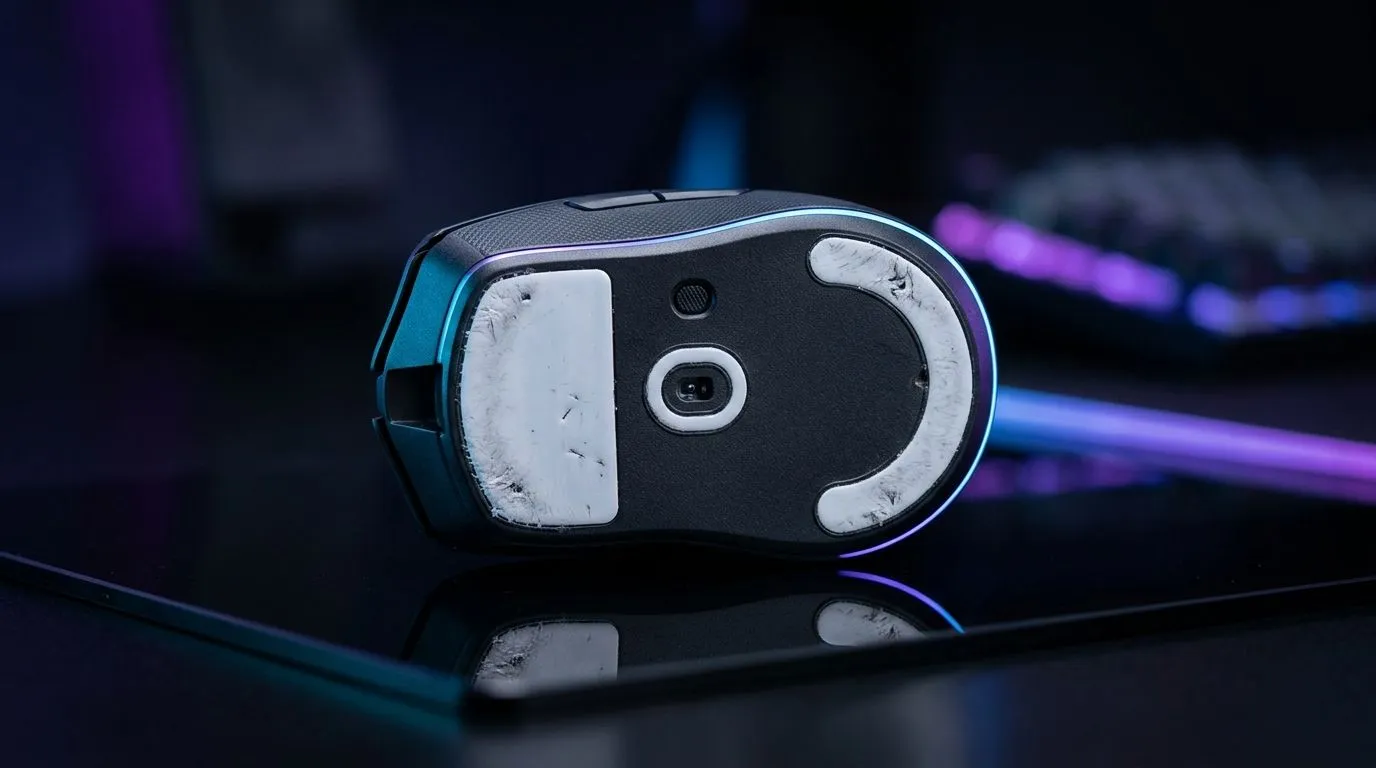
Mouse drag and stutter fix: worn skates and replacement timing for smoother play 🔧
If your mouse feels sticky, heavy, or a little “jumpy” across the desk, the problem may not be your DPI settings at all. It could be worn skates. For South African gamers, that means missed flicks, shaky tracking, and aim that feels off in the middle of a clutch. The frustrating part? It often creeps in slowly... until one day you notice the drag.
Mouse drag and stutter fix: how worn skates affect performance
Mouse skates, also called feet, are the small glide pads on the underside of your mouse. They reduce friction so the sensor can track smoothly. When they wear down, the mouse may feel uneven, scratchy, or inconsistent. That is when the drag starts. In fast shooters, even a tiny change in glide can make your aim feel less controlled.
A quick check helps. Lift your mouse and inspect the feet. If they look flat, shiny, chipped, or uneven, replacement is worth considering. If the glide feels different on one side, that can also create the sense of stutter.
Mouse drag and stutter fix: replacement timing that actually makes sense
There is no universal replacement schedule, because it depends on how often you play, your mousepad surface, and how hard you press. Heavy daily use wears skates faster. Rougher mousepads can also shorten lifespan.
A practical rule is simple:
- Replace skates when glide feels rough or inconsistent
- Replace them when the edges become visibly worn
- Replace them if the mouse starts feeling slower on clean surfaces
- Replace them if you notice sensor tracking feels less predictable
If you play a few hours every night, check them every month or two. If you are a weekend grinder, inspect them before the next big session. Small maintenance now can save a bad ranked night later ⚡
Mouse drag and stutter fix: what to do before buying a new mouse
Sometimes the mouse itself is fine. A dirty sensor, dusty pad, or worn cable can mimic drag. Before you rush to replace hardware, clean the underside, wipe the sensor area gently, and test on a different surface.
If the issue persists, browse Evetech’s mouse accessories for replacement-friendly options. If your current unit is getting old and the buttons or sensor are also losing consistency, it may be smarter to compare a wired mouse or a wireless mouse depending on your setup and desk space.
Mouse drag and stutter fix: choosing the right upgrade path
A new mouse is not always the answer, but sometimes it is the cleanest one. If you want tighter latency and no charging worries, wired remains a strong pick for competitive play. If you value a cleaner desk and freedom of movement, wireless has become far more practical than it used to be.
For shoppers comparing options, start with Evetech’s best gaming mouse deals to see current value, then check the wider gaming mouse range if you want to match shape, grip style, and budget. In South Africa, that matters... because the right mouse is the one that fits your hand and your wallet.
Quick Glide Check ✨
If your mouse feels scratchy, test it on a clean sheet of paper for 10 seconds. If the glide feels smoother there than on your mousepad, the pad or the skates may be the culprit.
Mouse drag and stutter fix: a simple maintenance habit for better aim
The best approach is routine, not panic. Check skates, clean the mouse, and pay attention to glide changes before they become obvious. That habit keeps performance stable and helps you avoid replacing hardware too early. It also makes your upgrade decisions smarter, which is especially useful when you are shopping in ZAR and want every rand to pull its weight.
Ready to Find Your Perfect Match? The Mac vs Windows debate is complex, but for maximum power, choice, and value in South Africa, Windows is hard to beat. Explore our massive range of laptop specials and find the perfect machine to conquer your world.











