



850W PSU Planning for RTX 5080 Super Builds in SA
850W for RTX 5080 Super needs a full-build check, not a simple yes. Review GPU guidance, CPU draw, transient load, connectors, PSU quality, and upgrade plans before deciding.
Read moreDirect mouse answer: Mouse not keeping up with your work? Everything that matters about dual-mode 2.4GHz + BT 5.0: DPI behaviour, channel switching, battery curves and per-app button mapping. Covers when 2.4GHz USB wins (low-latency desk) and when BT 5.0 wins (laptop, d
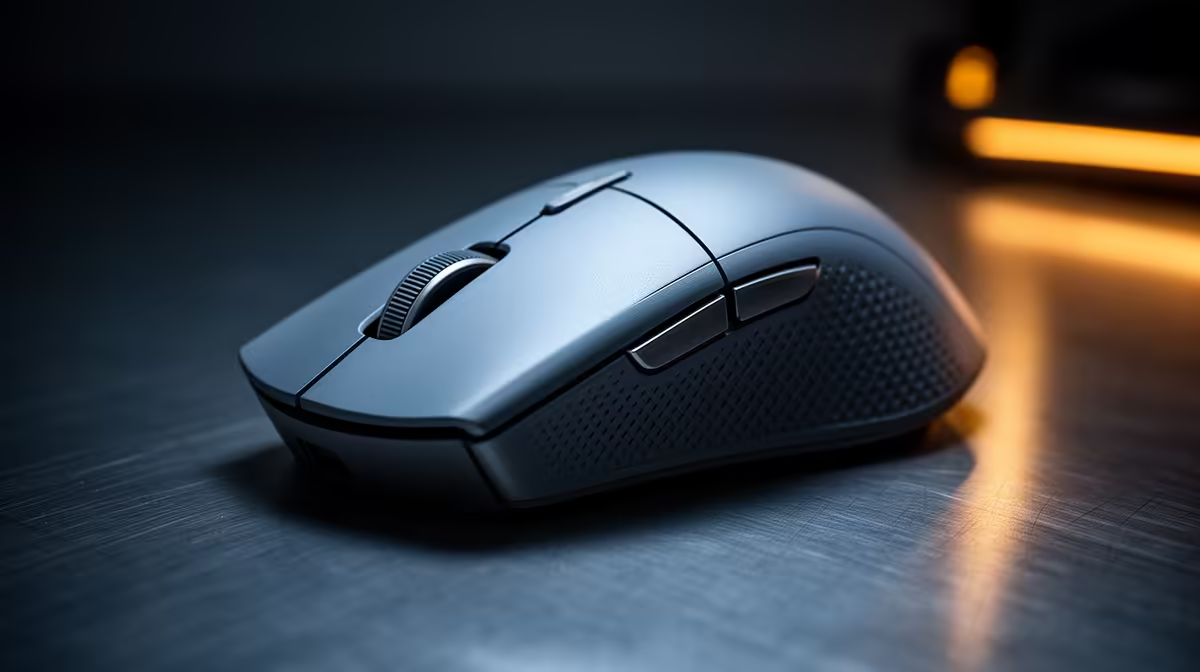
Bluetooth 5.0 means the mouse uses your device's built-in Bluetooth radio, no dongle needed, with latency around 8 to 15ms. 2.4GHz means the mouse includes a dedicated USB receiver that creates a private wireless channel with under 1ms latency. Both operate in the same 2.4GHz radio band but in very different ways.
When a mouse spec sheet lists 2.4GHz wireless, it refers to a proprietary connection between the mouse and a bundled USB nano-receiver, not standard Bluetooth. The manufacturer programs a private radio protocol between the two units, typically with frequency hopping to avoid Wi-Fi and Bluetooth traffic. This private channel delivers polling rates of 125Hz or higher, meaning the receiver checks for mouse position updates 125 times per second minimum, with gaming models going up to 8,000Hz. The result is cursor movement that feels instantaneous. The dongle is small enough to leave permanently inserted in a laptop or desktop, requiring no pairing setup beyond plugging it in for the first time. The limitation is that the dongle occupies a USB-A port, though some receiver technologies like Logitech's Logi Bolt support up to six devices per receiver.
Bluetooth 5.0 is a published open standard that any device with a compatible radio can join. Your laptop, phone, tablet, and headphones all use the same Bluetooth antenna. A Bluetooth mouse connects to this shared infrastructure rather than a private channel. Bluetooth 5.0 improves on earlier versions with higher theoretical throughput and longer range, but the shared spectrum and standard stack still introduce more latency than a private 2.4GHz link. The major advantage is zero dongle requirement: a Bluetooth mouse works on any Bluetooth-enabled device immediately after pairing, making it the preferred choice for ultrabooks with limited ports and for users who pair to multiple operating systems.
If you use one Windows desktop or a docked laptop with available USB ports, the 2.4GHz dongle delivers better latency and connection stability. If you use a slim ultrabook where every port counts, or you regularly switch between a PC and an Android tablet, Bluetooth 5.0 removes all dongle management. Dual-mode mice combining both technologies, available in the R700 to R1,200 range at Evetech, cover every scenario.
Bluetooth 5.0 and 5.1 mice offer noticeably better connection stability than Bluetooth 4.0 or 4.2 models. If a wireless mouse listing just says Bluetooth without specifying the version, check the full spec sheet. Older Bluetooth mice on clearance may be 4.0 units with higher base latency and less reliable reconnection behaviour.
Rarely. Modern 2.4GHz mice use frequency-hopping spread spectrum to avoid active Wi-Fi channels. Some interference can occur if the dongle is very close to the router, but placing the dongle on the desk rather than at the back of a tower resolves it in almost every case.
Bluetooth devices enter a low-power sleep state after inactivity to save battery. When you move the mouse, it wakes and reconnects, which takes one to three seconds. Disabling power management for the Bluetooth adapter in Device Manager eliminates this pause.
Bluetooth 5.0 requires only the laptop's built-in Bluetooth, which virtually all modern laptops include. The 2.4GHz dongle requires a USB-A port or a USB-C adapter if the laptop has USB-C only. Bluetooth is truly adapter-free; 2.4GHz always needs the receiver inserted.
Confused about which wireless standard suits your setup? Evetech's range includes Bluetooth, 2.4GHz, and dual-mode wireless mice with clear specs and local expert support to help you pick the right one.
850W for RTX 5080 Super needs a full-build check, not a simple yes. Review GPU guidance, CPU draw, transient load, connectors, PSU quality, and upgrade plans before deciding.
Read more
FPS drops blamed on a wireless gaming headset often point to input, driver, USB, network, or system-load checks. Use a quick SA-friendly troubleshooting flow to isolate software, firmware, thermals, storage, and game settings before replacing
Read more
1440p is the sweet spot for Polokwane gamers because it balances sharper visuals with manageable GPU demand. Compare refresh rate, graphics card tier, monitor size, and game settings before choosing a display.
Read more
240Hz monitors are mainstream in SA esports because smoother motion and lower input feel matter in Sandton matches. See how GPU frame rates, panel choice, desk setup, and local budget decide whether 240Hz is a smart upgrade from 144Hz.
Read more
4K monitors still cost more for gamers because resolution, refresh rate, panel quality, and GPU demands raise the bar. Polokwane buyers should compare screen size, ports, adaptive sync, and whether 1440p is a better fit.
Read more
Edenvale gpu price pressure questions need cautious SA context because pricing can move with availability, exchange rates, specs, and warranty support. Treat the trend as a planning signal, not a fixed price promise.
Read more
Cyber Monday gaming chair is a cautious guide for seasonal tech deal planning. Compare spec priorities, timing, warranty support, and realistic SA price checks for SA buyers without assuming live prices, availability, or exact benchmark results.

Pre-Black Friday wired gaming mouse buying planning should focus on shape, specs, warranty, and usual price bands. Use this SA guide to shortlist sensible options before deal periods without assuming live discounts.

ATX 3.1 vs ATX 3.0 for Competitive Esports comes down to GPU power connectors, PSU quality, cable routing, headroom, and upgrade plans. SA buyers should match the choice to their setup instead of assuming one option always wins.

Wi-Fi 6E vs Wi-Fi 6 depends on Couch co-op gaming needs, platform limits, and budget fit. Compare compatibility, latency, upgrade path, and real setup constraints before choosing for an SA build.

How to fix FPS drops on AM5 motherboard starts with BIOS, chipset drivers, cooling, and memory stability. South African gamers can work through power, EXPO, refresh-rate, overlay, and game-setting checks before spending on new hardware.

RX 9070 XT build frame pacing issues needs a step-by-step check before replacing parts. Review drivers, settings, thermals, power, background apps, display limits, cables, and game options before changing hardware.

Low fps on rtx 5080 build in south africa usually needs a settings, driver, thermal, or power check first. Work through safe SA troubleshooting steps before replacing parts or assuming a full upgrade.

1440p is the sweet spot for Mbombela gamers because it sharpens detail without demanding 4K-level GPU power. SA buyers should weigh monitor refresh rate, graphics card tier, desk size, and game mix before moving up from 1080p.
850W for RTX 5080 Super needs a full-build check, not a simple yes. Review GPU guidance, CPU draw, transient load, connectors, PSU quality, and upgrade plans before deciding.

Bluetooth headset or 2.4GHz wireless headset decisions in SA hinge on latency, device support, battery, and dongle access. Gamers should match the headset to competitive play, couch use, calls, and platform ports.
FPS drops blamed on a wireless gaming headset often point to input, driver, USB, network, or system-load checks. Use a quick SA-friendly troubleshooting flow to isolate software, firmware, thermals, storage, and game settings before replacing

ATX 3.1 vs ATX 3.0 for streaming on Twitch and YouTube Difference explained is mostly about compatibility, budget, upgrade path, and setup fit. SA buyers should check device support and real needs before expecting a clear win from either option.