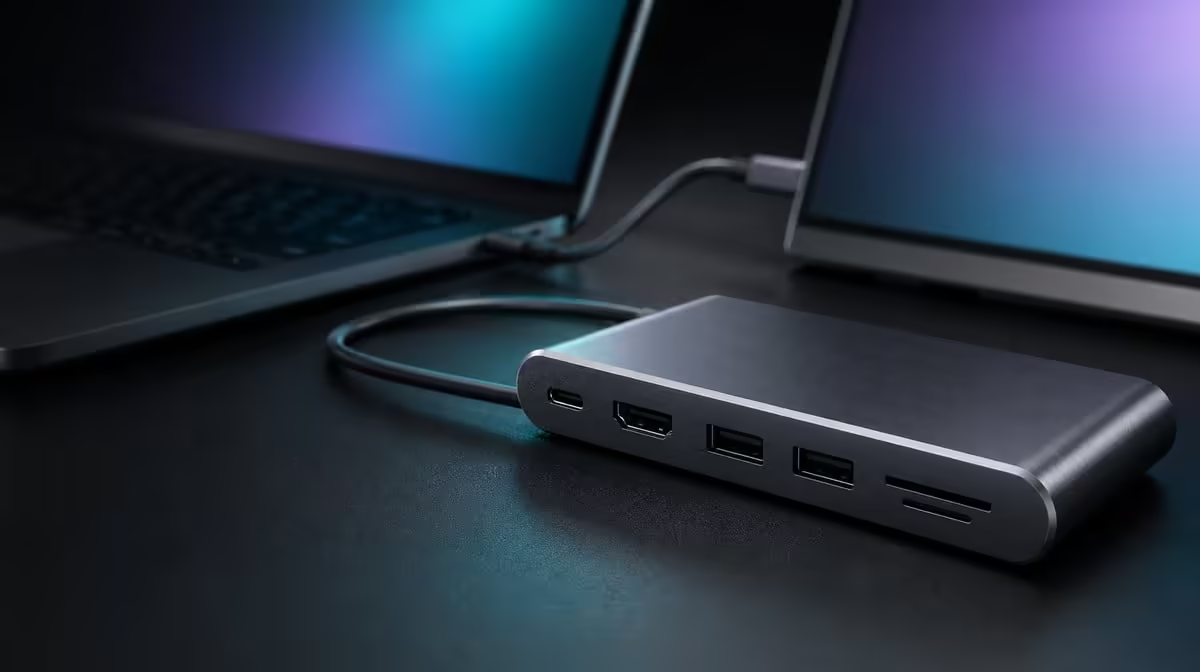
A sub-R1,000 budget is generous only if it purchases compatible connections rather than decorative extras. To choose a multiport USB-C hub under R1,000, protect the host-to-hub route first, then make display, charging, network, and storage features justify each part of the spend.
Quick Answer
Under R1,000, buy the port mix the laptop supports and the workspace uses, with special attention to video output and charging demand. The UPERFECT UExtend costs R399, leaving R601 below the ceiling while providing 4K output, 60W passthrough, 1000Mbps Ethernet, SD access, and two USB data ports.
💰 Keep the budget correction explicit
The UExtend is not close to the R1,000 limit: R399 is R601 under it. That price should become a comparison anchor, not a reason to buy without checking compatibility. A cheaper working route can outperform a costlier hub whose display or charging mode the host cannot use.
Review live USB hub choices when ready to buy. Keep the budget fixed while comparing current availability and exact functions, rather than raising the cap whenever another unused port appears.
🔍 Protect the essential connection first
List the laptop, monitor, charger, network, card, and USB devices. Confirm whether the host USB-C port sends display video and supports the intended power behaviour. The UExtend cannot add a source video mode that is absent, and its 60W figure cannot make a laptop accept more than the negotiated path supplies.
For the display, the hub states 4K output. The host, suitable cable, and screen must support the chosen mode together. For charging, compare the laptop's real demand with the 60W ceiling during the busiest normal session.
🌐 Price the network and storage jobs
Gigabit Ethernet earns money when the laptop often works beside a network cable. The port's 1000Mbps rating does not promise that every internet test reaches the number; local hardware, cabling, service, destinations, and traffic remain involved.
SD reading matters for a user who handles cards. Two USB data ports may be sufficient for a keyboard and drive, or too few for another desk. Compare the actual media and devices through the same representative transfer.
A buyer considering a more fixed connection centre can inspect Evetech's docking stations. A dearer option should solve a named gap such as another required connection or a different power need.
📊 Use a Rand-per-job decision
Mark each UExtend function as daily, weekly, occasional, or unused. Video, charging, wired network, SD, and the two data ports should receive weight according to the time or adapters they save. Do not assign equal value merely because the functions share one enclosure.
Then test the working routine. Connect compatible power, attach the host, establish the display, add Ethernet, and bring storage online separately. A repeated successful setup is stronger evidence of value than a theoretical count.
Evetech's gaming-accessories category can help identify what will occupy the USB ports. If the R399 hub serves every essential job, the remaining R601 does not need to be spent. If it misses one necessary role, compare alternatives around that role rather than around price alone.
Before purchase, ask:
- Which function fails the day if it is missing?
- Does the host support the intended display route?
- Is 60W suitable for the laptop under load?
- Will wired networking and SD access be used?
- Are two USB data connections enough?
This makes "under R1,000" a disciplined ceiling instead of a target to exhaust.
Test the R601 saving against missing work
Imagine the R399 UExtend is selected and the remaining R601 is left unspent. Does any essential display, charging, network, or storage task fail? If not, the saving is real. If a required job remains uncovered, the budget has not been solved merely because the price is low.
Run the same question against a more expensive candidate. Write the additional outcome beside the extra Rand. A larger charging ceiling, another connection, or different display arrangement deserves value only after it is confirmed and required.
Plan the host transition
Many buyers expect a hub to move between a personal and work laptop. Create a separate route for each host: video-capable USB-C socket, charging requirement, display mode, network profile, and attached devices. One laptop's successful setup does not prove another's.
Reconnect the UExtend between the two hosts and check whether the screen arrangement, Ethernet, and storage return without confusing a cable or port. If one machine needs a different power plan, keep the distinction documented rather than treating the hub as inconsistent.
Include safe storage handling in value
The SD reader and USB ports save adapters only when media can be inserted, copied, ejected, and removed without disturbing the station. Position the hub for access and complete a representative transfer from every storage type.
Record successful completion, stability and time using identical files. Let those results and the required port count decide which option remains under R1,000.
Finally, compare the full pack. Include the hub, charger, suitable display lead, Ethernet cable, card, and USB peripherals. A R399 device with a practical complete kit is better value than a nominally portable option whose required accessories do not fit the routine.
Compare value at three time horizons
For the first day, ask whether the hub connects every essential device. For the first month, count adapter swaps avoided and recovery problems encountered. For a future laptop, wait until its actual USB-C modes and charging needs are known.
This prevents speculative future proofing from consuming the under-R1,000 budget. A connection that serves today's real equipment can be valued now; an undefined later device cannot.
Keep network and internet language precise
The UExtend's Ethernet rating is 1000Mbps, but the service and destination remain separate. A buyer should not spend more because a different product implies it can overcome a slow internet plan.
Test the local wired route and the remote workload separately. If Ethernet is rarely available at the user's locations, reduce its weight and preserve the budget for a feature used more often.
End with a purchase-day check of the R399 figure and current availability. Do not make the shortlist permanent; keep the compatibility requirements permanent and apply them to the live options.
Keep a small portion of the under-R1,000 ceiling unassigned until the full setup has been tested. A suitable display lead, compatible charging cable, or safe cable-management solution may matter more than spending the remaining amount on hub features. This is not a fixed accessory prescription; it is a reminder to price the functioning chain.
After the desk passes, record the final total and which jobs the hub performs. The R399 unit should be credited for those results without implying that every buyer needs to consume the full budget.
Frequently Asked Questions
How far below R1,000 is the UExtend?
At R399, it is R601 below that spending limit.
Should unused budget be spent on extra ports?
No. Spend more only when a confirmed capability solves a real setup gap.
Can a budget hub still support 4K?
The UExtend states 4K output, subject to compatible host, cable, and display support.
Why does the laptop charging requirement matter?
The hub passes up to 60W, which may or may not suit the machine's normal demand.
Is fast USB given a numeric rate?
Test its two data ports with your normal devices and files.
Ready to keep the hub budget below R1,000 without losing the connections you need?
Compare Evetech's USB hub range by host compatibility and daily jobs, then let the unused budget stay unused.