


Some Windows 11 PCs are crashing in a small group of multiplayer games after the August update KB5121003. Reports name Arc Raiders, The Finals and Marvel Tokon: Fighting Souls, with symptoms ranging from a silent close to EXCEPTION_ACCESS_VIOLATION. The safest response is to confirm the affected build before changing a working system.
Quick Answer
The reports cover Windows 11 24H2 and 25H2 on builds 26100.9168 and 26200.9168. Microsoft is investigating a possible conflict involving inpoutx64.sys. Checking the installed build, saving the error and submitting feedback costs R0 and avoids an unnecessary rollback. Do not follow a blanket uninstall instruction: one captured article names KB5121003 as the cause but tells readers to remove a different update.
🧭 Confirm that this is the same fault
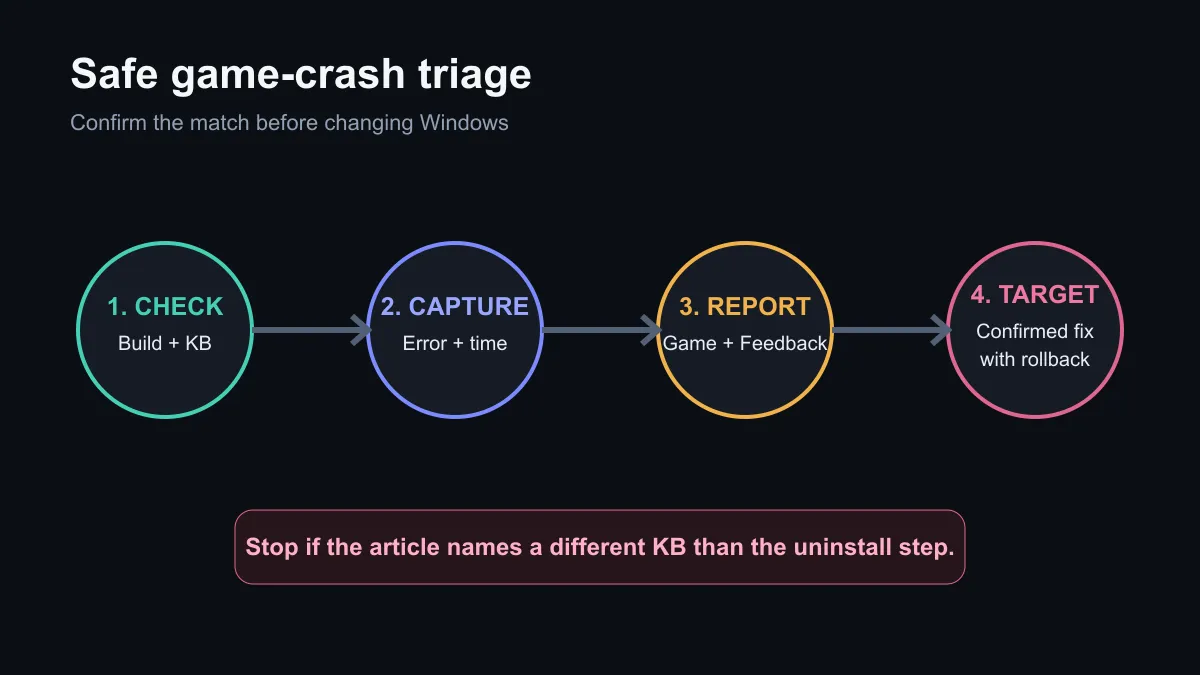
Open Windows Settings, check the system version and view the installed update history. Record the KB number and OS build before launching the affected game again. If it fails, note the time, exact message and whether Windows restarted, froze or returned to the desktop. A screenshot or Reliability Monitor entry gives support teams something concrete.
The issue is not reported across every game or every PC. Arc Raiders, The Finals and Marvel Tokon: Fighting Souls are the named examples. Version 26H1 was not listed among affected client systems in the captured reports. Similar crashes can come from graphics drivers, unstable memory, overlays, anti-cheat software or damaged game files, so the KB should not be blamed without a matching pattern.
🛡️ Use the low-risk steps first
Save work and restart once. Update the game through its launcher, check for developer notices, and submit the crash details through Feedback Hub. Keep Windows Security active. Avoid downloading replacement system files or third-party "fix" tools from unverified pages.
The Windows operating-system category helps when a machine needs a legitimate licence, but buying another licence will not repair an update conflict on an activated PC. The first troubleshooting pass should cost R0.
⚠️ Treat rollback advice as targeted, not universal
KB5121003 includes security changes, so removing it has a trade-off. The captured coverage is internally inconsistent: the story attributes the crashes to KB5121003 while its rollback text names KB5120708. That mismatch is enough to stop and verify through Windows Update, the game developer and Microsoft support before uninstalling anything.
If a developer publishes a temporary workaround, apply it only to the named game and preserve the original file or setting so it can be restored. Do not rename or delete a driver across the whole PC based on an unrelated forum comment. If the machine is used for work as well as play, schedule any rollback for a time when recovery media and backups are available.
🧰 Decide whether hardware is involved
A matching update-only failure does not justify replacing the PC. If crashes also occur in unrelated games or stress tests, inspect temperatures, memory stability and graphics drivers. The current gaming PC range is relevant only when the hardware itself no longer meets the workload. A gaming headset has no bearing on this fault, though disconnecting unnecessary USB devices can help isolate a broader driver conflict.
Keep the system unchanged when the named games work normally. If the fault matches, collect evidence, follow the game's official channel and wait for a confirmed patch or precise workaround. This is a limited compatibility report, not proof that the August update breaks every gaming PC.
Frequently Asked Questions
Which Windows versions are in the reports?
Windows 11 24H2 and 25H2 are named. Version 26H1 was not listed as affected.
Which games are involved?
The captured reports identify Arc Raiders, The Finals and Marvel Tokon: Fighting Souls.
Should everyone remove KB5121003?
No. The issue is limited, the update contains security changes, and published rollback wording is inconsistent.
What is the safest first action?
Confirm the installed build and KB, capture the error, restart once and report the problem before altering system files.
Troubleshooting a sudden game crash? Match the build and symptom first, then use only a developer or Microsoft-confirmed remedy.











