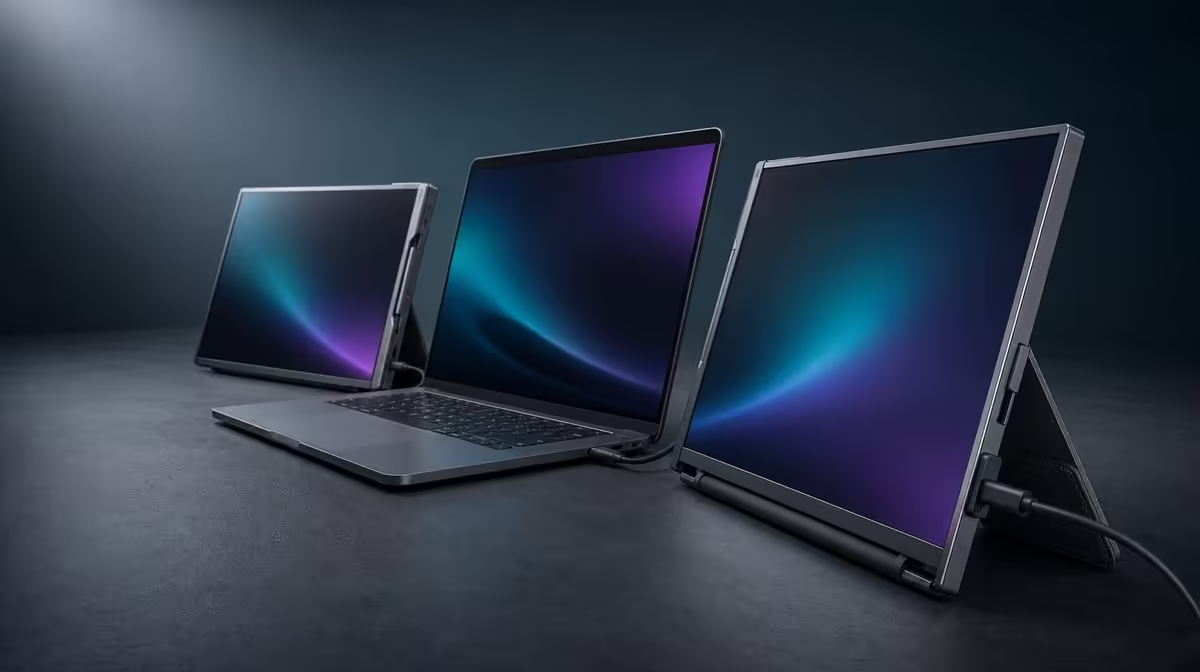
A dual portable monitor is a display system, connection plan and travelling support in one product. This dual portable monitor buying guide starts with the two panels and laptop companion, then checks independent content, host capability, built-in stability, folding and motion. The UPERFECT Delta anchors the process at R4,299.
Quick Answer
Choose a dual portable monitor by matching two 15.6-inch Full HD work areas to the tasks, confirming the laptop can run the intended USB-C path and testing the stand and folded unit in real locations. The R4,299 Delta offers independent IPS panels, one-cable use with compatible hosts, separate-device support, a built-in stand, 360-degree folding and 25ms response.
📐 Match panel area to the work
The Delta supplies two 1920 x 1080 displays. Assign a main task to one and reference, controls or communication to the other.
Use extended desktop for independent windows. Mirror mode is useful only when the same content needs to repeat.
Begin with matching scaling and native resolution. Add application zoom after the system baseline is stable.
Consider the 25ms response in motion-heavy work. It favours productivity, static tools and casual use over speed chasing.
Sketch the intended desktop before buying. Put the laptop in the centre or to one side, then label the two Delta panels with the applications they will hold. A plan such as document, research and communication is more useful than simply saying three screens. It also exposes a weak purchase case when the same two windows could be managed comfortably on the existing laptop.
Readability should be tested at the normal viewing distance. Full HD on 15.6 inches can create a useful compact work area, but the operating system's scale and each application's zoom still affect comfort. Start both panels with the same baseline, then adjust a specific application only when its interface needs it. This keeps window movement predictable across the pair.
Browse the Evetech portable monitor range to compare mobile screen formats.
🔌 Confirm every source
One USB-C cable can run both Delta panels only when the laptop supplies the required video and power path.
Name the approved port and test a clean connection, sleep, wake and reconnection. Do not rely on connector shape.
Treat that confirmation as a purchase gate, not a troubleshooting detail for later. Look up the laptop model and the capabilities of the exact port that will be used. If a machine has more than one USB-C connector, their functions can differ. The neatest one-cable desk therefore begins with host evidence rather than an assumption based on the plug.
Plan for the alternative arrangement as well. The Delta's independent screens can accept two separate compatible devices, one per panel. This is valuable when a person needs a work source beside a secondary device, but it is not the same as extending one laptop desktop. Draw both connection maps and choose the one that serves the daily routine.
Each independent panel can also show another device. Separate sources need their own compatible leads and desk arrangement.
Keep cable slack away from the folding hinge and stand. One-cable convenience should not create mechanical tension.
After the first successful setup, label or remember the working laptop port and cable route. Test what happens after the computer sleeps and after the assembly is disconnected for travel. A portable workstation that detects correctly only after repeated rearrangement can still cost time, so reconnection behaviour belongs in the buying decision.
🧭 Inspect support and positioning
Support both panels while opening and deploy the built-in stand before connecting. The surface should hold the complete assembly without rocking.
Try only positions the workflow needs. A 360-degree hinge provides range, while stability and readability decide the usable angle.
Include the laptop in the physical layout. The desk needs enough width for keyboard access, cable routing and all visible screens.
Check three real surfaces: the main desk, a smaller secondary table and the kind of temporary surface used while travelling. Open the Delta slowly on each, place the laptop companion where typing remains comfortable and confirm that the stand's footprint does not compete with a mouse or notebook. Portability has to survive less generous spaces, not just a staged wide desk.
The hinge's full movement is not a target angle. Use only the orientation that keeps both IPS panels readable and the assembly settled. Avoid hanging cables across moving joints or using their tension to hold a position. If the workflow involves showing one panel to another person, rehearse that movement while supporting the unit rather than twisting it under load.
When the workstation rarely moves, compare it with Evetech's fixed PC display category.
🎒 Test the travel cycle
Close applications, disconnect and fold before packing. Compare the closed Delta physically with the intended backpack.
Protect both panels and keep cables outside the hinge path. The built-in stand reduces separate gear but does not remove careful packing.
Pack the complete kit, including the laptop, power equipment and any source-specific leads. A monitor that fits alone may no longer fit once the rest of the workstation is present. Check the compartment without forcing it, keep hard plugs away from the display surfaces and make sure the bag can close normally. No published universal fit can replace this direct test.
Rebuild on a second surface and restore screen identification, resolution and task placement. A side photograph and display screenshot can guide the process.
Repeat the move after a normal working day rather than only in a quiet trial. Save the project, disconnect in a deliberate order, pack and set up elsewhere. Note the elapsed time and any repeated friction: reversed display order, forgotten cable, unstable placement or windows that reopen off-screen. Those observations turn portability from a marketing idea into a measured operating routine.
Compare the price only after these checks. At R4,299, the Delta combines two panels and support hardware, but the useful value still depends on how often both work areas travel. A person who remains at one desk should compare the cost and ergonomics of fixed monitors, while a hybrid worker can count the days on which the folding design avoids losing a familiar layout.
At R4,299, value comes from successful repeated use. Review Evetech's monitor best-seller collection and current availability after the guide's checks pass.
Frequently Asked Questions
How much panel space does the Delta offer?
It provides two independent 15.6-inch Full HD work areas.
What connection question comes first?
Confirm that the selected laptop connector delivers both display signals and the power route needed here.
Why inspect the built-in stand?
It supports the monitor at each work location and must remain stable before cables are attached.
Can the screens accept separate devices?
Yes. The independent panels can show different source devices.
What does 25ms indicate?
It is the response figure to consider for motion-sensitive use.
Where does the Delta sit on price?
The complete monitor costs R4,299.
Should both panels use the same scale?
Begin with the same operating-system scale and native resolution. Change application zoom only where readability calls for it.
Does one-cable use work from every USB-C port?
No. The selected host socket has to operate the two Delta screens and satisfy their power needs.
What belongs in a travel-fit test?
Pack the closed display beside the notebook, power equipment and leads in the actual bag, then rebuild the workstation on a second surface.
Ready to buy a dual portable monitor as a complete travelling workstation?
Explore Evetech monitors and use the Delta's R4,299 display, source, stand and packing checks as one decision.