


Complete Guide: Setting Up AIO Liquid 420mm
Setting Up AIO Liquid 420mm. Tested & verified settings for best FPS and visual quality on SA hardware budgets.
Read moreHydraulic bearing fans for gaming PCs can run cooler and smoother for longer. Learn how they work, what affects lifespan, and when to choose them for quieter builds 😊🔧
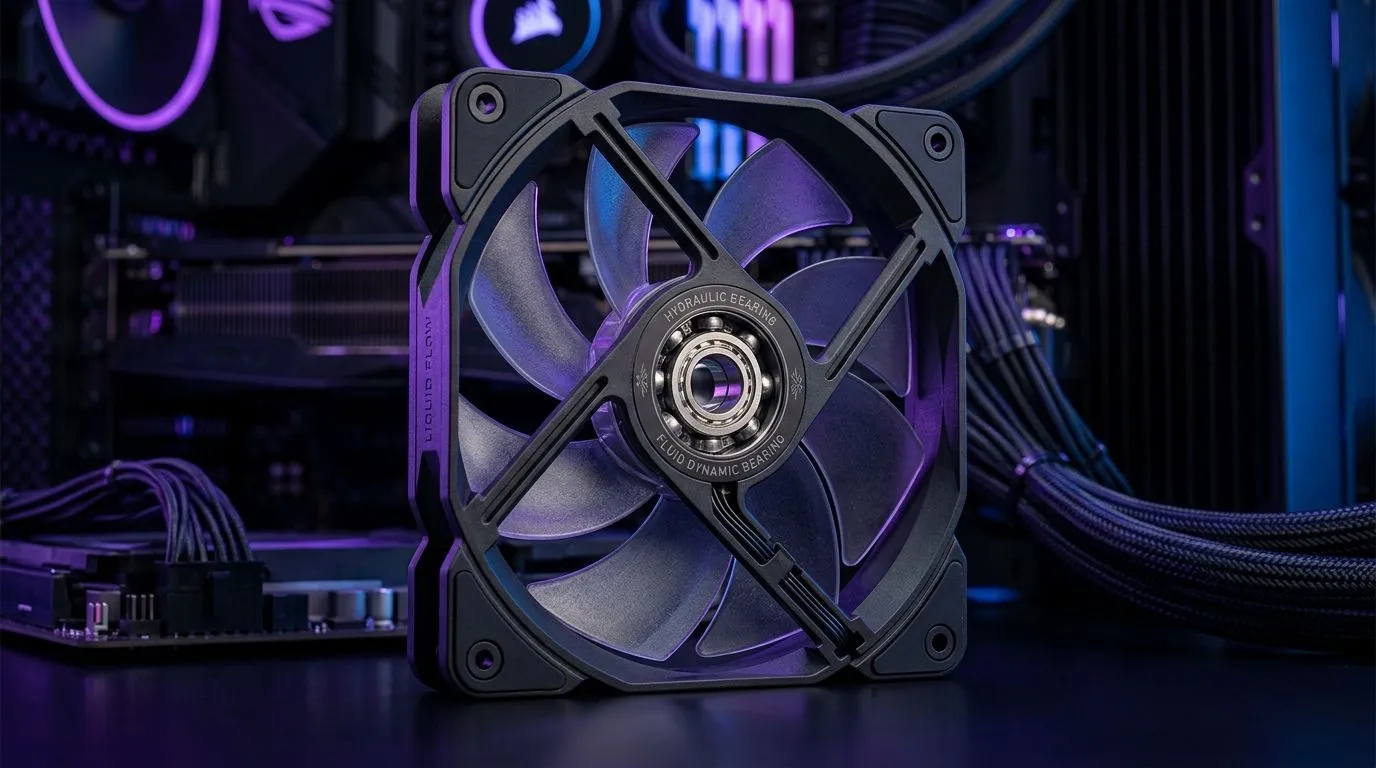
If your gaming PC sounds like it’s “working overtime”, you’re not alone. In South Africa, where summer heat can push your temps up fast, fan quality matters more than most people think. 🔧 Hydraulic bearing fans are popular for a reason: smoother spin, strong durability, and typically less annoying noise over time. But buying one is only half the story… the other half is choosing the right size and setting them up properly.
Hydraulic bearing fans use oil and precision bearing surfaces to reduce friction. In plain terms, that usually means less wear as they spin for long periods. That’s why many users notice calmer operation months later, not just on day one.
However, lifespan is never just the bearing type. Airflow, temperature load, dust, and even fan speed control all affect how long a fan stays “happy”.
For most mid-towers, 120mm and 140mm fans are common. The trade-off is simple: 140mm fans can move similar air with less RPM, which often helps noise. If your case supports it, 140mm is worth considering. ✨ You can browse options here:
Not every “gaming” fan fits every build. Some cases are picky about blade clearance, fan headers, and cable routing. Also, lighting is a choice, not a requirement. If RGB is your thing, make sure the fans match your motherboard’s ecosystem.
You can filter through Evetech’s case fan selection here:
Here’s the part most people skip. Even the best hydraulic bearing fan will wear faster if it runs at high RPM constantly… especially in dusty environments.
Before you chase louder fans, check your dust filter and intake habits. Keep the intake facing clean air, not a carpet collecting fibre. Vacuum the exterior, then use compressed air carefully to blow dust out from the fan blades. 🔥
If your motherboard software lets you set fan curves, do it. A good curve keeps RPM low under light gaming loads, then ramps up smoothly during heavier sessions. The goal is steady cooling without constant high speed.
Windows, use your motherboard’s fan control software (or a trusted control utility if your board supports it) to create a two-step curve: keep fans near low RPM at idle, then gradually ramp only when your CPU GPU hits your chosen temperature targets. Less time at high RPM usually means longer bearing life and lower noise. "
Hydraulic bearing fans are a strong pick for daily gaming rigs, streaming PCs, and anyone who wants quieter operation over months. If you mostly run your PC 4K editing plus long raids, you’ll appreciate fans that don’t feel “rough” later on.
That said, if your case has limited airflow or you’re fighting constant high temps, the better move might be improving intake/exhaust balance first. Fans can only do so much if hot air can’t escape.
Before you add to cart, confirm:
Ready to Find Your Perfect Match? The Mac vs Windows debate is complex, but for maximum power, choice, and value in South Africa, Windows is hard to beat. Explore our massive range of laptop specials and find the perfect machine to conquer your world.
Hydraulic bearing fans use a fluid-filled bearing to reduce friction and stabilize rotation, which supports smoother operation and longer hydraulic bearing fan lifespan.
They often last longer than basic sleeve designs because friction stays lower under load. Actual lifespan depends on dust, airflow, and fan speed.
Usually yes. Hydraulic bearing fans tend to cut vibration and wear-related rattling, improving gaming pc fan noise reduction over time.
Hydraulic bearings can excel for stability and smoother running, while ball bearings are strong too. Lifespan varies by model, load, and build quality.
Dust buildup, insufficient airflow, high continuous RPM, and poor power delivery can shorten lifespan. Proper mounting and cleaning help hydraulic bearing fans last.
Look for consistent RPM control, good airflow specs, and reputable bearing ratings. Match fan size to your case and target noise vs cooling.
Light maintenance helps: keep dust off the blades and heatsinks, check mounting vibration, and ensure cables avoid strain on the fan.
Replace if you notice grinding, increased noise, unstable RPM, or poor cooling performance. These are common signs bearing wear is progressing.
Setting Up AIO Liquid 420mm. Tested & verified settings for best FPS and visual quality on SA hardware budgets.
Read more
Intel XTU Download & Setup Guide: Intel CPU. Clear setup instructions with SA-specific considerations, troubleshooting tips & recommended components.
Read more
Cyberpunk 2077 Max Settings on RTX 4090. Tested & verified settings for best FPS and visual quality on SA hardware budgets.
Read more
The Complete Guide to GPU. Everything you need to know with SA pricing, step-by-step instructions & expert recommendations.
Read more
NVCleanstall Download & Setup Guide: NVIDIA. Clear setup instructions with SA-specific considerations, troubleshooting tips & recommended components.
Read more
to Driver Installation for Beginners. Everything you need to know with SA pricing, step-by-step instructions & expert recommendations.
Read more
AMD RX 9050 XT: Rumoured Specs, Price & Release. SA-focused analysis with local pricing data, real-world insights & actionable buying advice.

Can RTX 4080 Super Run AI Workloads for SA Developers Detailed answer with SA data, expert analysis & practical recommendations for local buyers.

Can RTX 4090 Run AI Workloads for SA Developers Detailed answer with SA data, expert analysis & practical recommendations for local buyers.

Top Settings for Intel Arc B580 at Ultrawide 1440p picks evaluated on performance, value & SA availability with current Rand pricing from Evetech.

RTX 4060 CS2 Low Settings at 1080p: FPS Results. Real-world benchmark data, FPS numbers & performance analysis. What SA gamers can actually expect.

Visual Artifacts: Possible GPU Issue Issue #1. Diagnosis steps, proven fixes & when to seek professional help. SA-specific support info included.

Can the RTX 4090 Handle 1440p 144Hz Gaming. Performance testing verdict with real data & practical recommendations for SA buyers.

Top ASUS GPU Under R15000 picks evaluated on performance, value & SA availability with current Rand pricing from Evetech.

GTA 6 Max Settings on RTX 5070. Tested & verified settings for best FPS and visual quality on SA hardware budgets.

Cyberpunk 2077 Max Settings on RTX 5080. Tested & verified settings for best FPS and visual quality on SA hardware budgets.

Starfield Max Settings on RTX 5070 Ti. Tested & verified settings for best FPS and visual quality on SA hardware budgets.

Top RTX 5090 Under R5000 picks evaluated on performance, value & SA availability with current Rand pricing from Evetech.