


AIO Liquid 240mm Setup and Configuration: Complete Tutorial
AIO Liquid 240mm Setup and Configuration. Clear setup instructions with SA-specific considerations, troubleshooting tips & recommended components.
Read moreLaptop stand materials compared: learn how aluminum, plastic and steel perform for durability and heat dissipation so you can choose the best stand. 🔧💻
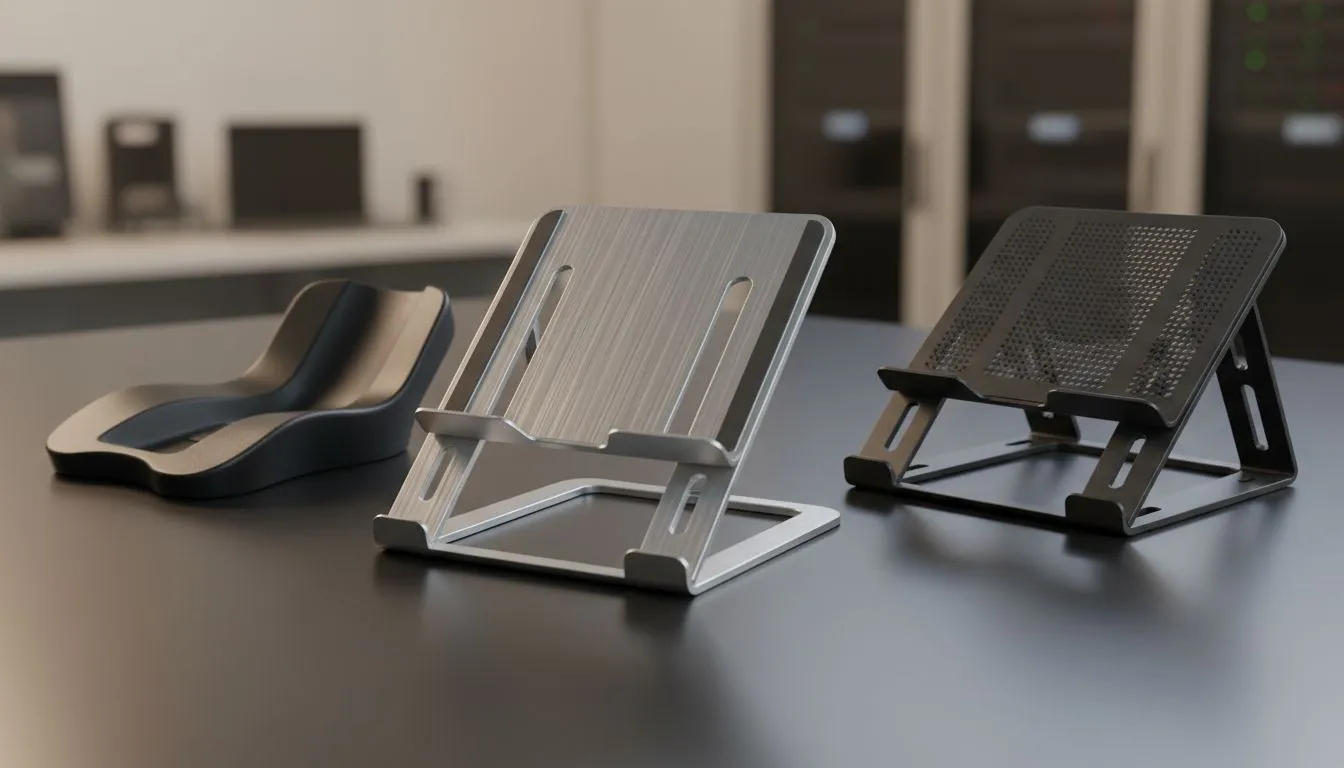
Ever noticed your laptop fans screaming like a jet engine during a long session of Apex Legends? Choosing the right laptop stand materials: aluminum vs plastic vs steel can make or break your setup. In South Africa, where summer heat is no joke, your choice affects both ergonomics and thermal performance. Let’s find your perfect match. 🔧
Aluminum is the gold standard for heat management. It acts as a massive heat sink for your machine. Metal naturally draws heat away from the chassis... helping your internal fans work less. Brands like Orico often use high-grade aluminum to help dissipate heat away from vital components. This keeps your frame rates stable while you work or play. It also looks sleek on a modern desk.
Always position your laptop stand so the top third of your screen is at eye level. This prevents neck strain during those marathon sessions. It also ensures better airflow around the intake vents located at the bottom of most gaming laptops.
Plastic is the lightweight king of the desk world. If you are a student or a digital nomad moving between coffee shops, plastic is easy to carry. You can find many affordable laptop cooling pads made from reinforced polymers. These stands often include RGB lighting for that extra flair. While plastic does not dissipate heat as well as metal... it is much more budget-friendly for those starting their setup. 🚀
Steel is for the permanent battle station. It is incredibly heavy and stable. If you have a massive 17-inch gaming laptop, you need something that won't wobble. Many Promate cooling solutions use steel mesh or frames to provide that rock-solid foundation. Steel stands are durable and can survive years of intense use. They are perfect if you rarely move your setup. ✨
If you want the best of both worlds, look at premium cooling options over R764. These usually combine metal surfaces with high-performance fans. This combination offers the structural integrity of steel with the thermal benefits of aluminum. Investing in a quality stand protects your laptop's lifespan by keeping temperatures low.
Ready to Chill Your Hardware? The debate between aluminum, plastic, and steel depends on your specific needs, but keeping your laptop cool is a priority. Explore our massive range of laptop cooling pads and find the perfect machine to conquer your world.
It depends on goals: choose aluminum for cooling and balance, steel for maximum durability, or plastic for light weight and low cost.
Yes. Aluminum has higher thermal conductivity than plastic, so aluminum laptop stand heat conductivity helps move heat away from the laptop.
Many plastic stands work for light daily use, but plastic laptop stand lightweight durability can suffer under heavy loads or prolonged heat exposure.
Steel offers superior strength and longevity but adds weight. Steel laptop stand pros cons include durability versus portability tradeoffs.
Metal stands improve passive cooling by raising airflow and conducting heat away from the base, boosting laptop cooling compared with many plastics.
For travel pick lightweight aluminum or reinforced plastic. Aluminum balances portability and cooling; plastic often wins on price and weight.
Evaluate thermal conductivity, build quality, weight and ventilation. Prioritize aluminum for cooling, steel for heavy-duty durability.
AIO Liquid 240mm Setup and Configuration. Clear setup instructions with SA-specific considerations, troubleshooting tips & recommended components.
Read more
Setting Up DDR5 64GB Kit. Tested & verified settings for best FPS and visual quality on SA hardware budgets.
Read more
Overwatch 2 Setup Guide Gamers. Clear setup instructions with SA-specific considerations, troubleshooting tips & recommended components.
Read more
R and RStudio on Mac: Data Science Setup Guide. Clear setup instructions with SA-specific considerations, troubleshooting tips & recommended components.
Read more
NVIDIA Broadcast Setup with GPU: Streamer Guide. Clear setup instructions with SA-specific considerations, troubleshooting tips & recommended components.
Read more
Core Ultra 7 265K Temperature Guide: Normal Range. Complete product range with SA pricing, key specs & recommendations for different budgets.
Read more
AMD RX 9050 XT: Rumoured Specs, Price & Release. SA-focused analysis with local pricing data, real-world insights & actionable buying advice.

Can RTX 4080 Super Run AI Workloads for SA Developers Detailed answer with SA data, expert analysis & practical recommendations for local buyers.

Can RTX 4090 Run AI Workloads for SA Developers Detailed answer with SA data, expert analysis & practical recommendations for local buyers.

Top Settings for Intel Arc B580 at Ultrawide 1440p picks evaluated on performance, value & SA availability with current Rand pricing from Evetech.

RTX 4060 CS2 Low Settings at 1080p: FPS Results. Real-world benchmark data, FPS numbers & performance analysis. What SA gamers can actually expect.

Visual Artifacts: Possible GPU Issue Issue #1. Diagnosis steps, proven fixes & when to seek professional help. SA-specific support info included.

Can the RTX 4090 Handle 1440p 144Hz Gaming. Performance testing verdict with real data & practical recommendations for SA buyers.

Top ASUS GPU Under R15000 picks evaluated on performance, value & SA availability with current Rand pricing from Evetech.

GTA 6 Max Settings on RTX 5070. Tested & verified settings for best FPS and visual quality on SA hardware budgets.

Cyberpunk 2077 Max Settings on RTX 5080. Tested & verified settings for best FPS and visual quality on SA hardware budgets.

Starfield Max Settings on RTX 5070 Ti. Tested & verified settings for best FPS and visual quality on SA hardware budgets.

Top RTX 5090 Under R5000 picks evaluated on performance, value & SA availability with current Rand pricing from Evetech.