


Repetitive Strain: Mouse Guide for SA Gamers
Repetitive Strain: Mouse Guide Gamers. Everything you need to know with SA pricing, step-by-step instructions & expert recommendations.
Read more- WD SSD comparison: evaluate Red SN700, Blue, Black - Map each drive to workloads and budgets - Recommend buying and upgrade paths 🔍💾 WD SSD comparison helps you choose the right NVMe or SATA drive by performance, endurance and price.
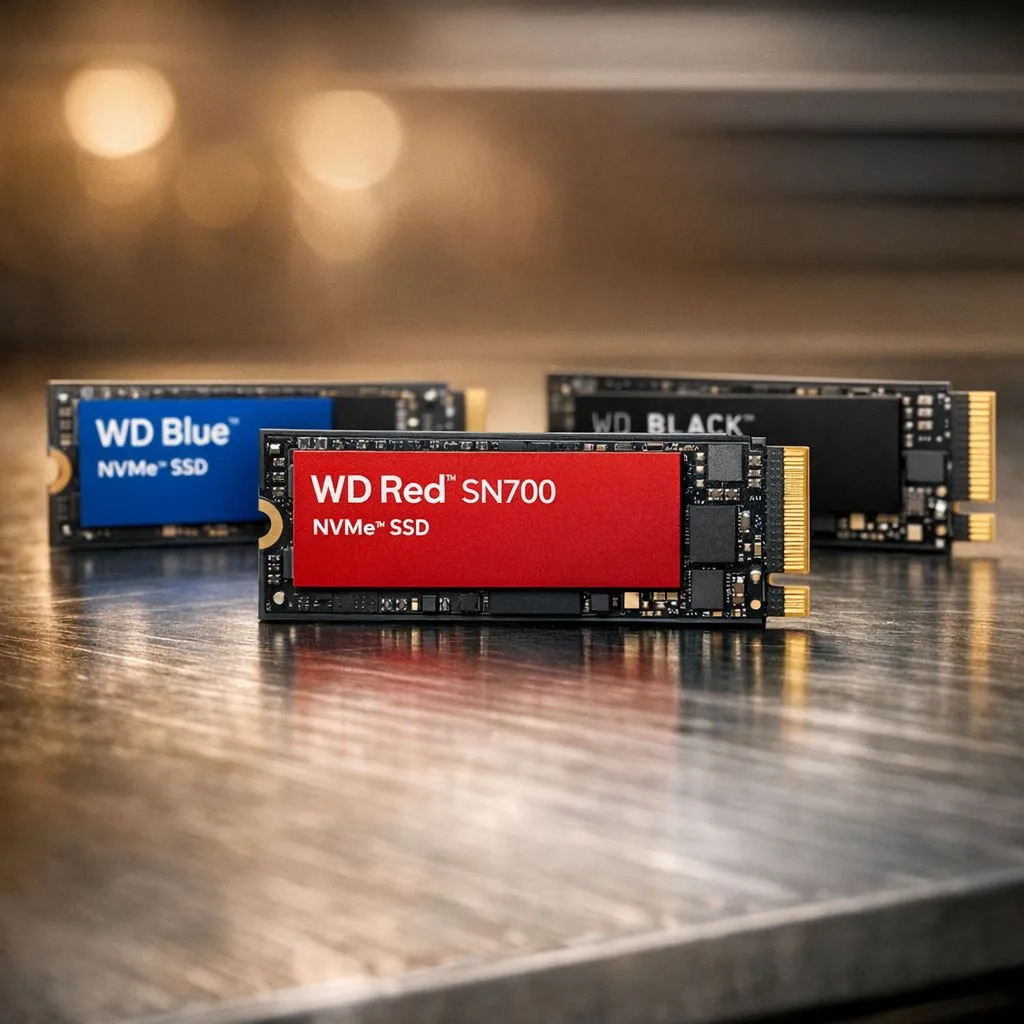
Staring at a shelf of SSDs in South Africa can feel overwhelming. You see Red, Blue, and Black... but which one actually makes your PC faster? Selecting the wrong drive can lead to wasted ZAR or sluggish load times. This WD SSD comparison: Red SN700 vs Blue vs Black breaks down the specs so you can upgrade with total confidence. 🚀
If you want the absolute best for your gaming rig, the WD Black series is the gold standard. These drives are built for speed... specifically focusing on low latency and high IOPS. While most users are happy with standard speeds, enthusiasts look for cutting-edge Gen 5 (NVME) technology to future-proof their builds.
The WD Black SN850X is a favourite at Evetech for a reason. It pushes the limits of the PCIe 4.0 interface, ensuring that heavy titles like Cyberpunk 2077 or Starfield load in seconds. When every millisecond counts, this is the drive that keeps you in the lead.
Not everyone needs to break land-speed records. For the average South African student or office worker, Western Digital drives from the Blue range offer the best balance of price and performance. These drives excel at everyday tasks like browsing, booting Windows, and light content creation.
The WD Blue SN580 is a popular choice for those looking to buy solid state drives without spending a fortune. It might not have the flashy heatsinks of the Black series, but it provides a massive leap over old mechanical hard drives. It is the sensible choice for a reliable home PC or a budget-friendly laptop upgrade.
When installing a high-speed NVMe drive, always check if your motherboard has a heatsink. WD Black drives run fast and hot. If your board doesn't have a built-in cooler, picking a version with a pre-installed heatsink can prevent thermal throttling during long gaming sessions.
The WD Red SN700 is a different beast entirely. It is designed for Network Attached Storage (NAS) environments. Unlike the Blue or Black, the Red SN700 is built for 24/7 reliability and high endurance. It uses a robust PCI Express (NVME) interface to handle caching in servers.
If you are running a Plex server or a small business data hub, you need a drive that won't give up after constant read/write cycles. The SN700 is rated for much higher Terabytes Written (TBW) than its siblings... making it the endurance king of the family. ✨
While Western Digital is a titan in the industry, it is always worth looking at what other brands offer. You might find competitive performance from Kingston or excellent value in the latest ADATA models. Comparing specs across brands ensures you get the most gigabytes for your Rand.
For those on the move, internal drives aren't the only option. High-speed external SSDs have become incredibly affordable. If you need to move large 4K video files between your desktop and laptop, choosing a drive with an External form factor gives you the flexibility that internal NVMe drives simply cannot match. 🔧
To keep it simple:
Choosing the right storage is the easiest way to optimise your computing experience in South Africa. Whether you are building a new rig or just trying to speed up an old one, there is a WD drive tailored for your specific needs.
Ready to Find Your Perfect Match? The WD SSD comparison: Red SN700 vs Blue vs Black highlights that there is a drive for every budget and use case. Explore our massive range of Western Digital SSDs and find the perfect machine to conquer your world.
WD Black typically delivers higher peak performance for gaming and creative work; WD Red SN700 balances NVMe speed with NAS-focused endurance.
Yes. WD Red SN700 targets NAS use with sustained performance and endurance for 24/7 operation; verify compatibility with your NAS device.
WD Blue fits mainstream laptops: balanced speed, power efficiency and value. Choose WD Black for top-tier gaming speeds.
WD Red SN700 and many WD Black models offer higher endurance ratings. Match drive endurance to your write workload and warranty.
You can, but WD Black prioritizes peak performance over continuous NAS endurance. WD Red SN700 is better tuned for 24/7 NAS reliability.
WD Blue is usually the most affordable, WD Red SN700 sits mid-range for NAS features, and WD Black commands a premium for performance.
WD Black is best for gaming and heavy creative workloads due to superior sequential and random I/O; WD Red SN700 is optimized for NAS tasks.
Repetitive Strain: Mouse Guide Gamers. Everything you need to know with SA pricing, step-by-step instructions & expert recommendations.
Read more
Mouse Durability: Complete Guide. Everything you need to know with SA pricing, step-by-step instructions & expert recommendations.
Read more
FPS Mouse Installation Guide for Your PC. Real-world benchmark data, FPS numbers & performance analysis. What SA gamers can actually expect.
Read more
Gaming Endurance: Mouse Guide Gamers. Everything you need to know with SA pricing, step-by-step instructions & expert recommendations.
Read more
Wireless Mouse Configuration Guide: Complete. Clear setup instructions with SA-specific considerations, troubleshooting tips & recommended components.
Read more
Mouse Specs Explained for Beginners. Plain-English explanation of what it means, why it matters & how it affects your buying decisions in SA.
Read more
CS2 Low FPS: Monitor Bottleneck. Real-world benchmark data, FPS numbers & performance analysis. What SA gamers can actually expect.

Is AOC a Good Monitor Brand for Gaming in South Africa Detailed answer with SA data, expert analysis & practical recommendations for local buyers.

What Gaming Monitor Can You Get for R20,000. Full parts list, Rand pricing & expected performance. Build confidently with SA-available components.

What Gamers Actually Bought: November Report. Real purchase data from SA retailers revealing what local buyers are actually choosing and why.

Can the RX 7700 XT Handle 1440p 144Hz Gaming. Performance testing verdict with real data & practical recommendations for SA buyers.

Top Laptop with Core i7 + RX 7700S: Picks picks evaluated on performance, value & SA availability with current Rand pricing from Evetech.

RX 7700 XT Black Myth Wukong 2 FPS: Performance. Real-world benchmark data, FPS numbers & performance analysis. What SA gamers can actually expect.

RTX 6080 Gran Turismo 7 PC Performance: FPS Test. Real-world benchmark data, FPS numbers & performance analysis. What SA gamers can actually expect.

MacBook Pro 16-Inch M5 Max: Complete Specs,. Everything you need to know with SA pricing, step-by-step instructions & expert recommendations.

Travelling With a MacBook: Travellers. Everything you need to know with SA pricing, step-by-step instructions & expert recommendations.

Back-to-School Parent Guide: Laptops. Everything you need to know with SA pricing, step-by-step instructions & expert recommendations.

MacBook Air 13-Inch M5: Complete Specs, Features. Everything you need to know with SA pricing, step-by-step instructions & expert recommendations.