

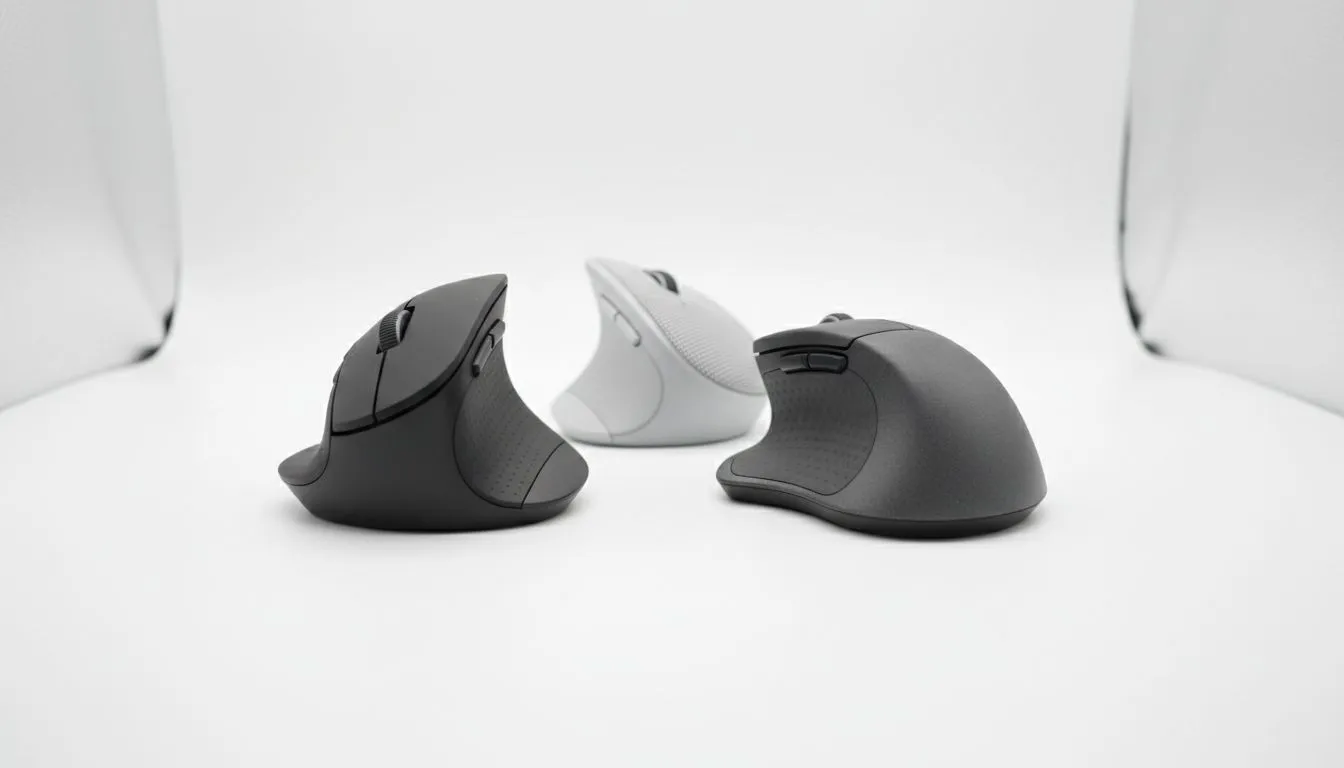
Is your wrist throbbing after a long raid? Do you feel that familiar twinge in your forearm when editing video? It might be time to ditch the standard flat clicker. Finding the Best Ergonomic Mouse 2025: Vertical & Sculpted Picks isn't just about comfort... it is about longevity. Whether you are a competitive gamer in Joburg or a remote worker in Cape Town, saving your joints is the best upgrade you can make this year.
The Science of Comfort (and Why It Matters)
We often obsess over DPI and sensor accuracy, but we rarely think about the angle of our ulna and radius bones. When you browse our extensive gaming mouse collection, you will notice a distinct shift in design philosophy. Manufacturers are moving away from purely ambidextrous, flat shapes toward contours that fit the human hand naturally.
The goal is to reduce pronation—that twisting motion required to place your palm flat on a desk. However, your mouse hand is only part of the equation. If you are craning your neck up or down at old PC monitors that lack height adjustment, your shoulder tension will eventually travel down to your wrist, negating the benefits of a good mouse.
Vertical vs. Sculpted: Picking Your Weapon ⚔️
In 2025, ergonomic mice generally fall into two camps.
The Vertical Mouse
These look odd, almost like a shark fin. They force your hand into a "handshake" position. This is fantastic for chronic RSI sufferers as it completely un-twists the forearm.
The Sculpted Mouse
These look more traditional but feature aggressive thumb rests and a tilted slope. They offer a middle ground between performance and comfort.
To get the most out of these devices, your entire peripheral setup needs to harmonise. Pair your ergonomic choice with the cheapest gaming keyboard in South Africa that includes a magnetic wrist rest. This keeps your typing angle neutral when you switch from clicking to chatting.
Efficiency is also a factor here. While solid state drives ensure your games and apps load instantly, an ergonomic mouse ensures your physical reaction times remain sharp during those extended sessions without fatigue setting in.
Beyond the Mouse: The Full Ergonomic Setup 🔧
Ergonomics is a holistic game. You cannot fix one part of the chain and ignore the rest.
Sometimes, the best move is to change your input method entirely for certain genres. Switching to high-quality gaming controllers for racing games or RPGs allows you to lean back and give your mouse hand a complete break.
Weight distribution matters for your head and neck, too. Heavy audio gear drags you down over time, causing you to slump. Look for lightweight headphone headsets with memory foam padding to keep your spine aligned.
For the content creators out there, the "hunch" is a real enemy. Investing in proper streaming essentials, specifically boom arms, helps you maintain good posture while broadcasting. If you use standalone microphones on a desk stand, you likely lean forward to be heard... straining your lower back. A boom arm brings the mic to you, letting you sit back in your ergonomic chair where you belong.
The 90-Degree Rule 📐
When setting up your new ergonomic mouse, adjust your chair height so your elbows are at a 90-degree angle (or slightly open) while typing or gaming. If your elbows are below the desk surface, you are compressing nerves. If they are too high, you are shrugging your shoulders. Get the height right, and the mouse will do the rest.
Save Your Wrists, Up Your Game Your health is your most important stat. Don't wait for carpal tunnel to set in before upgrading your setup. From vertical productivity tools to sculpted gaming beasts, we have the gear to keep you playing longer. Shop our full range of ergonomic and gaming mice today and feel the difference.











