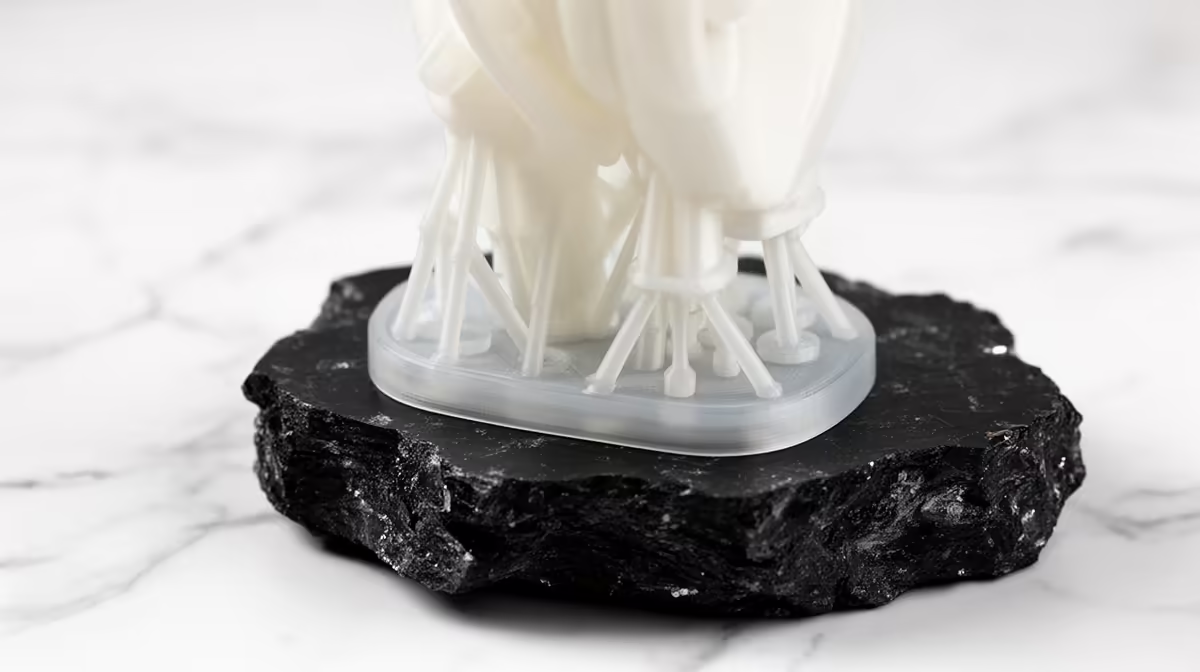
Few resin failures are as frustrating as opening the chamber to find your model dangling from snapped supports, with ghostly floating layers cured in mid air where the part used to be. Resin supports snapping mid-print comes down to two things you control in the slicer: contact tips that are too thin to hold the peel force, and a model standing too upright so every layer fights maximum suction. Tilt the model and thicken the tips, and the problem usually disappears.
Quick Answer
Tilt the model 10 to 45 degrees off vertical and increase support contact tip diameter to roughly 0.3mm to 0.5mm. Tilting shrinks the cross-section peeling on each layer, and thicker tips give the supports the strength to survive the force, so they stop snapping and leaving floating layers.
Why Upright Models Punish Supports
Every layer in MSLA printing has to peel away from the FEP film as the plate lifts. The wider the cross-section at that layer, the harder the suction pulls. A model standing dead vertical presents large flat slices to the film, so the peel force spikes layer after layer.
Supports are the only thing transferring that force back to the cured part above. When the load exceeds what a thin contact tip can carry, the tip shears off. The print keeps going, curing new layers in space where there is no longer anything beneath them, and you get those floating shards of resin that mark exactly where the support failed.
Tilt First, Then Fix the Tips
Orientation is the bigger lever, so start there. Rotating the model 10 to 45 degrees off vertical does two useful things at once. It reduces the area peeling on any single layer, which lowers the suction, and it spreads the contact points across more of the surface so no single support carries everything.
A steeper tilt of 30 to 45 degrees suits dense or chunky models that generate strong peel forces. A gentler 10 to 20 degrees can be enough for slim parts. There is a trade-off: more tilt usually means more supports and a little more cleanup, but a finished print beats a perfect plan that snaps every time.
Once the angle is set, raise the contact tip diameter. Default tips around 0.2mm are often too fine for anything but the lightest models. Moving to 0.3mm to 0.5mm gives each tip real strength while still being small enough to remove cleanly. Pair that with slightly larger support bodies on the heaviest sections.
Slow the Peel and Add Redundancy
If tilting and thicker tips are not quite enough, two more settings help. Slowing the lift speed and adding a longer rest before exposure lets resin flow back under the part, which reduces the suction shock on each peel. Adding more supports under overhangs and heavy mass spreads the load so no single tip is doing all the work.
Reliable results also depend on a printer that holds tolerances and a steady FEP film, so it is worth checking the current 3D printers stocked at Evetech if your machine is fighting you on every print.
Frequently Asked Questions
What tilt angle works best for resin prints?
Most models do well between 10 and 45 degrees off vertical. Use the steeper end for dense or large parts that create strong suction, and the gentler end for thin or delicate models. The goal is to reduce the cross-section peeling on each layer.
How thick should support contact tips be?
Around 0.3mm to 0.5mm is a safe range for most models. Thinner tips snap under peel force, while thicker tips hold but leave bigger marks. Increase tip size on heavy areas and keep it smaller on fine detail you want to preserve.
Why do I get floating layers when a support breaks?
When a support shears off, the printer keeps curing the scheduled layers even though nothing is holding that area in place. The new resin cures wherever it can, leaving hardened fragments suspended in the layer where the support failed.
Can lift speed cause supports to snap?
Yes. A fast lift creates a sharper suction shock as the part separates from the film. Slowing the lift and adding a short rest before each exposure reduces that shock and takes load off the contact tips.
Should I just add more supports instead of tilting?
More supports help, but tilting fixes the root cause by lowering the peel force itself. The best approach is to tilt first, then add enough well-placed supports with adequate tip thickness so the remaining load is shared safely.
Dialled-in settings deserve solid kit. Stock up on cleaning, curing, and finishing tools from the accessories best sellers at Evetech and keep your resin prints coming off the plate intact.