


Best AMD GPU Under R40000 in SA 2026
Top AMD GPU Under R40000 picks evaluated on performance, value & SA availability with current Rand pricing from Evetech.
Read moreSet up ARGB without a compatible motherboard using standalone controllers, ARGB hubs, or SATA/USB adapters. Step-by-step options, parts list, and quick troubleshooting to get full lighting control fast ⚡✨
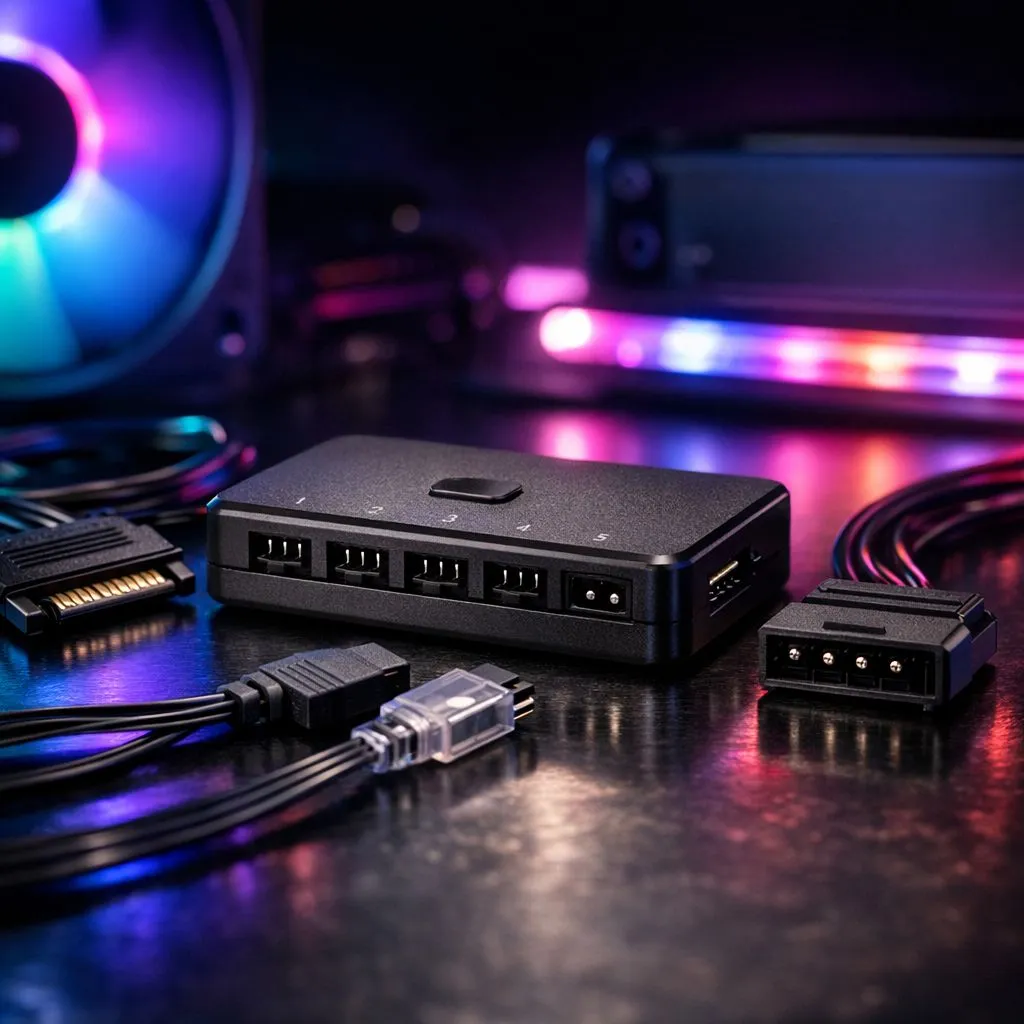
You’ve finally unboxed those stunning addressable RGB fans, but there’s a snag... your older motherboard doesn't have a 3-pin 5V header. It is a common South African DIY frustration. Staring at a dark PC case while your mates rock full rainbow sync is a vibe killer. Fortunately, you can set up ARGB without a compatible motherboard by using simple, affordable hardware controllers that bypass the board entirely. 🔧
The most straightforward way to get your glow on is by using a dedicated ARGB controller. These small devices plug directly into your Power Supply Unit (PSU) via a SATA or Molex cable. This means you aren't reliant on your motherboard's software or headers for power. Most modern case fans can be connected to these hubs, allowing you to cycle through colours using a physical remote or a button on your chassis.
If you are looking for a premium experience with deep software customisation, CORSAIR offers the iCUE ecosystem. Their Lighting Node PRO or Commander Core hubs connect via an internal USB 2.0 header, letting you control every LED through their software even on older platforms. For those looking for great value in ZAR, Deepcool provides excellent standalone controllers that are easy to hide behind your motherboard tray. ⚡
When using a SATA-powered ARGB controller, try to mount it behind the motherboard tray with double-sided tape. This keeps your cable management clean and prevents the controller from rattling around inside the case during transport to your next LAN event.
When you decide to set up ARGB without a compatible motherboard, you need to ensure your fans match your case's physical dimensions. Standard 120mm fans are the go-to for most South African gamers, offering a perfect balance of airflow and aesthetics. However, if your case supports them, 140mm fans can move more air at lower speeds, which helps keep your system quiet during those intense summer gaming sessions. 🚀
Not every build needs to be a neon light show. While many enthusiasts crave the vibrant customisation of RGB components, some professionals prefer the stealthy "blackout" look. Choosing None for your lighting effects can result in a sophisticated, professional workstation that focuses purely on performance without the visual flair.
If you want the best of both worlds... software control without the 5V header... look for USB-based controllers. These devices translate software commands from your OS into signals the LEDs understand. It is a brilliant way to bypass hardware limitations on older Intel or AMD platforms. You can often find these hubs bundled with triple-fan packs, making it a cost-effective upgrade for any mid-tower rig. ✨
Ready to Light Up Your Rig? Don't let an older motherboard stop you from achieving the perfect aesthetic. Whether you need a standalone controller or a full set of high-performance fans, we have the stock to get you glowing. Explore our massive range of case fans and upgrade your setup today.
Yes. Use an ARGB controller or ARGB hub powered by SATA or USB to run addressable RGB without a motherboard.
Buy a standalone ARGB controller or hub—many include remote or software via USB, making ARGB control without a motherboard simple.
Yes. Several ARGB controllers accept SATA power to run LEDs and controllers, letting you use ARGB without motherboard power.
Most ARGB controllers support both ARGB fans and strips; check pin type and connector to ensure compatibility with your ARGB devices.
Not always. Many external ARGB controllers include remotes or hardware modes; USB controllers may use companion software if you want advanced effects.
Use a single ARGB hub or controller with multiple headers or chainable connectors to sync addressable RGB without motherboard headers.
Check power source (SATA/USB), confirm 3-pin ARGB connector orientation, test with another controller, and verify firmware or remote pairing.
Top AMD GPU Under R40000 picks evaluated on performance, value & SA availability with current Rand pricing from Evetech.
Read more
Top RTX 4090 Under R12000 () picks evaluated on performance, value & SA availability with current Rand pricing from Evetech.
Read more
Ryzen 5 5600X + B550 + RTX 4060 Build Under. Full parts list, Rand pricing & expected performance. Build confidently with SA-available components.
Read more
Ryzen 5 5600X + B550 + RTX 4060 Build Under. Full parts list, Rand pricing & expected performance. Build confidently with SA-available components.
Read more
Top AMD GPU Under R25000 picks evaluated on performance, value & SA availability with current Rand pricing from Evetech.
Read more
Top Crucial GPU Under R15000 picks evaluated on performance, value & SA availability with current Rand pricing from Evetech.
Read more
Snapdragon X2 NPU Explained: How 80 TOPS Changes. Plain-English explanation of what it means, why it matters & how it affects your buying decisions in SA.

HBM? High Bandwidth Memory Used in GPUs and AI. Plain-English explanation of what it means, why it matters & how it affects your buying decisions in SA.

How much should you spend on sim racing accessories in South Africa for a realistic setup? We break down budgets by quality tiers, so you buy smart gear and avoid overspending 🎮💸

G-Sync and FreeSync? Variable Refresh Rate. Plain-English explanation of what it means, why it matters & how it affects your buying decisions in SA.

AMD Laptop: Value. SA-focused analysis with local pricing data, real-world insights & actionable buying advice.

How MacBook Neo Handles 30+ Chrome Tabs with Only. SA-focused analysis with local pricing data, real-world insights & actionable buying advice.

Why Apple Put 8GB RAM in MacBook Neo: The A18 Pro. SA-focused analysis with local pricing data, real-world insights & actionable buying advice.

Upgrade your work laptop with a New Motherboard. Step-by-step instructions with SA-specific tips, common pitfalls to avoid & expert recommendations.

Maintain wired headset — Checklist: • inspect cables • clean earpads • store properly 🔧🎧 Practical steps to preserve sound quality and avoid premature replacements.

Fix crackling headset fast: step-by-step checks for cables, connectors, drivers, and settings to remove static or distorted audio on wired headsets 🎧⚙️

Stereo vs mono headsets: learn which delivers clearer calls, better spatial music, or simpler mono voice performance — pick the right headset for meetings, music, or gaming 🎧💬

- Compare gaming headset vs studio headphones; - Assess comfort, mic and sound; - Recommend best daily picks. Gaming headset vs studio headphones: learn which suits work, music and casual gaming. 🎧⚖️