



PCIe 5.0 vs PCIe 4.0 for Video editing in 4k in SA
PCIe 5.0 vs PCIe 4.0 for video editing in 4k is mainly about fit, features, compatibility, cost, and upgrade path, not one automatic winner. SA buyers should match the choice to the setup.
Read moreDual USB and XLR dynamic microphones give hybrid creators one capsule with two connections: plug-and-play USB today and an XLR path for an interface later. This guide covers when each output wins, so you buy once and scale your audio chain without re-buying the mic.
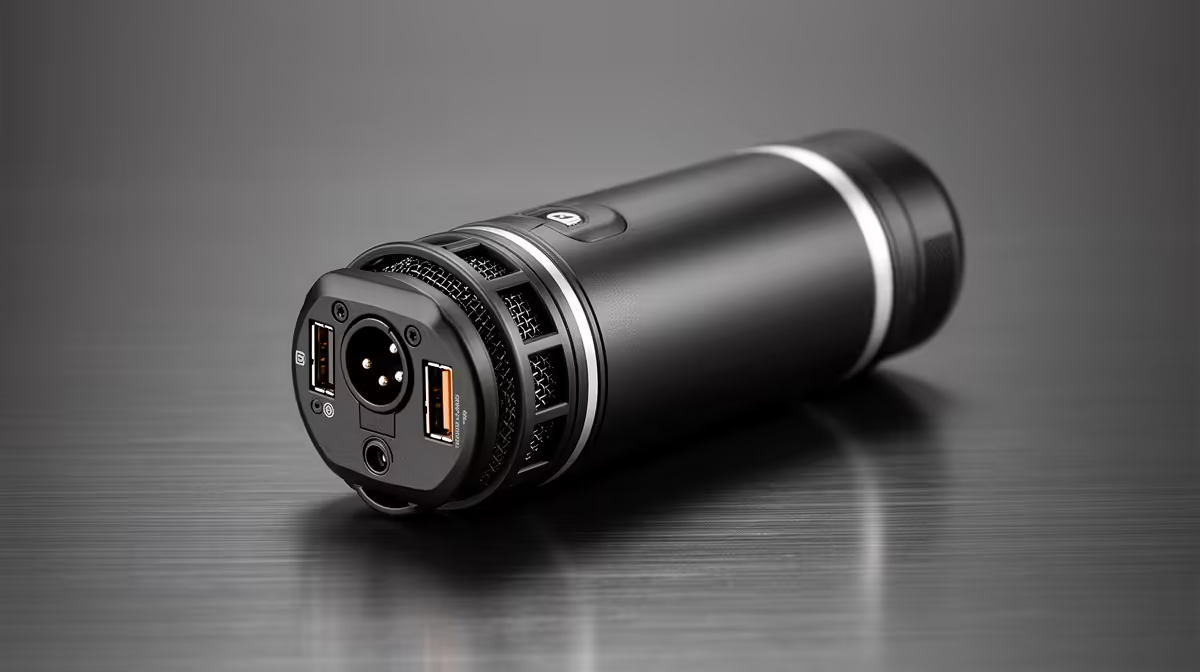
Most streamers and podcasters buy their first microphone, then buy a completely different one six months later when they add an audio interface. A dual USB and XLR dynamic microphone breaks that cycle. One capsule, two connectors, and the ability to use whichever output matches your current setup while the other sits ready for the day you are ready to scale.
A dual USB and XLR dynamic microphone combines both connectors on a single capsule. USB plugs straight into a PC for immediate recording with no extra hardware. XLR feeds a mixer or audio interface for cleaner preamp gain and multi-source recording. You use the output that fits your setup now and switch when you grow.
The design is less complicated than it sounds. Inside the body is one capsule, the transducer that converts acoustic sound to an electrical signal. From there the signal splits. One path feeds onboard analogue-to-digital conversion circuitry and exits through a USB port, ready for direct computer use. The second path leaves the capsule as a balanced XLR signal and exits through the standard three-pin connector, headed for whatever preamp or interface you plug it into.
The two paths share the same capsule, which means the character of the sound is consistent between them. You are not getting two different microphones in one housing. You are getting the same source with two different output formats, each suited to a different part of a creator's journey.
Dynamic mics suit this dual design well because of their noise floor characteristics. A dynamic capsule has low self-noise and handles high sound pressure levels confidently, which means it records a clean vocal track even with modest electronics behind it. That matters on the USB side, where the onboard conversion chain is doing everything without an external preamp to compensate.
When a dual mic specifies 24-bit USB audio, that means the analogue-to-digital converter inside is sampling your voice at 24-bit depth. In practice this gives you roughly 144 decibels of dynamic range, far more than any recording environment would ever need. What it actually does is keep noise well below the noise floor of the recording so the output sounds clean even after gain adjustments in editing.
For streaming and conferencing, 24-bit USB output is more than sufficient. The platform you are streaming to or the video call software you are using will compress the audio further anyway. The 24-bit source simply gives the compression algorithm something clean to work with rather than amplifying any existing noise.
USB is the default for a reason. It is simple, it works immediately, and for a solo streamer or remote worker it produces excellent results. The XLR side becomes worth using once one or more of three things changes in your setup.
The first is gain. Dynamic mics require more input gain than condenser mics to produce the same output level. The onboard preamp driving the USB output has a fixed, reasonably good gain structure. An external audio interface, particularly a quality one designed for music and broadcast, provides cleaner preamp gain with more headroom. If you record at low volumes, speak quietly, or use the mic further than ideal from your mouth, the interface preamp will give you a better result than the USB chain alone.
The second is multiple inputs. A USB microphone occupies one port and delivers one audio stream. The moment you add a co-host, a second instrument, or a guest mic to a setup, USB cannot handle it natively. XLR into a two-channel or four-channel interface solves this cleanly. Each mic has its own gain control and its own clean preamp channel.
The third is the rest of your signal chain. If you are already running an audio interface for other reasons, plugging the XLR side in keeps everything in one routing path. That simplifies monitoring, levels and the interface's built-in processing without running two separate audio drivers on the computer.
If you already own an interface, always test the XLR side first before assuming USB is easier. Run a gain comparison at your normal speaking distance. Some creators find the interface preamp lifts presence noticeably on a dynamic capsule, especially in a quiet room. Others hear no meaningful difference at their streaming resolution and save the interface for other sources.
Some dual mics support concurrent output on both connectors, and when available it is a genuinely useful capability. The most common application is recording a local PC backup over USB while sending the XLR feed to a live audio board at an event or broadcast. The two streams are independent, which means a level change on the interface does not affect the USB recording on the computer.
For a home streamer, simultaneous output also lets you record a dry reference track over USB while a hardware processor on the XLR chain shapes the live stream output. You keep the unprocessed recording for editing and the processed one for the broadcast audience, from one microphone, in one take.
Not every dual mic supports this, so check the specification before assuming it is available. Many only allow one output to be active at a time, which still covers most use cases but prevents the simultaneous workflow.
Buying a dual mic is a different financial calculation from buying a USB-only mic and then an XLR mic later. A USB-only mic starts near R1,000. A quality XLR-only dynamic capsule for a studio or interface setup runs from R2,000 upward. If you buy USB now and XLR later, you are buying two microphones. A dual mic in the R2,500 range gives you both connectors once, from the same capsule, with no second purchase when you upgrade the rest of the chain.
The caveat is that a dual mic's onboard USB conversion is not the same quality as a dedicated high-end external converter. If your path is clearly heading toward professional voiceover or music recording, a dedicated XLR capsule and a quality interface from the start may make more sense. For the majority of South African streamers, podcasters and content creators, the dual mic is the financially sensible route because it matches the most common upgrade trajectory: start on USB, grow into XLR, reuse the capsule throughout.
It is a single microphone body housing one dynamic capsule with two output connectors: a USB port for direct computer connection and an XLR connector for a mixer or audio interface. The same capsule drives both outputs. You choose whichever connection suits your current setup and can switch to the other at any point without replacing the mic.
Use USB when you have no interface or mixer and want to record or stream immediately. USB carries full-quality digital audio to your PC, handles the gain onboard, and requires no additional hardware. For solo streaming, video calls and podcasting without a co-host, the USB output delivers everything most creators actually need.
XLR becomes the better choice once you add an audio interface with a quality preamp, particularly if you need more clean gain for a quieter voice or a more distant mic position. It is also the right output when you are adding a second microphone to the setup, since a two-channel interface gives each mic independent gain and routing.
Usually, yes. Rather than buying a USB mic now and then a separate XLR capsule when you upgrade your chain, a dual mic gives you both connectors from one purchase. Most dual dynamic mics land in the R2,000 to R3,000 range. Buying USB and XLR separately over time often costs more in total and leaves you with a redundant mic in the drawer.
Some dual mics support simultaneous output, letting you feed a live audio board over XLR while recording a PC backup over USB concurrently. Others only activate one output at a time. Check the specification of the specific model before relying on simultaneous use. When available it is useful for live events and broadcast setups where a local safety recording matters.
No. Dynamic microphones generate their signal through electromagnetic induction and do not require external power to operate. The 48V phantom power that condenser mics rely on will not damage a dynamic mic if accidentally applied to most modern units, but it is not needed and contributes nothing. The XLR side of a dual dynamic mic will work on any balanced XLR input without phantom power enabled.
Ready to buy a microphone that grows with your setup? Browse the dual USB and XLR dynamic microphone range for South African streamers and creators, and pick the one capsule that covers you from day one to the studio upgrade.
It is a single microphone body housing one dynamic capsule with two output connectors: a USB port for direct computer connection and an XLR connector for a mixer or audio interface. The same capsule drives both outputs. You choose whichever connection suits your current setup and can switch to the other at any point without replacing the mic.
Use USB when you have no interface or mixer and want to record or stream immediately. USB carries full-quality digital audio to your PC, handles the gain onboard, and requires no additional hardware. For solo streaming, video calls and podcasting without a co-host, the USB output delivers everything most creators actually need.
XLR becomes the better choice once you add an audio interface with a quality preamp, particularly if you need more clean gain for a quieter voice or a more distant mic position. It is also the right output when you are adding a second microphone to the setup, since a two-channel interface gives each mic independent gain and routing.
Usually, yes. Rather than buying a USB mic now and then a separate XLR capsule when you upgrade your chain, a dual mic gives you both connectors from one purchase. Most dual dynamic mics land in the R2,000 to R3,000 range. Buying USB and XLR separately over time often costs more in total and leaves you with a redundant mic in the drawer.
Some dual mics support simultaneous output, letting you feed a live audio board over XLR while recording a PC backup over USB concurrently. Others only activate one output at a time. Check the specification of the specific model before relying on simultaneous use. When available it is useful for live events and broadcast setups where a local safety recording matters.
No. Dynamic microphones generate their signal through electromagnetic induction and do not require external power to operate. The 48V phantom power that condenser mics rely on will not damage a dynamic mic if accidentally applied to most modern units, but it is not needed and contributes nothing. The XLR side of a dual dynamic mic will work on any balanced XLR input without phantom power enabled.
PCIe 5.0 vs PCIe 4.0 for video editing in 4k is mainly about fit, features, compatibility, cost, and upgrade path, not one automatic winner. SA buyers should match the choice to the setup.
Read more
Wi-Fi 7 vs Wi-Fi 6e for competitive esports comes down to router support, latency goals, device compatibility, and coverage. SA buyers should match the choice to the real network setup.
Read more
ATX 3.1 vs ATX 3.0 for mMO and live-service games buyers - what changes is mostly about compatibility, budget, upgrade path, and setup fit. SA buyers should check device support and real needs before expecting a clear win from either option.
Read more
LGA 1851 vs LGA 1700 can affect Twitch and YouTube streaming when gaming and encoding share CPU resources. For SA creators, the real-world difference depends on encoder choice, memory support, motherboard cost, thermals, and upgrade plans.
Read more
X870E vs X670E for aaa single-player gaming is mainly about fit, features, compatibility, cost, and upgrade path, not one automatic winner. SA buyers should match the choice to the setup.
Read more
Hall Effect switches vs Mechanical switches for mMO and live-service games is mostly about compatibility, budget, upgrade path, and setup fit. SA buyers should check device support and real needs before expecting a clear win from either option.
Read more
A fake 113GB GTA VI ISO reportedly used empty padding around a small malware payload. SA gamers should delete unofficial builds, keep Windows security active and wait for official channels.

Wi-Fi 6E vs Wi-Fi 6 matters for 4K video editing when files move across a network. The real-world difference between Wi-Fi 6E and Wi-Fi 6 for video editing in 4K depends on NAS access, cloud uploads, router range, and SA creator workflows.

The difference between PCIe 5.0 and PCIe 4.0 for SA gamers is mostly bandwidth headroom. Compare GPU slot needs, NVMe speed, motherboard support, and upgrade timing before paying extra for a newer platform.

Gaming PC stuck pixel checks in South Africa should confirm the monitor fault first. Use colour tests, screenshot comparison, cable swaps, display menu checks, and clear photos before deciding on support.

Shokz OpenFit Air 2 earbuds weigh 7.2g each and use a redesigned dual-driver open-ear layout. SA buyers should choose them for comfort and awareness, not maximum isolation.

AMD's current driver now lists a Radeon RX 9050 4GB, while product coverage details a narrowed memory system. SA buyers should weigh the low VRAM ceiling against current local Radeon options.

Samsung Display has demonstrated a 16-inch 2.5K OLED laptop panel running at 300Hz. SA buyers should wait for a named notebook, full panel specifications and a local price before planning an upgrade.

Microsoft says some Windows 11 game crashes after recent updates are linked to RGB-related drivers. Affected SA gamers should confirm the update and driver before using the published registry workaround.

Minisforum's M2 Pro pairs Core Ultra X7, Arc B390 graphics and 32GB onboard memory in 1.8 litres. SA buyers should weigh its fixed memory and $1,439 launch offer against local mini PCs.

Smart monitors can add apps and convenience, but they also add privacy settings and unwanted-software risk. SA buyers should audit the operating system before paying for extras.

Lenovo says Legion Go failures linked to BIOS N3CN42WW are not user error. Affected SA owners should stop retrying the update, preserve proof and open a support case.

The ROG Gjallar gaming soundbar is now listed in the US at $599.99. SA buyers should compare its 2.1.2 audio, wireless bass and built-in chat controls with simpler local options.