


Complete Gaming Setup Guide for the SA Esports Athlete in SA 2026
Complete Gaming Setup Guide for the Esports. Clear setup instructions with SA-specific considerations, troubleshooting tips & recommended components.
Read moreLearn multimedia knob functionality on gaming keyboards: volume control, media shortcuts, and software mapping. Tune audio fast, reduce key presses, and game with less friction 🎮🔊
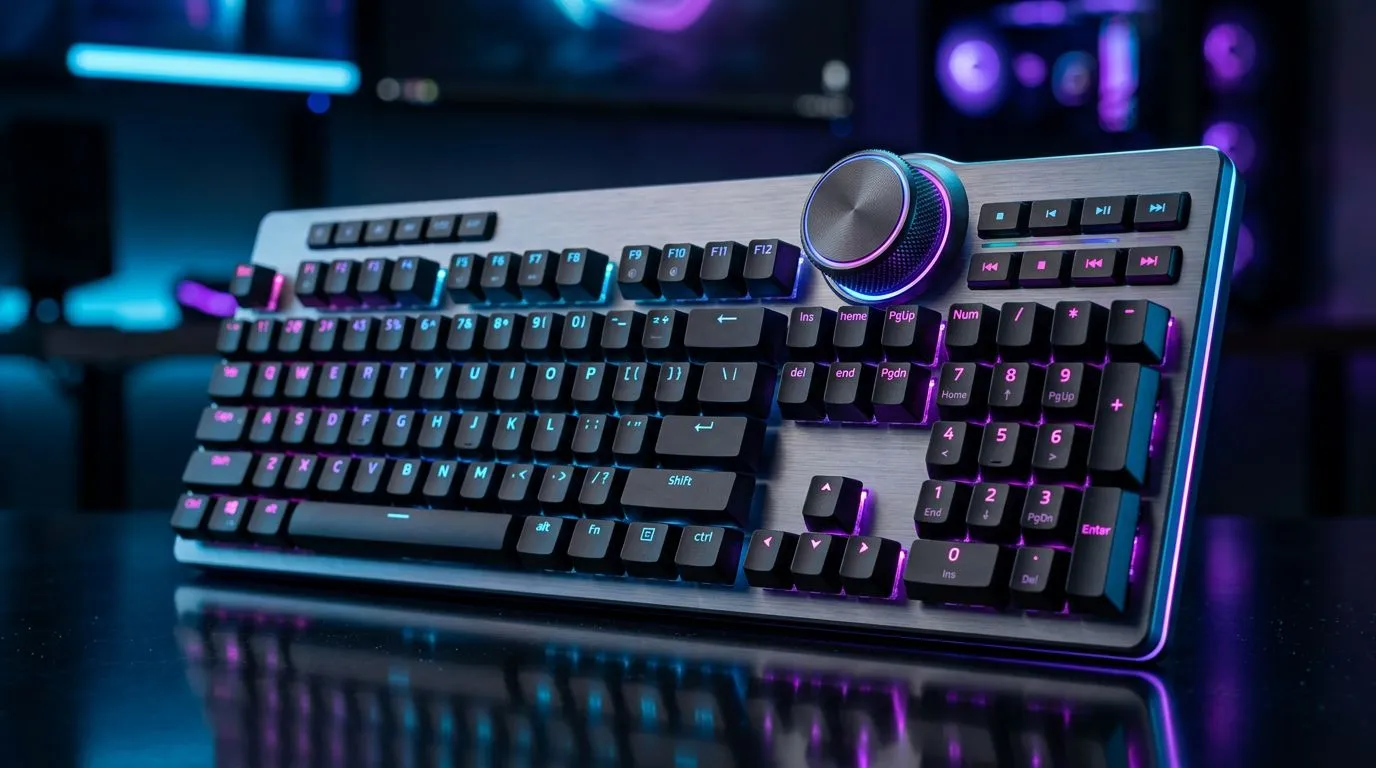
If you’ve ever wondered what that shiny “knob” is actually for… you’re not alone. In South African homes, where one desk often does everything from work to Warzone or Rocket League, the right gaming keyboard can save time. 🔧
A Multimedia Knob Functionality on Gaming Keyboards: Complete Guide helps you understand what the knob controls, how to set it up, and how to avoid annoying mis-maps. Let’s make that knob earn its keep… every day.
Most gaming keyboards with a multimedia knob are designed for quick, hands-on control of audio and media. Common functions include:
What it usually won’t do, without software, is magic. The knob still needs firmware and drivers to map correctly. That’s why setup matters… especially on Windows.
For buying in South Africa, start by matching your connection type to your setup. Wired is simple and consistent, while wireless can be convenient but sometimes adds latency considerations.
Before you touch the knob, confirm two basics:
Then test the knob in a controlled way:
If actions feel “off”, it’s usually one of these:
In everyday use, the knob should feel the same on paper, but there are practical differences:
If you want a fast, fuss-free desk experience, wired is often the safe bet.
A solid starting point is browsing wired gaming keyboard options for models that fit your budget in ZAR.
If you prefer a cleaner desk setup, consider wireless gaming keyboards and check whether the model includes knob mapping software.
If you’re comparing value across the board, you can also explore cheapest gaming keyboard picks in South Africa (full range) and filter from there.
When you’re shopping for a keyboard with a multimedia knob, don’t only chase the knob. Confirm these details first:
If remapping isn’t possible (or not supported on your OS), the knob might be limited to volume/media only. Look for product pages that clearly mention custom functions or driver support. 🔍
Many keyboards treat the knob as both:
A press action matters if you often alt-tab between games and Discord.
Some boards include both. If you game hard, dedicated keys can be more reliable in chaotic moments.
A good knob should not feel loose. If you’re spending real ZAR, you want that “daily driver” feel.
If you’re hunting deals, check best gaming keyboard deals and look specifically for models mentioning a multimedia knob or media control wheel.
Here’s how the knob should feel in real SA gaming life… not in theory.
You start a match, then realise your teammates are too loud.
If your knob controls volume but not Discord routing, that’s not a keyboard failure. It’s usually Windows sound routing.
You scrub a timeline and want volume control without leaving your editor.
If you plug in and immediately use the keyboard, rotate volume should still behave in most setups. Remapping might need software, but basic media control is often usable.
If you want to build a complete desk setup around your controls, a keyboard and mouse combo can simplify choices. For example: keyboard-mouse combo deals. 🚀
If you’re aiming for reliability, start with a known deal and confirm knob/media mentions on the product page before checkout.
Once you understand what the knob is meant to do, you can buy smarter. Look for software support, confirm whether the knob has a press function, and test in your real apps. That way, your desk stops being “setup hell”… and becomes a smoother gaming rig.
Ready to Find Your Perfect Match? The Mac vs Windows debate is complex, but for maximum power, choice, and value in South Africa, Windows is hard to beat. Explore our massive range of laptop specials and find the perfect machine to conquer your world.
Multimedia knob functionality typically controls volume and media actions like play, pause, and track skip, often mapped via keyboard software.
Install the keyboard software, open the controls or shortcuts section, then assign the knob actions for volume and playback to match your workflow.
Some keyboards ship with partial mappings; verify the knob mode in software, confirm shortcut assignments, and ensure the correct profile is active.
Yes. Many models let you bind the knob and its press action to macros, shortcuts, or app-specific functions through their companion software.
Often you get basic volume control by default, but advanced media shortcuts and custom macros usually require the vendor software or firmware support.
Try switching profiles, update firmware, clean dust around the encoder gently, and reset settings in the software to restore knob calibration.
Volume and some shortcuts can work cross-platform, but custom mappings usually depend on the keyboard software and OS permissions.
Complete Gaming Setup Guide for the Esports. Clear setup instructions with SA-specific considerations, troubleshooting tips & recommended components.
Read more
AIO Liquid 360mm Installation Guide for Your PC. Clear setup instructions with SA-specific considerations, troubleshooting tips & recommended components.
Read more
MacBook Display Colour Looks Wrong? Calibration. Everything you need to know with SA pricing, step-by-step instructions & expert recommendations.
Read more
Printer Terminology Guide. Everything you need to know with SA pricing, step-by-step instructions & expert recommendations.
Read more
Git on Mac: Complete Setup Guide for Beginners. Clear setup instructions with SA-specific considerations, troubleshooting tips & recommended components.
Read more
Ryzen 9 9900X Thermal Paste Dry: Reapplication. Everything you need to know with SA pricing, step-by-step instructions & expert recommendations.
Read more
AMD RX 9050 XT: Rumoured Specs, Price & Release. SA-focused analysis with local pricing data, real-world insights & actionable buying advice.

Can RTX 4080 Super Run AI Workloads for SA Developers Detailed answer with SA data, expert analysis & practical recommendations for local buyers.

Can RTX 4090 Run AI Workloads for SA Developers Detailed answer with SA data, expert analysis & practical recommendations for local buyers.

Top Settings for Intel Arc B580 at Ultrawide 1440p picks evaluated on performance, value & SA availability with current Rand pricing from Evetech.

RTX 4060 CS2 Low Settings at 1080p: FPS Results. Real-world benchmark data, FPS numbers & performance analysis. What SA gamers can actually expect.

Visual Artifacts: Possible GPU Issue Issue #1. Diagnosis steps, proven fixes & when to seek professional help. SA-specific support info included.

Can the RTX 4090 Handle 1440p 144Hz Gaming. Performance testing verdict with real data & practical recommendations for SA buyers.

Top ASUS GPU Under R15000 picks evaluated on performance, value & SA availability with current Rand pricing from Evetech.

GTA 6 Max Settings on RTX 5070. Tested & verified settings for best FPS and visual quality on SA hardware budgets.

Cyberpunk 2077 Max Settings on RTX 5080. Tested & verified settings for best FPS and visual quality on SA hardware budgets.

Starfield Max Settings on RTX 5070 Ti. Tested & verified settings for best FPS and visual quality on SA hardware budgets.

Top RTX 5090 Under R5000 picks evaluated on performance, value & SA availability with current Rand pricing from Evetech.