


Complete Gaming Setup Guide for the SA Esports Athlete in SA 2026
Complete Gaming Setup Guide for the Esports. Clear setup instructions with SA-specific considerations, troubleshooting tips & recommended components.
Read moreOptical switches vs mechanical switches in gaming mice: which feels faster? We compare actuation, latency, and consistency for faster clicks in FPS and MOBAs. ⚡🎮
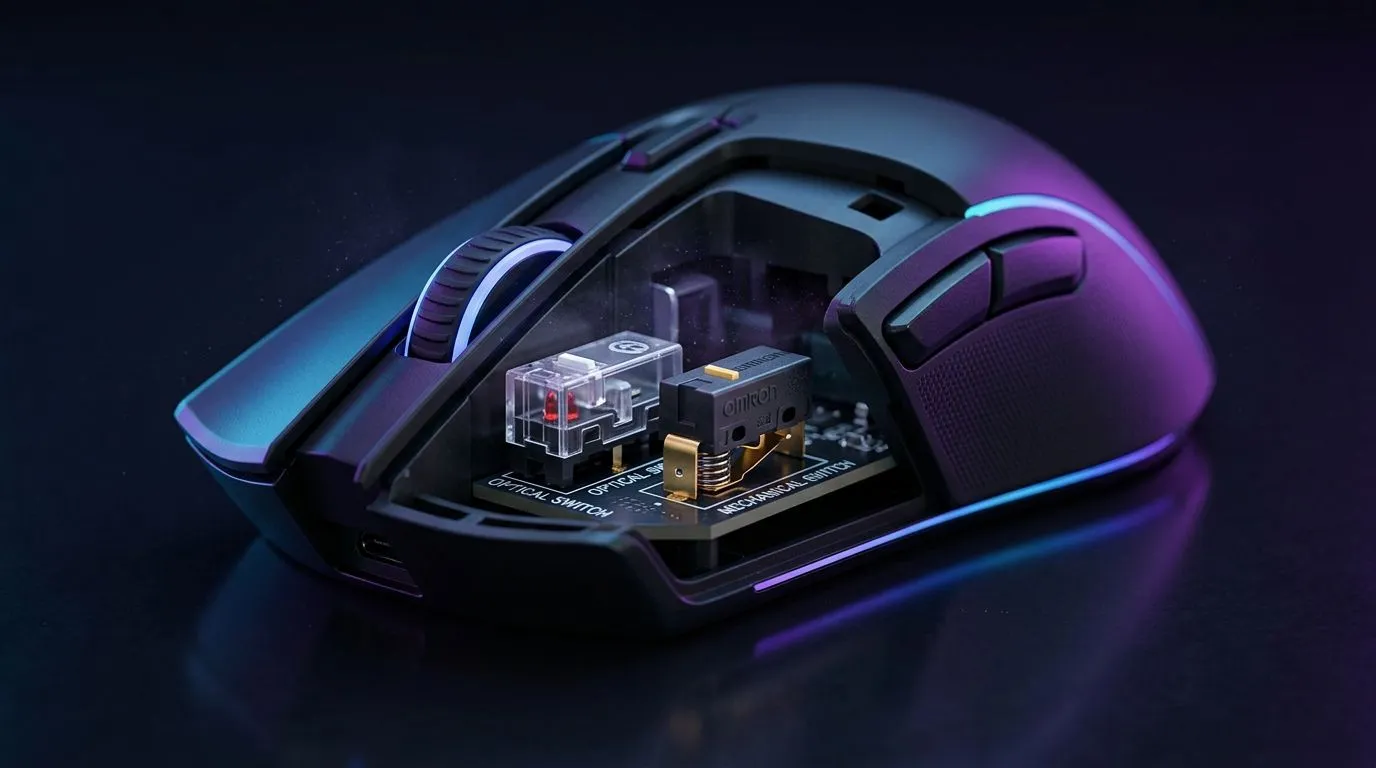
If your mouse feels “just a bit off” during a clutch moment, you notice. South African gamers sweat the details… from recoil control to micro flicks. And when manufacturers talk about “speed,” the question is simple: what actually changes in-game? Today we’re comparing optical switches vs mechanical switches in gaming mice, with a practical speed test mindset. 🚀
Before we start, quick promise: we’ll keep it grounded in how the switches work, what speed realistically means, and how to choose for your playstyle.
Optical switches detect clicks using light. When you press, the mouse sends an input based on a light interruption or reflection pattern. Because there’s typically no metal-to-metal contact, optical designs often aim for consistent actuation and reduced switch wear over time.
Mechanical switches rely on physical contacts inside the button. That contact closes a circuit, registering a click. Because contacts wear with use, mechanical switches may eventually feel different after heavy use, depending on the model and switch quality.
In normal gaming, the biggest difference you’ll feel is often consistency. Yes, optical designs are commonly marketed as faster due to actuation behavior and reduced debounce effects. However, in real terms, your sensor performance, polling rate, and mouse firmware stability also heavily influence “responsiveness.”
If you want to start your hunt with the right hardware category, browse Evetech’s options here:
Here’s a speed test you can do at home without fancy lab gear. The goal is to compare your experience, not chase marketing.
Use the same:
Then run 3 rounds:
A “fast” click that feels inconsistent is frustrating. The best sign is whether rapid sequences stay reliable under pressure.
Wired often feels instantly consistent. Wireless can be just as good when tuned, but battery mode and signal conditions matter. For a curated selection, check out:
If you main fast FPS duels, quick double taps, or rhythm-heavy inputs, optical can be attractive for consistent actuation and reduced wear. It’s especially appealing if you click a lot daily.
Some players love the tactile feedback of mechanical switches. If you’re used to that click signature, you might prefer mechanical even if optical is theoretically faster.
Switch type matters, but ergonomics often matters more. If the mouse doesn’t match your grip, your aim will suffer. Start by browsing accessories and variants:
Keep a simple spreadsheet (or Notes app) of your settings and results after each mouse swap. Write down polling rate, DPI, sensitivity, and the scenario you used. After two or three tests, you’ll quickly see whether optical vs mechanical is actually improving your consistency... or if it’s mainly shape and tuning.
In a fair head-to-head, optical switches often win on consistency and reduced wear behavior, which can translate to more reliable input under repeated clicking. Mechanical switches can still feel excellent, especially when the mouse has premium switches and strong debounce behavior.
Here’s the honest SA-gamer takeaway: match the switch to how you play, but don’t ignore the rest of the mouse. Sensor quality, weight, and button layout can decide more matches than a spec sheet.
Ready to Find Your Perfect Match? The Mac vs Windows debate is complex, but for maximum power, choice, and value in South Africa, Windows is hard to beat. Explore our massive range of laptop specials and find the perfect machine to conquer your world.
Often, yes. Optical switches can reduce response variance, so clicks feel quicker and more consistent during fast FPS inputs.
Sensor polling rate, debounce behavior, firmware, and tracking latency all affect perceived speed. Switches help, but the full chain matters.
In many designs, optical can be lower or more consistent due to fewer electrical contact variables, but results vary by model.
Yes. Many mechanical switches provide a crisp tactile feel and reliable performance. The “faster” part is usually consistency under stress.
They can be, thanks to strong debounce and consistent actuation. However, double-click behavior also depends on the mouse’s firmware.
Optical switches are often rated for higher cycle life. Mechanical switches can also last long, but they wear through contact cycles.
Upgrade if you want more consistency and potentially smoother rapid inputs. If your current mouse already feels great, the gain may be small.
Look for click latency tests, switch debounce specs, and real user reports. Your playstyle and preference for tactile feel matter.
Complete Gaming Setup Guide for the Esports. Clear setup instructions with SA-specific considerations, troubleshooting tips & recommended components.
Read more
AIO Liquid 360mm Installation Guide for Your PC. Clear setup instructions with SA-specific considerations, troubleshooting tips & recommended components.
Read more
MacBook Display Colour Looks Wrong? Calibration. Everything you need to know with SA pricing, step-by-step instructions & expert recommendations.
Read more
Printer Terminology Guide. Everything you need to know with SA pricing, step-by-step instructions & expert recommendations.
Read more
Git on Mac: Complete Setup Guide for Beginners. Clear setup instructions with SA-specific considerations, troubleshooting tips & recommended components.
Read more
Ryzen 9 9900X Thermal Paste Dry: Reapplication. Everything you need to know with SA pricing, step-by-step instructions & expert recommendations.
Read more
AMD RX 9050 XT: Rumoured Specs, Price & Release. SA-focused analysis with local pricing data, real-world insights & actionable buying advice.

Can RTX 4080 Super Run AI Workloads for SA Developers Detailed answer with SA data, expert analysis & practical recommendations for local buyers.

Can RTX 4090 Run AI Workloads for SA Developers Detailed answer with SA data, expert analysis & practical recommendations for local buyers.

Top Settings for Intel Arc B580 at Ultrawide 1440p picks evaluated on performance, value & SA availability with current Rand pricing from Evetech.

RTX 4060 CS2 Low Settings at 1080p: FPS Results. Real-world benchmark data, FPS numbers & performance analysis. What SA gamers can actually expect.

Visual Artifacts: Possible GPU Issue Issue #1. Diagnosis steps, proven fixes & when to seek professional help. SA-specific support info included.

Can the RTX 4090 Handle 1440p 144Hz Gaming. Performance testing verdict with real data & practical recommendations for SA buyers.

Top ASUS GPU Under R15000 picks evaluated on performance, value & SA availability with current Rand pricing from Evetech.

GTA 6 Max Settings on RTX 5070. Tested & verified settings for best FPS and visual quality on SA hardware budgets.

Cyberpunk 2077 Max Settings on RTX 5080. Tested & verified settings for best FPS and visual quality on SA hardware budgets.

Starfield Max Settings on RTX 5070 Ti. Tested & verified settings for best FPS and visual quality on SA hardware budgets.

Top RTX 5090 Under R5000 picks evaluated on performance, value & SA availability with current Rand pricing from Evetech.