


Using GitHub Copilot: Complete Beginner's Guide for SA Developers
Using GitHub Copilot: Complete Beginner's Guide for SA Developers. Everything you need to know with SA-specific pricing and recommendations.
Read moreXbox controller ports — Checklist: • Identify keyword • Generate long-tails • Define intent • Create SEO elements • Select category & author. Learn controller ports, audio jacks, headsets and troubleshooting 🎧🔌
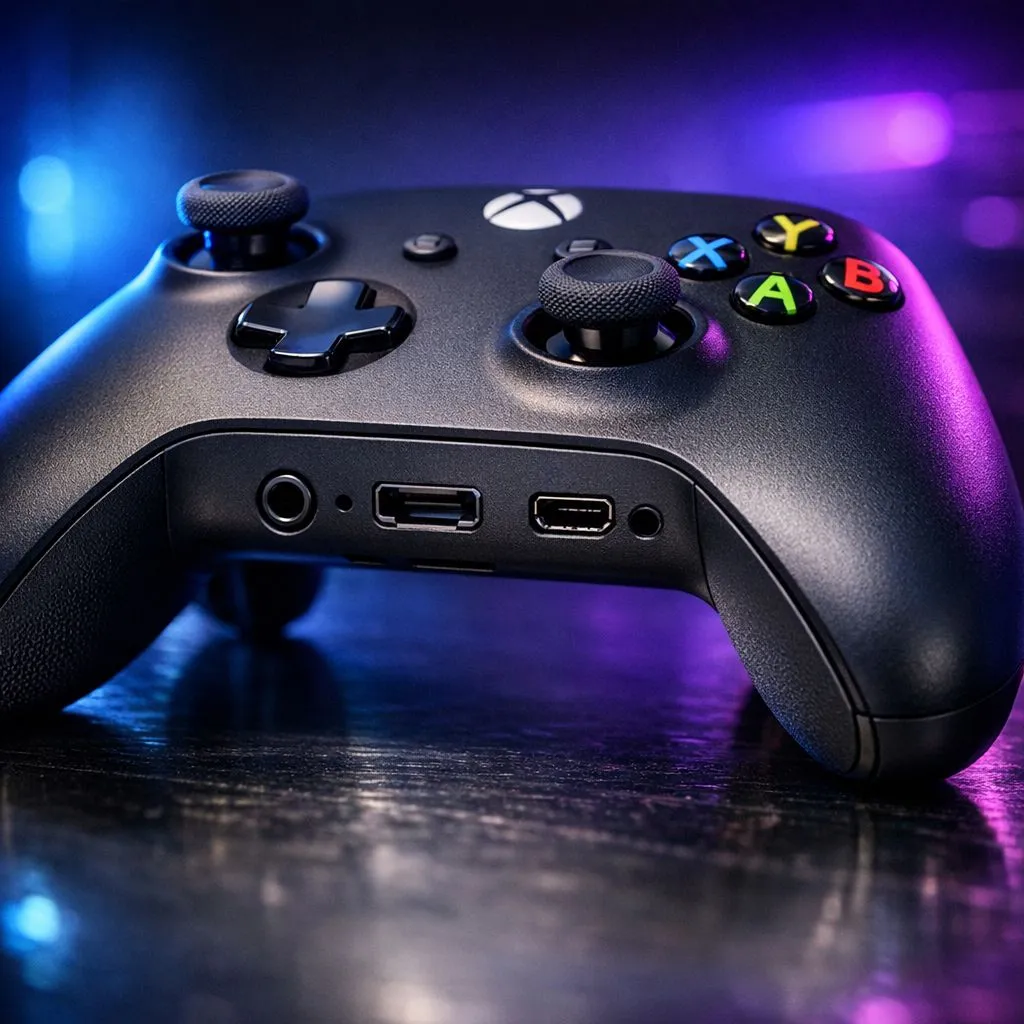
Ever plugged your headset into your Xbox controller only to be met with total silence? Whether you are playing Halo or FC25, clear audio is vital. Navigating the various Xbox controller ports: Complete guide to audio connections helps you fix these issues fast. From the classic 3.5mm jack to proprietary expansion ports, we break down how to get the best sound for your Mzansi gaming sessions. 🎮
Most modern Xbox controllers feature a standard 3.5mm jack. This port is located at the bottom of the controller. It supports both audio output and microphone input. If your current pad is acting up or the jack feels loose, you can buy gaming controllers from Evetech to get back in the action. Ensure your headset plug is pushed in fully... you should hear a slight click. This ensures the ground and mic rings align perfectly for the best sound quality.
Next to the 3.5mm jack, you will notice a wider, flatter port. This is the proprietary expansion port. In the early days of the Xbox One, this was the only way to get audio. You needed a Stereo Headset Adapter to plug in your gear. Today, it is mostly used for chatpads or high-end adapters that allow for quick volume balancing.
Many competitive players prefer Razer controllers because they often rethink these layouts for better ergonomics. While the expansion port is less common for basic audio now, it remains a sturdy connection point for professional accessories that require more power than a standard jack can provide.
If your wireless headset feels slightly delayed, try connecting it directly to the controller via the 3.5mm jack. This bypasses potential wireless interference in busy South African households with multiple Wi-Fi devices. It is a quick way to ensure your audio stays perfectly synced during intense matches.
The port at the top of your controller is primarily for charging and data. On the newer Series X|S controllers, this is a USB-C port. On older models, it is Micro-USB. While you cannot typically plug a USB headset directly into these Xbox controller ports: Complete guide to audio connections, they are essential for firmware updates.
Updating your controller firmware via USB can actually fix audio buzzing or mic dropouts. For those seeking the absolute pinnacle of performance, the Razer Wolverine V3 Tournament Edition offers an 8K polling rate. This wired connection ensures that your audio and inputs are processed with zero latency... a must-have for local tournaments. ✨
Once you have chosen the right port, you must optimise the software. Xbox supports Windows Sonic for Headphones for free. This provides a virtual surround sound experience. You can also purchase Dolby Atmos or DTS Headphone:X for even better spatial awareness. These settings can be found in the "Volume & audio output" menu on your console. 🚀
Remember to check your "Mic Monitoring" levels. This allows you to hear your own voice through the headset. It prevents you from shouting and waking up the whole house during a late-night session. High-quality Xbox controller ports: Complete guide to audio connections knowledge ensures your hardware and software work in perfect harmony.
Ready to Find Your Perfect Match? Mastering your connection is just the start. To truly dominate the leaderboards in South Africa, you need hardware that matches your skill. Explore our massive range of gaming controllers and find the perfect tool to elevate your gameplay today.
Most Xbox controllers include a 3.5mm audio jack and a USB-C or Micro-USB port for charging or wired connection.
Plug a compatible 3.5mm headset into the controller jack or use a USB/firmware-supported wireless headset with the console.
Yes — using the 3.5mm jack or official audio adapters lets you hear game and chat audio and adjust mix settings on console.
Xbox One controllers before 2015 often need a headset adapter; later revisions include a built-in 3.5mm jack.
Check headset, secure 3.5mm connection, test with another headset, update controller firmware, and verify console audio settings.
USB headsets usually connect directly to the console or via a compatible adapter, not through the controller's 3.5mm jack.
Yes, Xbox Series X|S controllers use a USB-C port for wired play and charging, while audio runs through the 3.5mm jack or wireless link.
Using GitHub Copilot: Complete Beginner's Guide for SA Developers. Everything you need to know with SA-specific pricing and recommendations.
Read more
Back-to-School Headset Buying Guide for SA 2026. Everything you need to know with SA-specific pricing and recommendations.
Read more
Mesh Front Panel Setup and Configuration: Complete Tutorial. Comprehensive coverage with SA insights, Rand pricing, and practical recommendations.
Read more
Black Screen: Troubleshooting Guide #1. Everything you need to know with SA-specific pricing and recommendations.
Read more
The Complete 2026 Guide to Storage in South Africa. Everything you need to know with SA-specific pricing and recommendations.
Read more
1000W PSU Not Working After Load Shedding: Recovery Guide. Everything you need to know with SA-specific pricing and recommendations.
Read more
AMD RX 9050 XT: Rumoured Specs, Price & Release. SA-focused analysis with local pricing data, real-world insights & actionable buying advice.

Can RTX 4080 Super Run AI Workloads for SA Developers Detailed answer with SA data, expert analysis & practical recommendations for local buyers.

Can RTX 4090 Run AI Workloads for SA Developers Detailed answer with SA data, expert analysis & practical recommendations for local buyers.

Top Settings for Intel Arc B580 at Ultrawide 1440p picks evaluated on performance, value & SA availability with current Rand pricing from Evetech.

RTX 4060 CS2 Low Settings at 1080p: FPS Results. Real-world benchmark data, FPS numbers & performance analysis. What SA gamers can actually expect.

Visual Artifacts: Possible GPU Issue Issue #1. Diagnosis steps, proven fixes & when to seek professional help. SA-specific support info included.

Can the RTX 4090 Handle 1440p 144Hz Gaming. Performance testing verdict with real data & practical recommendations for SA buyers.

Top ASUS GPU Under R15000 picks evaluated on performance, value & SA availability with current Rand pricing from Evetech.

GTA 6 Max Settings on RTX 5070. Tested & verified settings for best FPS and visual quality on SA hardware budgets.

Cyberpunk 2077 Max Settings on RTX 5080. Tested & verified settings for best FPS and visual quality on SA hardware budgets.

Starfield Max Settings on RTX 5070 Ti. Tested & verified settings for best FPS and visual quality on SA hardware budgets.

Top RTX 5090 Under R5000 picks evaluated on performance, value & SA availability with current Rand pricing from Evetech.