


LG has put a price on the native 1000Hz gaming monitor. The 24.5-inch UltraGear 25G590B is open for US preorder at $999.99, but that headline speed is only useful when the whole PC can feed it. For an SA buyer, the real question is not whether 1000Hz sounds faster. It is whether the games, graphics card, processor and connection can turn that ceiling into a visible competitive benefit.
Quick Answer
The LG UltraGear 25G590B is a specialised FHD esports display, not a universal monitor upgrade. Current Evetech gaming-monitor samples started at R1,899 and reached R2,699 across the first 12 live listings, so buyers should compare a proven 144Hz to 240Hz setup before waiting for an unconfirmed local 1000Hz model.
🖥️ What native 1000Hz actually changes
The new panel runs at 1,000 refreshes per second at 1920 x 1080. That differs from earlier dual-mode displays that reached four figures only after dropping to a lower resolution. LG also lists an optional 1100Hz overclock, Motion Blur Reduction Pro, FreeSync Premium and G-Sync compatibility.
The gain is temporal rather than spatial. A 1000Hz screen can present a new frame every 1ms, but it does not create detail that the game never rendered. If a title runs at 240 frames per second, most of the panel's refresh opportunities repeat old information. The best case is a lightweight competitive title with a very fast CPU and graphics card, not a cinematic game running at high visual settings.
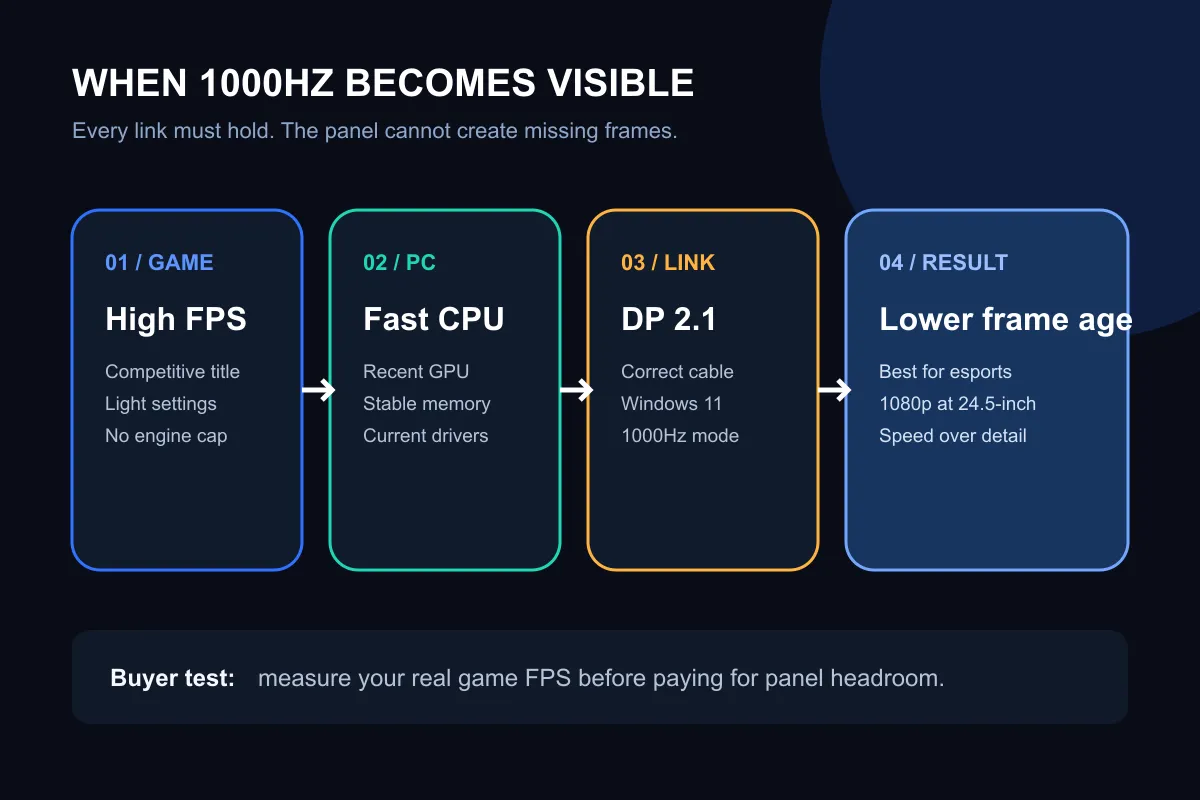
The official requirements make the dependency clear. Maximum refresh needs Windows 11, DisplayPort 2.1 and a recent high-end graphics card. LG also warns that game limits, drivers, CPU, GPU and memory can prevent the full result. At 1100Hz, FreeSync Premium is unavailable and G-Sync compatibility remains certified at 1000Hz, so the extra overclock comes with a synchronisation tradeoff.
🎯 The buyer who can use it
This display makes the most sense for a competitive player who already measures performance in hundreds of frames per second, accepts 1080p on a 24.5-inch screen and prioritises motion clarity over image size. That is a narrow but legitimate use case. A player on a 144Hz panel may feel a clearer step to 240Hz or 360Hz before the smaller returns above that level become worth chasing.
It is a weaker fit for a general gaming desk. A larger QHD or 4K screen can improve text, creative work, desktop space and slower games every hour. The full gaming monitor category is the right place to compare resolution, panel type, adaptive sync and size together instead of filtering on one record-setting number.
💰 What the SA catalogue says today
The exact 25 August snapshot found 12 in-stock gaming displays. Prices ran from R1,899 to R2,699 after sorting the catalogue from lowest to highest. It included FHD models at 144Hz, 165Hz, 180Hz and 240Hz. The new LG was not listed, so those prices are comparisons rather than a forecast for the 25G590B.
That distinction matters because the $999.99 US preorder excludes local freight, VAT handling, channel margin and warranty arrangements. Converting it directly would invent a price. SA buyers can instead use all current gaming monitor choices to decide what an immediate upgrade costs, then watch local availability without treating a foreign preorder as a promise.
🔌 Four checks before waiting
First, record the frame rate of the exact games you play. Second, confirm the graphics output and cable support DisplayPort 2.1 at the required mode. Third, decide whether 24.5-inch FHD is comfortable for work outside esports. Fourth, compare the total budget with a faster graphics card, because a premium panel without enough frames leaves most of its capability idle.
The monitor best sellers provide a useful reality check. Popular monitors tend to balance refresh, resolution, size and price. A 1000Hz purchase should solve a measured competitive problem, not simply win a specification contest.
Frequently Asked Questions
Is 1000Hz five times smoother than 200Hz?
The refresh count is five times higher, but perceived improvement does not scale in a straight line. Frame rate, latency, eyesight and the game all affect the result.
Does the LG 25G590B run at 1000Hz over HDMI?
LG's stated maximum-refresh requirement points to DisplayPort 2.1. Buyers should not assume every HDMI source will expose the same mode.
Will frame generation make 1000Hz worthwhile?
Generated frames may raise the displayed rate, but competitive value also depends on input latency and the quality of those generated frames.
Should an SA buyer preorder overseas?
Not on the available evidence. Local support, landed cost and the exact warranty path remain unconfirmed, so wait for a proper South African listing.
Ready to compare the upgrade you can use today? Check current Evetech gaming monitors by refresh rate, resolution and size, then match the display to the frame rate your PC can actually deliver.











