Connect Desktop PC to VGA Monitor Without a VGA Port: Start With the Right Adapter 🔧
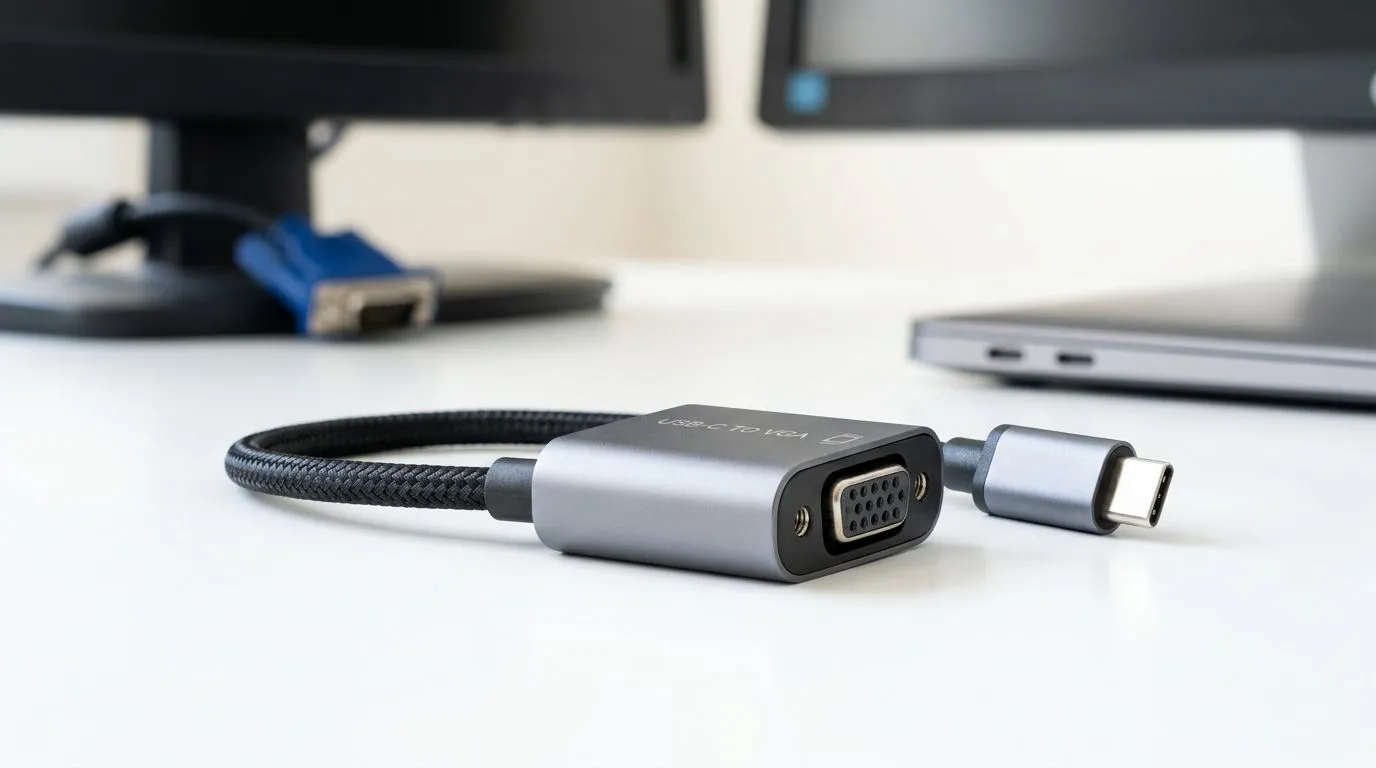
If your desk setup just got bigger… and your monitor is only VGA, you might be staring at the dreaded problem: your desktop has no VGA port. Don’t panic. In most cases, you can still connect your desktop PC to a VGA monitor without a VGA port by using the correct video adapter (and sometimes the correct cables).
In South Africa, this is a common “upgrade gap” for gamers upgrading GPUs or switching to newer motherboards. The good news? You’ve got options. The better news? Choosing the wrong adapter is an easy way to waste money.
Connect Desktop PC to VGA Monitor Without a VGA Port: Understand What Your Desktop Actually Outputs ⚡
Before you buy anything, check your desktop’s available ports. Look at the back of your PC and match it to the adapter you need. VGA is an analogue video signal. Modern desktop outputs are usually digital.
Here’s the typical mapping:
- HDMI (digital) → HDMI to VGA adapter (active adapter)
- DisplayPort (digital) → DisplayPort to VGA adapter (active adapter)
- DVI (digital) → DVI to VGA adapter (often works better, depending on the adapter)
Why “active” matters: Passive adapters often don’t convert signal types. Active adapters include electronics to translate the digital signal to VGA’s analogue format.
Quick port check (so you don’t buy twice) ✨
Open the side panel or look behind the PC:
- Find your GPU outputs (best place to confirm)
- Note whether you have HDMI, DisplayPort, DVI, or only newer types like USB-C/Thunderbolt
- Then buy the adapter that matches exactly
If you want accessories to help tidy up the setup, browse Evetech’s gaming accessory range here:
Gaming accessories deals
Connect Desktop PC to VGA Monitor Without a VGA Port: The Most Reliable Hardware Setup
Once you have the right adapter, the wiring is usually simple:
- Connect PC → adapter (HDMI or DisplayPort)
- Connect adapter → VGA monitor using a VGA cable
- Power on the monitor
- Boot the PC and select the correct input on the monitor
What can go wrong?
- No signal: often means wrong adapter type (active vs passive) or wrong input source.
- Flicker / bad picture: VGA is analogue, so longer cables and poor cable quality can hurt clarity.
- Audio confusion: VGA carries no sound. Your adapter will typically output only video. If you need audio, use speakers/headphones via the PC’s audio out.
Productivity Pro Tip 🔧
Productivity Pro Tip ⚡
On Windows, open Settings → System → Display, then press Win + P to cycle output modes (PC screen only, Duplicate, Extend). If the VGA monitor doesn’t appear, restart with the monitor connected and select the correct monitor input button. This avoids the “looks like nothing is detected” moment when you’re wiring up after upgrading parts.
Connect Desktop PC to VGA Monitor Without a VGA Port: Windows Display Settings That Actually Help 🚀
After connecting, Windows should detect the VGA display. If it doesn’t, try this:
- Right-click Desktop → Display settings
- Scroll to Multiple displays
- Click Detect if available
- If the monitor shows, set Resolution to match what the monitor supports
For best stability:
- Use the adapter’s recommended max resolution (commonly stated on the adapter listing/spec)
- Avoid running extremely high resolutions on older VGA monitors
If you’re also setting up a clean desk for gaming and content creation, Evetech has a wide selection of gear here:
Gaming accessories category (including adapter-friendly options)
Connect Desktop PC to VGA Monitor Without a VGA Port: Cable Quality Matters (Yes, Really) ✨
VGA isn’t just “an old connector”. It’s analogue, which means the signal can degrade depending on:
- cable length
- shielding quality
- connector wear
If your picture looks soft, try:
- shorter VGA cable
- better-quality VGA cable
- re-seating the connectors firmly (a surprising number of “No Signal” issues are loose ends)
For more accessory options that pair well with monitor upgrades, you can also browse Evetech’s gaming accessories:
More gaming accessories
Connect Desktop PC to VGA Monitor Without a VGA Port: Choosing the Right Adapter Without Getting Tricked
Here’s the decision checklist before you buy:
- ✅ Match the PC port type: HDMI-to-VGA or DisplayPort-to-VGA
- ✅ Prefer adapters that explicitly mention active conversion
- ✅ Check supported resolutions (especially for 1080p-class setups)
- ✅ Remember: VGA adapters usually don’t carry audio
If you’re unsure what port you have, take a quick photo of your PC back panel and compare it to the adapter listing. That small step saves serious cash in ZAR.
Ready to scale your setup the smart way?
If you want the cleanest route to a working VGA setup, you need the right adapter and the right accessories the first time. That’s where Evetech helps… fast, local, and with options that fit real South African desk setups.
Ready to Find Your Perfect Match?
The Mac vs Windows debate is complex, but for maximum power, choice, and value in South Africa, Windows is hard to beat. Explore our massive range of laptop specials and find the perfect machine to conquer your world.