


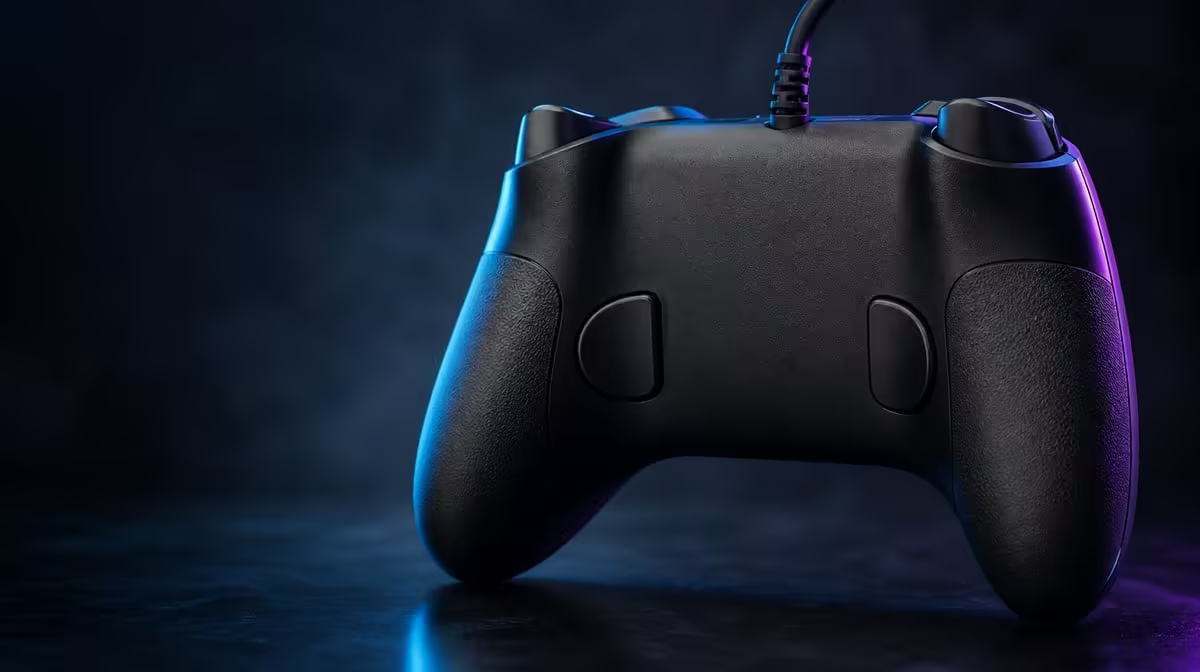
Rear mapping succeeds when the player forgets the button is extra and simply keeps control of the stick. The G7 HE back-button setup should move one useful action at a time, with grip pressure and misfires tested before a second assignment is added.
Quick Answer
Configure the R899 GameSir G7 HE by assigning one frequent face action to a rear button, testing it while both thumbs stay on the sticks and checking accidental grip presses. Add the second remappable input only after the first profile is comfortable.
🎯 Choose the interrupted action
Identify a command that makes a thumb leave aim or movement. Use a repeatable game sequence where that interruption is visible.
Map the action to one rear button and preserve the rest of the layout. Photograph or note the original profile.
Run ten attempts through the face button, then ten through the rear input. Compare control and comfort.
Evetech's gaming controller range can help compare remappable layouts.
🖐️ Test normal grip
Hold the wired pad as it is used during calm play. Check whether the mapped input fires under ordinary pressure.
Repeat during a tense or fast sequence. Fingers often squeeze harder under pressure.
Adjust the assignment, not the whole layout, if accidental presses persist.
🧩 Add the second mapping
Choose an action distinct from the first. Similar commands can become confusing under the gripping fingers.
Practise each input independently before using both in one combination.
Label the profile by game and keep a restore point. Rear caps do not display the mapped action.
🔍 Diagnose a missing rear action
Try the face-button route on that unchanged display. If it works, inspect mapping and profile state.
Keep Hall-stick settings fixed during diagnosis so aim changes do not distract from the rear input.
Route the controller and headset cables with slack. Pull can change grip and rear-button pressure.
For live setup comparisons, open Evetech's gaming-accessory category and its frequently chosen accessories.
Build a command inventory before choosing mappings. List actions used while aiming, moving, navigating menus and relaxing the sticks. The first two groups are the strongest candidates; the others may not justify a rear slot.
Record the face-button baseline. Perform the command ten times and note thumb interruption, success and comfort. This gives the rear route something concrete to improve.
Map the first button and practise taps, holds and repeated presses. A command may work as a tap but remain active too long when the gripping finger does not release cleanly.
Test the same assignment during dual rumble. Vibration can cause a reflex squeeze, revealing an accidental press that a quiet menu never exposes.
Add headset and cable routing to the grip check. A short audio lead may cross the middle finger, while a pulled controller lead can change the hand angle.
When configuring the second rear input, choose a different finger purpose. Two similar high-pressure actions may become confused. Label left and right by actual command, not "button one" and "button two".
Save a neutral profile for another player. A shared Xbox pad should have a recoverable state that does not fire a surprising action through normal grip.
Review the maps after several matches. Remove a rear assignment that the player avoids or forgets. Unused flexibility creates memory load without saving movement.
Finish by reproducing the chosen profile from the written note. If it cannot be restored quickly after a game change, the configuration is not yet complete.
Add a neutral-thumb test. Hold both sticks at useful positions while pressing each rear input. Check that the remapping actually preserves control instead of causing the thumbs to compensate.
Use a full-session review. Early mappings may feel exciting, but late fatigue reveals whether the gripping fingers can release cleanly.
Test with Mic Mute and headset cables in their normal positions. Audio routing can influence the same fingers that use rear controls.
Record accidental actions separately from missed actions. A mapping that fires too often needs a different response from one the player cannot reach.
Share the profile only after the labels are clear. Another player should be able to restore default or personal assignments without guessing.
Create a one-minute profile audit: load game, read assignments, test left rear, test right rear and confirm the face-button originals.
Use the audit after transport, another player or a title change.
Keep a misfire count for a week and move high-risk commands if tense grip remains a problem.
Test mappings during rumble and with the headset cable attached.
At R899, the two rear buttons earn their value through clear, recoverable profiles that keep both thumbs working.
Create a weekly map review with actions used, thumb saved and accidental presses.
Remove a low-use assignment rather than filling every slot.
Keep left and right controls labelled by command.
Test the profile after a normal restart.
Restore neutral mappings before handing the controller to another user.
Build each profile from a one-action hypothesis. Write which thumb leaves which stick, move that command to a rear input, and perform the original and remapped routes through the same game sequence.
Add movement and aim only after the isolated command is clean. Then test tense grip, dual rumble and late-session fatigue, recording every unintended press beside the rear side that caused it.
The second button needs a different problem. If no other frequent action interrupts control, leave it unassigned rather than creating a mapping the player must remember without benefit.
Use short profile names that include the game and both actions. Close the title, restart the controller and restore the map from the written note to prove that setup is not dependent on memory.
Keep the standard face prompts practised. Remapping adds an alternate finger route; it does not remove the need to understand menus, shared play or a neutral recovery layout.
Frequently Asked Questions
Which action should be mapped first?
Choose a frequent command that normally pulls a thumb from a stick.
How many rear inputs are available?
The G7 HE has two remappable back buttons.
Why test tense grip?
Pressure increases during difficult moments and may trigger a rear button unintentionally.
Should both buttons be configured together?
Configure one fully first, then add the second after the profile is reliable.
How much is the G7 HE?
The wired Xbox controller costs R899.
Ready to keep a thumb on aim through one more action? Browse Evetech's controller range, map one G7 HE rear input and measure control before filling the second.











